


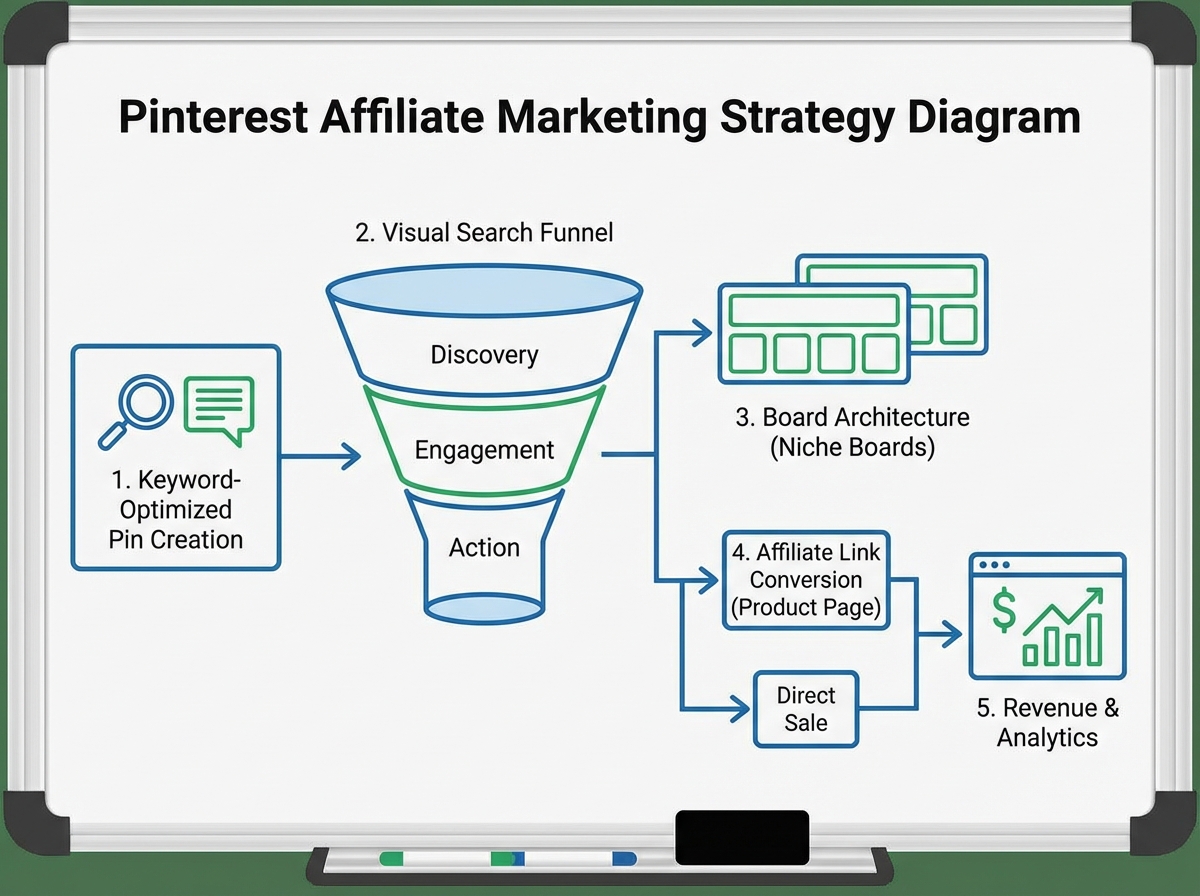
If you’ve been posting on Instagram and watching your reach shrink every other week, you already know how exhausting it is to keep up with an algorithm that punishes you the moment you stop feeding it. Pinterest felt like a gamble at first — quieter, slower, almost old-fashioned. Then the traffic started arriving three months after I’d stopped thinking about it.
If you’re looking to learn Pinterest marketing for affiliate income, the short answer is: Pinterest is a search engine disguised as a social platform, and that single difference changes everything about how you use it. Pins don’t disappear after 24 hours. A well-optimized pin you create today can pull traffic — and affiliate clicks — eighteen months from now. The gap between what most people expect from Pinterest and what it actually delivers is enormous, and it’s almost always because they’re treating it like Instagram.
- Pinterest works on search intent, not social momentum — which means your content compounds over time instead of decaying
- Setting up a business account with keyword-optimized boards is the non-negotiable first step before creating a single pin
- Affiliate commissions on Pinterest depend far more on how your pins are structured than how often you post
What Pinterest Marketing Actually Means for Affiliates
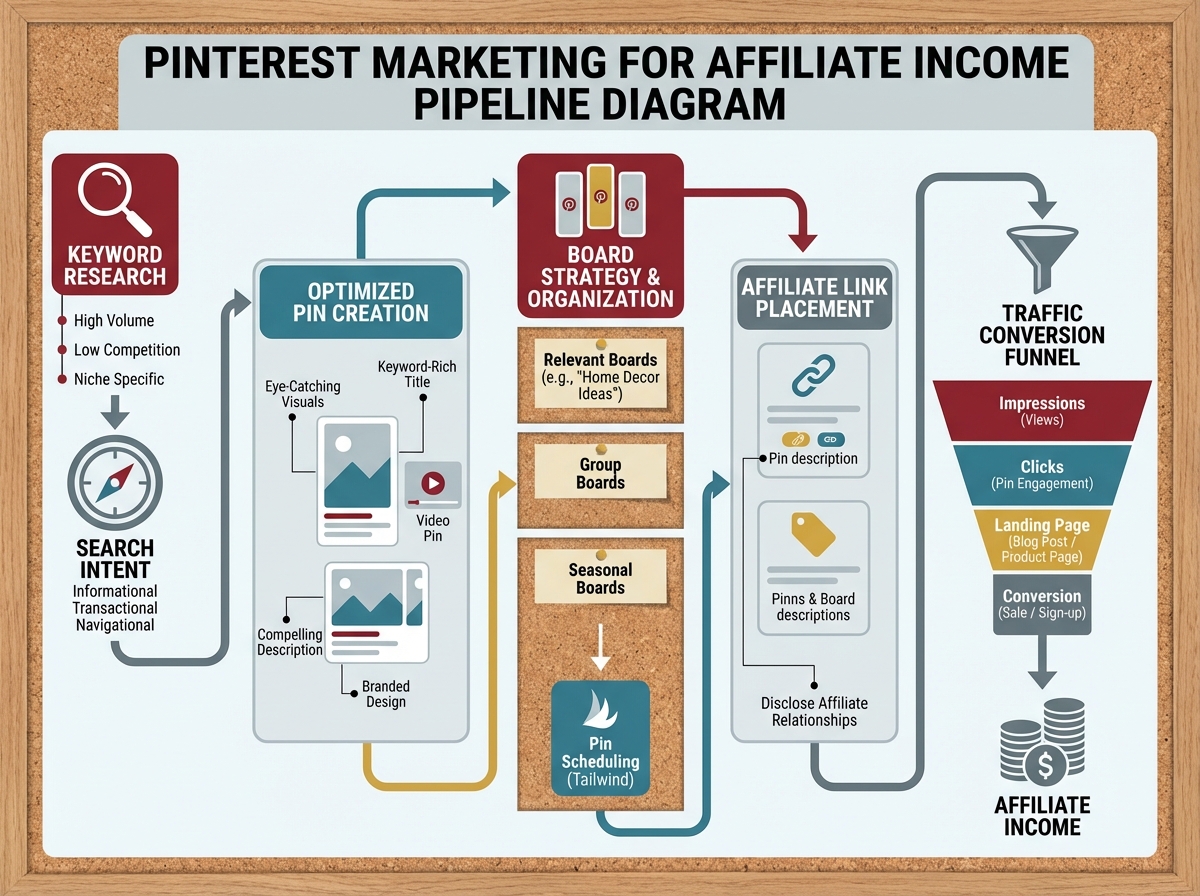
Pinterest marketing for affiliates isn’t about going viral. It’s the practice of creating keyword-rich visual content that surfaces in Pinterest’s internal search and, increasingly, in Google Image results — then directing that traffic to content where an affiliate link converts. The platform sits closer to Google than to TikTok in terms of how discovery works.
There are three things worth distinguishing early:
- Organic Pinterest marketing — creating and optimizing pins and boards to rank in Pinterest search over time
- Pinterest Ads — paying to promote pins to targeted audiences, useful for testing before committing to organic volume
- Affiliate pins — pins that link directly (or through a landing page) to products you earn a commission on
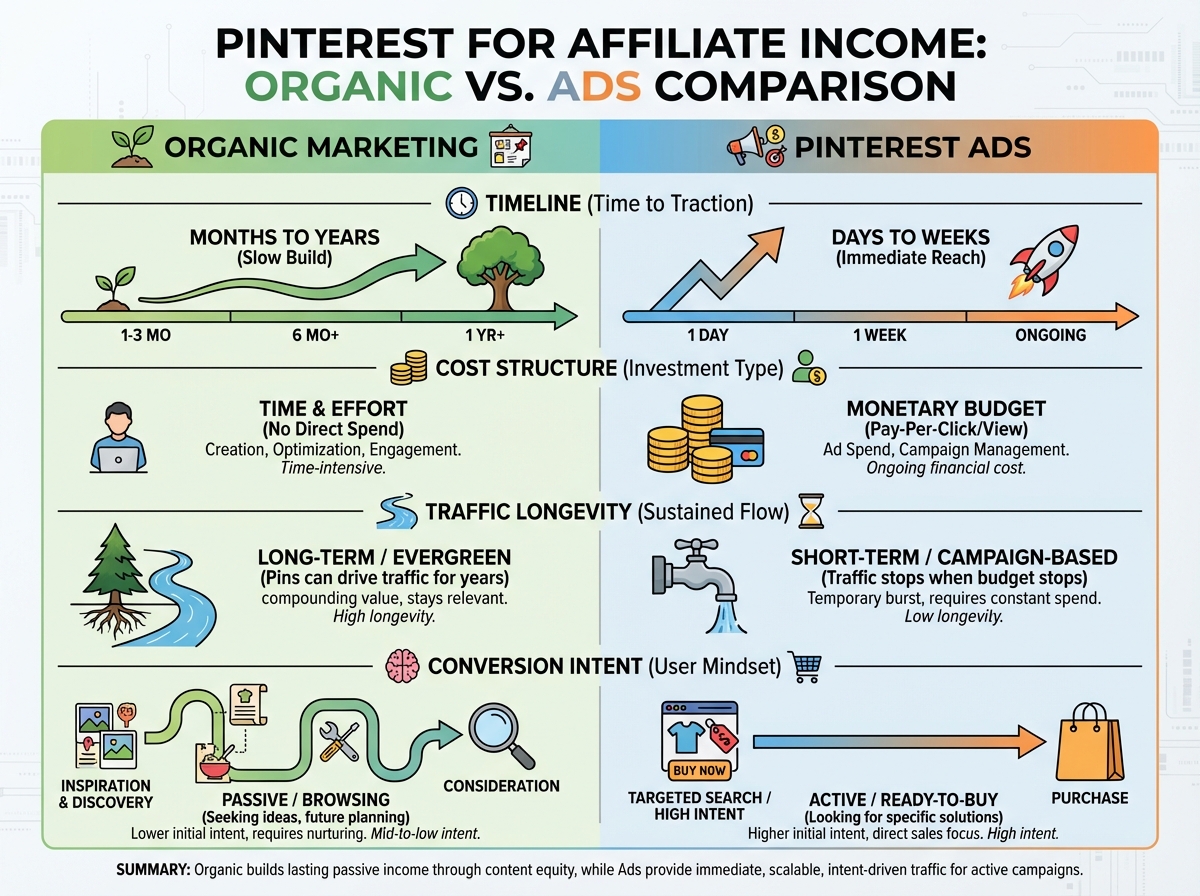
Most beginners try to do all three at once before understanding any of them. That’s where the confusion starts.
Three Things No One Tells You Before You Start
- Pinterest’s algorithm rewards consistency of niche, not consistency of posting frequency
- A pin saved by someone else to a relevant board outperforms your own daily pinning by a significant margin
- Your board titles matter more for SEO than your pin descriptions — Pinterest reads them like page titles
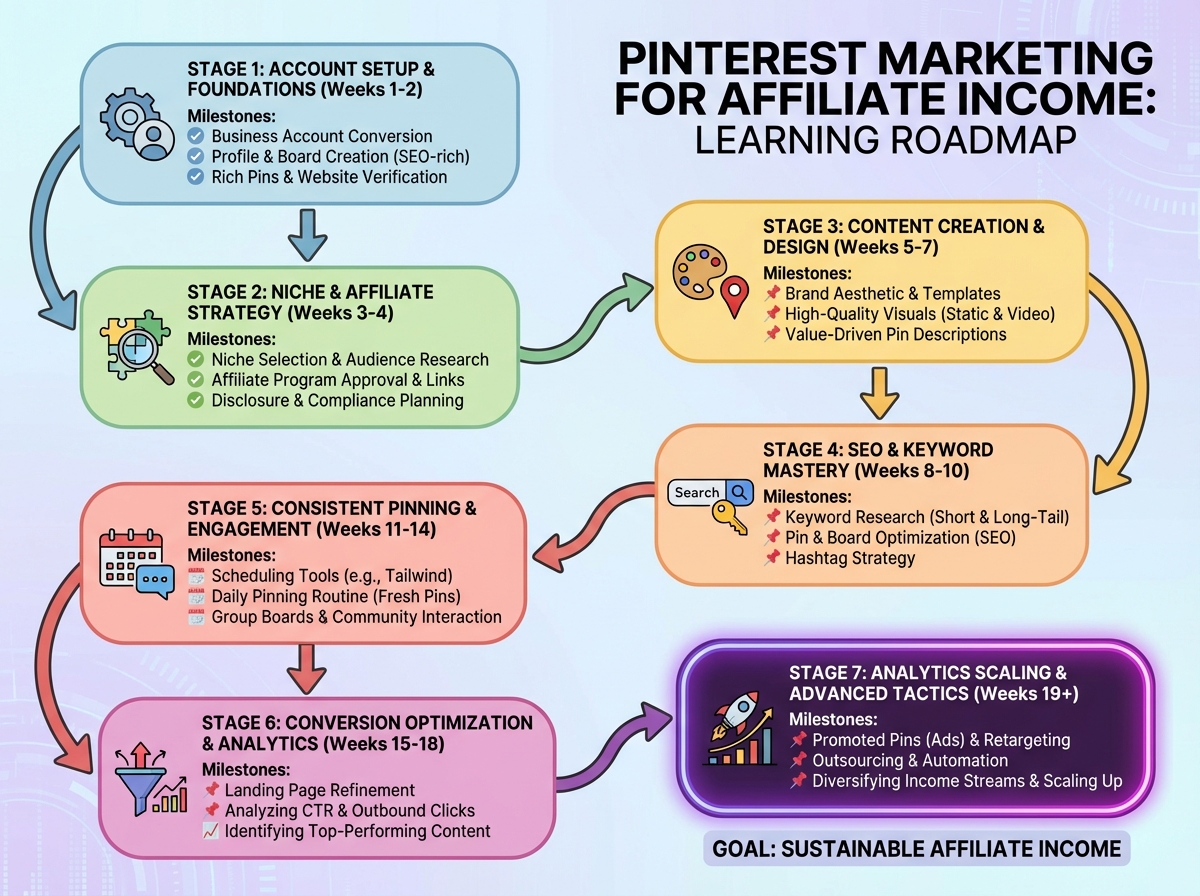
How Long the Real Learning Curve Takes
| Stage | What You’re Working On | Estimated Time |
|---|---|---|
| Foundation | Business account setup, board architecture, keyword research | Week 1–2 |
| Pin Production | Creating high-converting pin formats, writing optimized descriptions | Week 3–5 |
| Board Strategy | Organizing boards, group boards, board SEO, rich pins | Week 4–6 |
| Traffic Mechanics | Understanding what drives clicks, A/B testing pin designs | Week 6–10 |
| Affiliate Integration | Linking strategy, landing pages vs. direct links, compliance | Week 8–12 |
| Ads Layer | Running promoted pins, targeting, campaign structure | Week 10–16 |
| Analytics & Scaling | Reading Pinterest Analytics, doubling down on what works | Week 12–20 |
| Total | From zero to consistent affiliate traffic | 4–5 months |
The order matters more than the speed. Building boards before you understand keyword intent means rebuilding them later — most people who feel like Pinterest “doesn’t work” skipped the foundation stages entirely.
If it takes you six or seven months instead of four, that’s normal — the compounding effect still kicks in at the same point; it just kicks in later.
The Setup Nobody Wants to Do First
The first instinct when starting Pinterest for affiliate marketing is to create pins. That’s the wrong move. The account architecture — how you name boards, what keywords you put in your profile bio, whether you’ve claimed your website — determines whether Pinterest ever shows your content to the right people.
When you convert to a business account, you unlock Pinterest Analytics and the ability to claim your website. Claiming your website is what ties your pins back to your domain, which is what makes rich pins possible. Rich pins pull metadata directly from your page, meaning your product pin updates automatically if the price or availability changes. For affiliate marketers, this means the pin stays accurate long after you’ve moved on to creating new content.
The profile name field is not just your name — it’s a keyword placement. If your niche is home organization and sustainable living, your profile name should reflect that directly, not just say “Sarah M.” Most people skip this and wonder why their account never picks up traction from cold search.
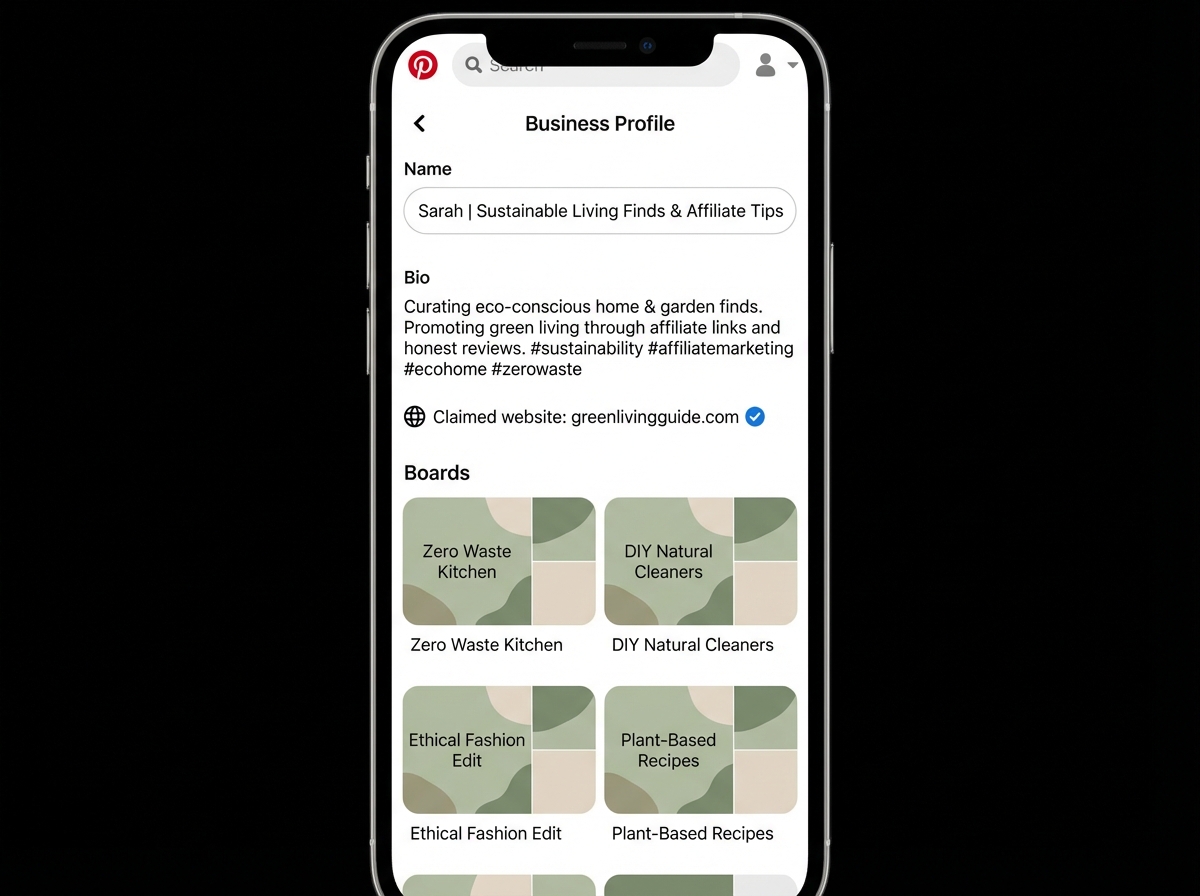
Board naming is equally deliberate. “My Favorites” ranks for nothing. “Minimalist Kitchen Organization Ideas” ranks for exactly the words people are already searching. Every board you create is essentially a landing page in Pinterest’s ecosystem — it gets indexed, it gets followed, and it becomes the container that either amplifies or buries every pin inside it.
What a High-Converting Pinterest Pin Actually Looks Like
The single biggest mistake people make when learning Pinterest marketing is designing pins for aesthetics rather than for search intent. Beautiful pins that don’t match what someone is actively searching for don’t get saved. And saves are the signal Pinterest uses to decide whether your content is worth distributing further.
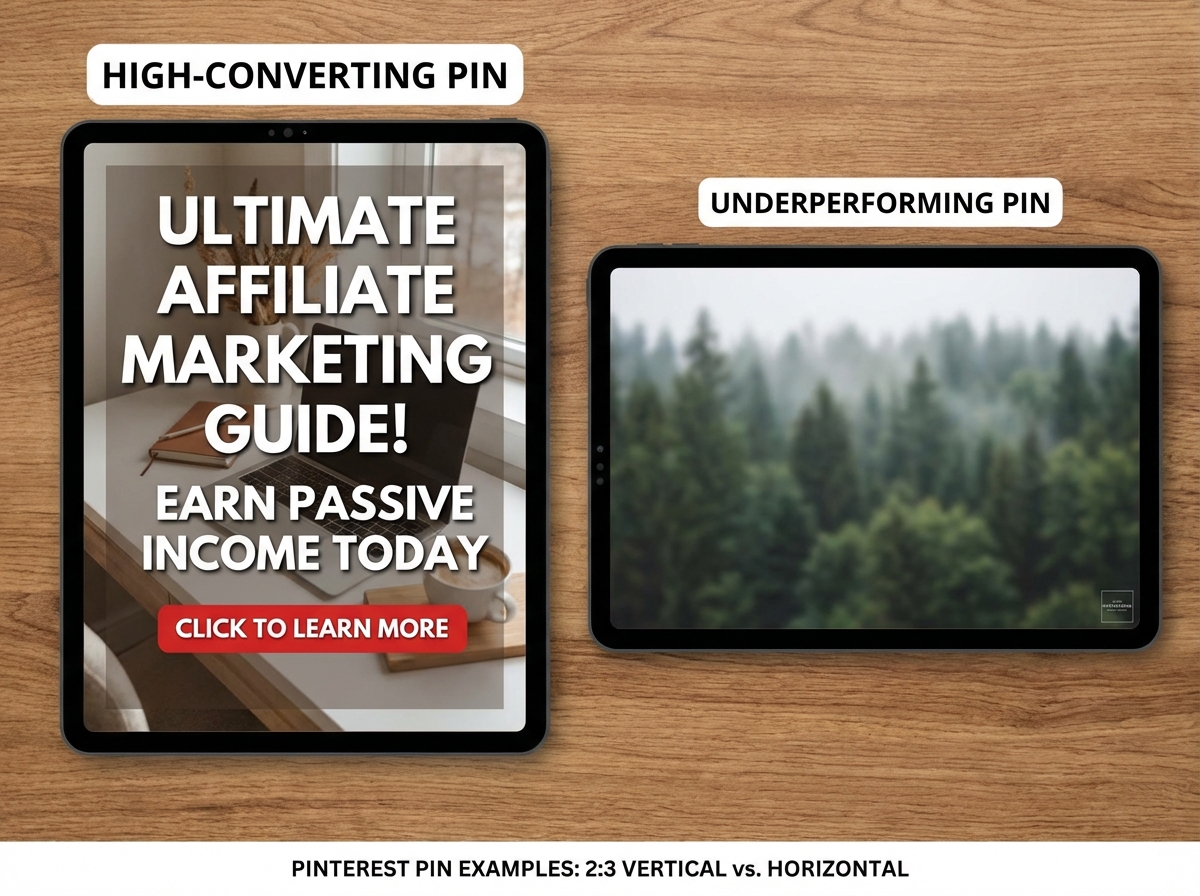
A pin that converts well in an affiliate context has three structural components working together: an image that stops the scroll, a text overlay that answers the exact question someone just typed into Pinterest search, and a description that uses natural keyword language to tell Pinterest’s algorithm what the pin is about. None of those three components is optional — they work as a system.
The vertical format (2:3 ratio) is not a style preference; it’s how Pinterest allocates visual real estate. Tall pins occupy more space on mobile, where the overwhelming majority of Pinterest traffic originates. How to Design a Mobile App in Figma Using Low-Fidelity Wireframes illustrates the same principle of designing for mobile-first consumption — the context is different but the constraint is identical: if it doesn’t work on a small screen, it doesn’t work.
Video pins change the conversion equation significantly. A 6–15 second loop demonstrating a product, or a before-and-after transition, consistently outperforms static pins in both impressions and outbound clicks. Pinterest prioritizes video in the home feed algorithm. Most affiliates haven’t entered this format yet because it requires more effort — which is exactly why it still works.
The Traffic Gap Between Pinning and Actually Getting Clicks
Here’s the part that frustrates people in months two and three: impressions are climbing, saves are happening, and almost nobody is clicking through to your website. That gap exists because impressions and outbound clicks measure entirely different user behaviors on Pinterest.
Impressions mean your pin appeared. Outbound clicks mean someone found the promise on the pin compelling enough to leave Pinterest to resolve it. The bridge between those two behaviors is copy — specifically, whether the text overlay and description create a curiosity gap or imply that the answer requires one more step. “10 kitchen products I replaced with sustainable alternatives” generates more outbound click intent than “sustainable kitchen ideas” because it implies a specific list exists somewhere worth seeing.
This divergence between brand marketing and affiliate marketing on Pinterest is real. A brand earns something from impressions alone — recognition compounds. An affiliate earns nothing until the click happens. Every design and copy decision needs to work as a click invitation, not just a category signal. Hashtags serve a narrow supporting role here: three to five highly specific hashtags per pin, targeting seasonal or trending terms, not a wall of twenty that flags the pin as spam.
How Pinterest Ads Fit Into an Affiliate Strategy
Running Pinterest Ads before you have organic data is like paying for a billboard before knowing which road your customers travel. The ads platform is genuinely precise — keyword targeting, interest layers, and lookalike audiences can surface your content to buyers rather than browsers — but it amplifies what’s already working rather than replacing organic foundations.
The practical entry point is promoted pins: identify your best-performing organic pin by outbound clicks (not impressions), then put paid budget behind it. This validates the creative before you scale spend. If that pin converts organically at a consistent click rate, promoting it gives you a baseline. Promoting an unproven pin produces cost-per-click data that tells you nothing replicable.
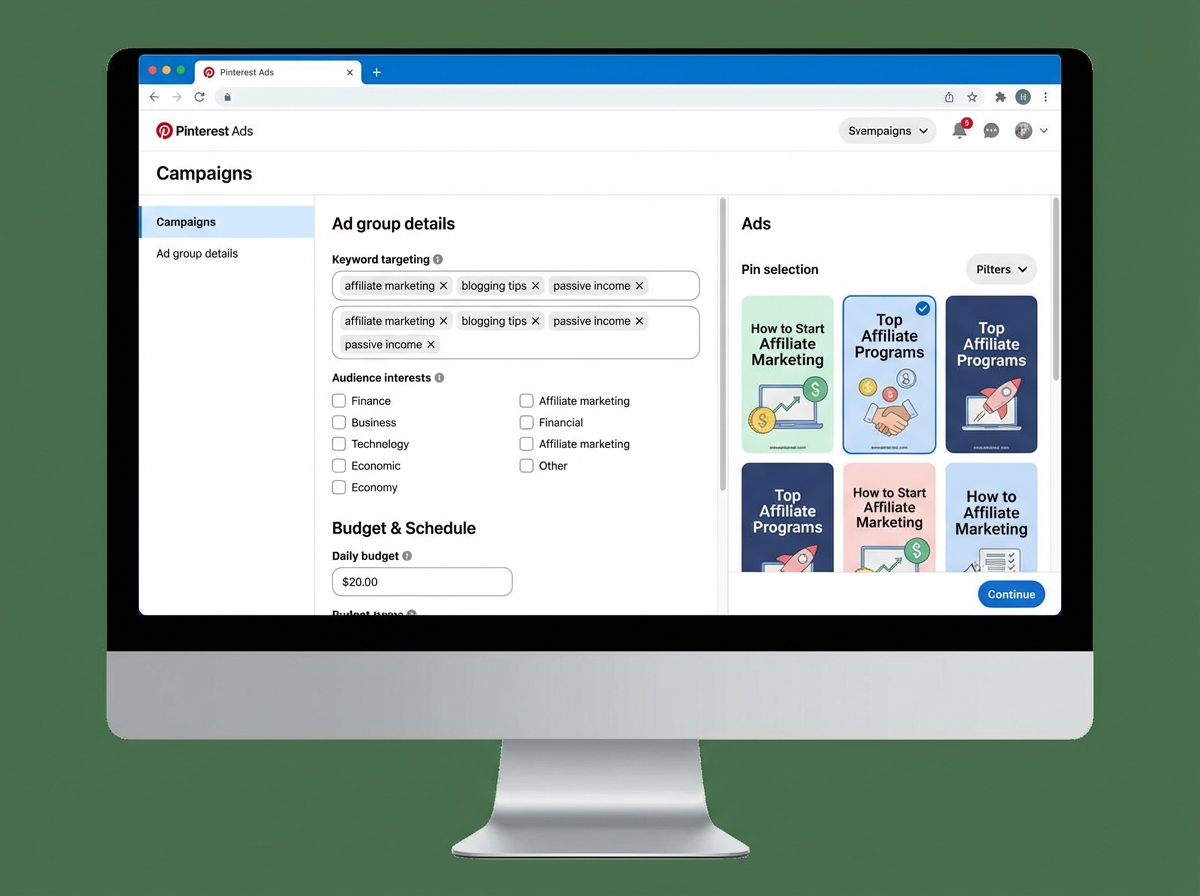
Campaign structure matters more than budget size for learning purposes. A single campaign with one ad group and one pin produces no comparison data. Running two pin variations within the same ad group — identical audience, different creative — is the minimum setup that generates insights worth acting on. The Pinterest ad delivery system will automatically push more spend toward the better-performing variant, which means you learn and optimize simultaneously.
Reading the Analytics Before You Scale
Pinterest Analytics has a section most beginners skip entirely: audience insights. This panel shows you what else your current audience is saving and engaging with outside your own content. That data reveals adjacent niches where your pins are landing — and those niches are your expansion roadmap, not a distraction.
The metrics that matter specifically for affiliate Pinterest marketing are outbound clicks and saves — in that order. Outbound clicks represent revenue potential. Saves represent compounding reach. Impressions are only meaningful when they’re converting to one of those two downstream behaviors. Chasing impression volume while outbound clicks stay flat means you’re optimizing the wrong metric entirely.
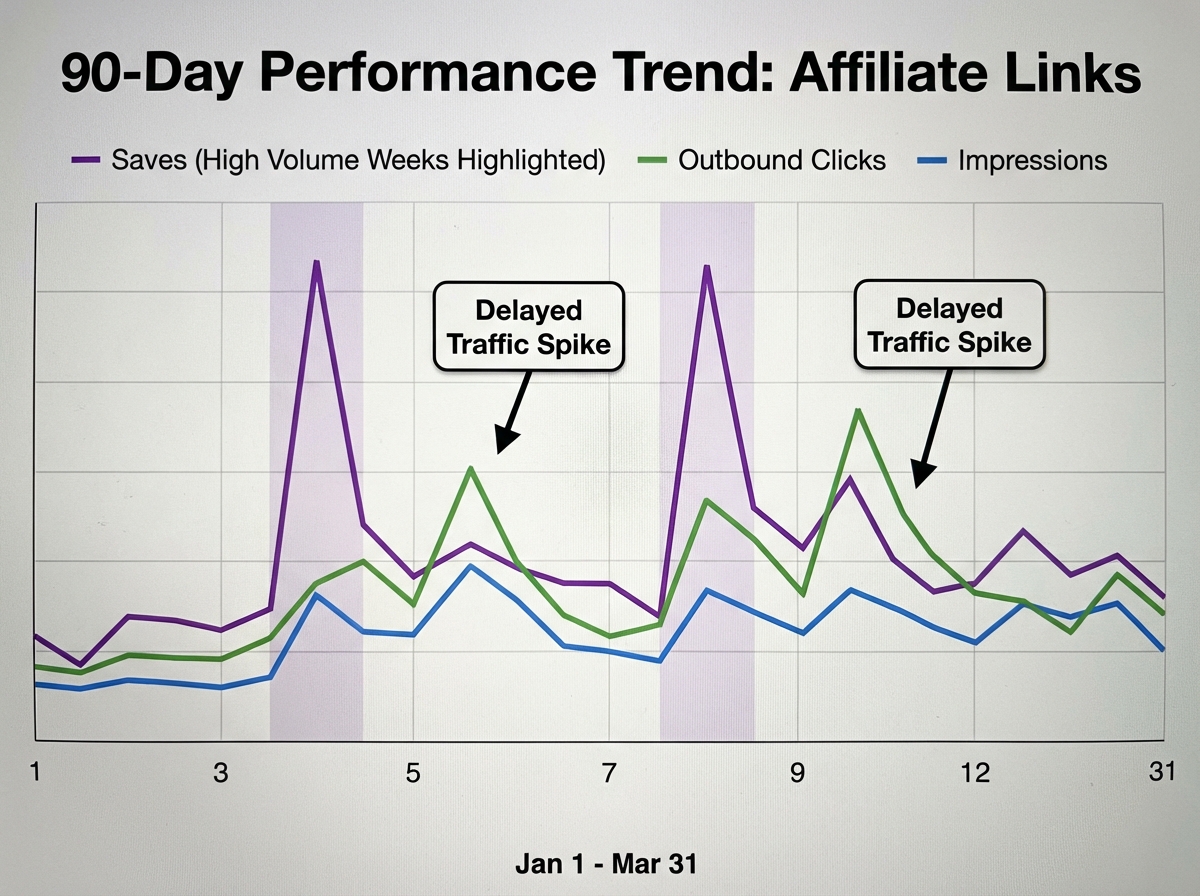
One pattern that becomes obvious after a few months of consistent pinning: high save counts on a pin don’t produce immediate outbound clicks. The saves come first — people bookmarking content for later — and then the clicks arrive weeks afterward, when those saved pins resurface in other people’s feeds through the save chain. Abandoning a pin after two weeks because the click rate looks flat is almost always a mistake. The distribution cycle on Pinterest is longer than on any other platform, and the patience required to let it run is what most people can’t sustain.
Integrating Affiliate Links Without Killing Your Account
Pinterest allows direct affiliate links on pins, but the platform’s spam filters are aggressive about certain affiliate networks and redirect chains. The more durable approach — and the one that builds a real business rather than a fragile pin strategy — is linking to content on your own domain: a comparison post, a tutorial, a curated resource list that contains the affiliate links. This preserves the audience relationship and captures email subscribers that a direct affiliate link never could.
Building a content layer between your pins and your affiliate offers connects to the broader principle behind how to grow a social media audience that actually makes you money — own the relationship, don’t rent it from a third-party merchant. That principle holds regardless of which platform sends the traffic.
Seasonal timing on Pinterest runs approximately 30–45 days ahead of when people actually buy. Users save content while they’re in the planning phase, not the purchasing phase. If you’re promoting holiday gift guides, those pins need to be live and indexed in mid-October — not the week before Thanksgiving when the purchase intent is already peaking. Aligning your keyword research to Pinterest’s seasonal search trends, rather than to retail sales calendars, is what separates affiliates who earn consistently from those who catch one lucky month and wonder why it doesn’t repeat.
What Sticks After You’ve Done It for a While
Looking back at the early months of building a Pinterest affiliate strategy, the thing that stands out isn’t the tactics. It’s the shift in how you think about content permanence. Every other social platform trains you to think in recency terms: what am I posting today, this week, this month? Pinterest retrains you to think in inventory terms: what am I building that will still pull traffic a year from now?
That mental shift is what makes the whole thing feel different once it starts working. A pin you made eight months ago quietly becomes your second-best traffic source. You didn’t resurface it. The algorithm found a fresh audience for it after enough people saved it to enough relevant boards, and now it runs on its own — connecting buyers you never targeted to an affiliate offer you almost forgot you’d made.
Immediate Actions Worth Taking Now
- Rename every board using searchable keyword phrases — “My Favorites” ranks for nothing; “Minimalist Kitchen Organization for Small Spaces” ranks for the exact terms your audience types into Pinterest search
- Convert to a business account and claim your website before creating any more pins — rich pins and analytics are foundational and cannot be retroactively applied to earlier content
- Populate each new board with 15–20 saves from other creators before adding your own pins — this signals topical relevance to Pinterest’s algorithm from day one and prevents your boards from appearing thin
- Design every pin at 1000×1500px with a text overlay that answers one specific question — vague aesthetic pins attract decorators, not buyers with purchase intent
- Write pin descriptions as natural keyword sentences, not hashtag clusters — Pinterest reads descriptions as metadata and rewards specific, conversational language over keyword stacking
- Use outbound clicks — not impressions — as your primary performance metric — impressions tell you about reach, outbound clicks tell you about affiliate revenue potential
- Schedule seasonal affiliate content 30–45 days before peak demand — Pinterest’s distribution cycle means pins need time to compound before your audience is ready to buy
- Test two pin designs for every affiliate offer before promoting — run them in the same ad group to the same audience and let Pinterest’s delivery system tell you which creative wins
Leave a Reply