


The moment I decided to start a blog, I had no idea I was about to spend three months doing the wrong things in the right order — and still wondering why nothing ranked.
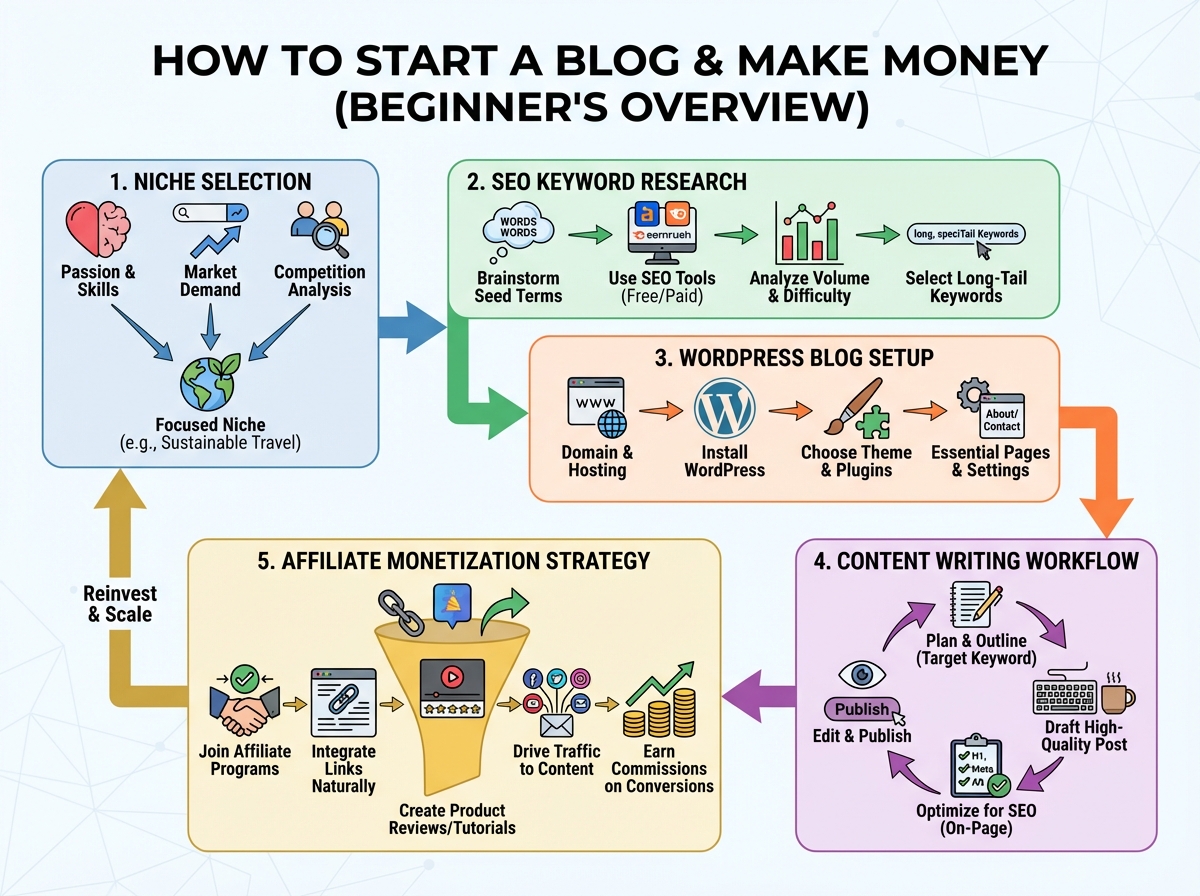
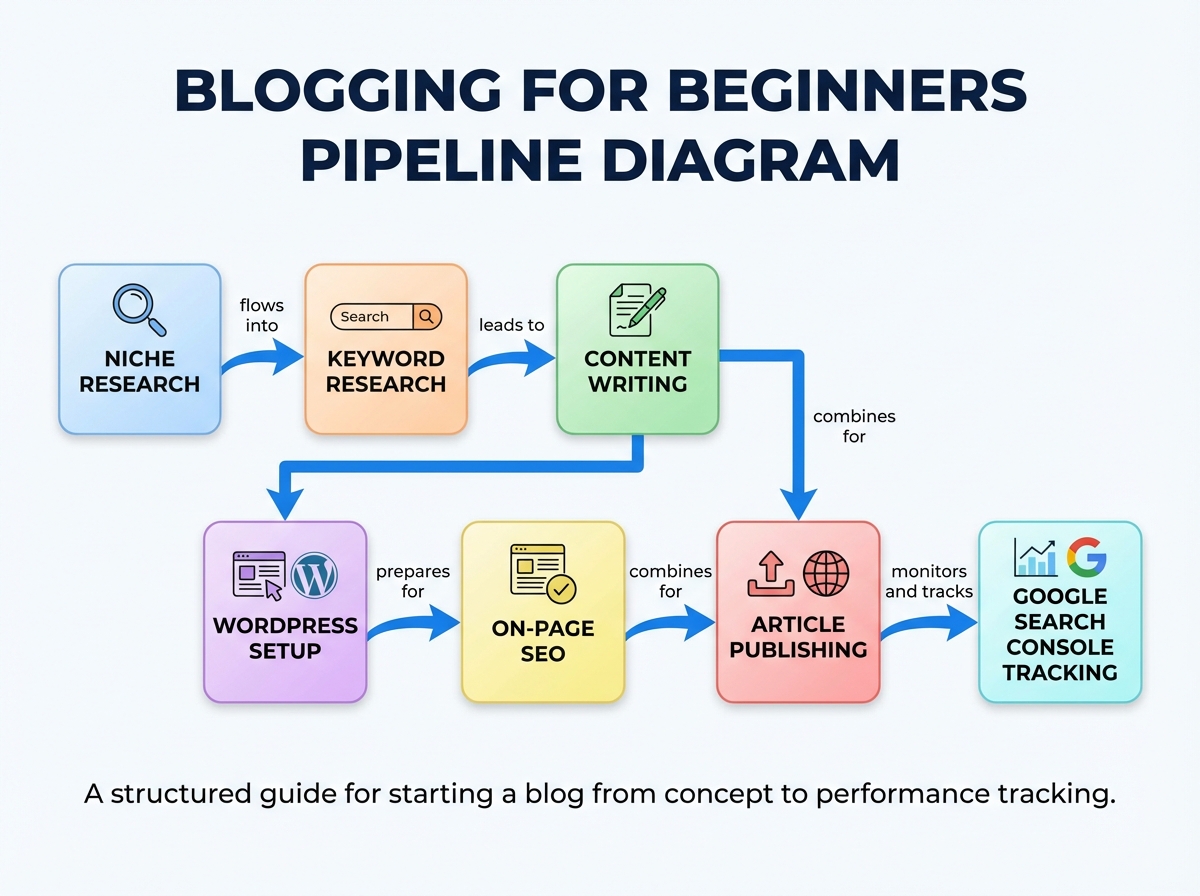
If you’re looking to learn blogging and make money from it, the honest answer is: the skill itself isn’t complicated, but the sequence is everything. Most beginners fail not because they can’t write, not because they don’t understand SEO, but because they pick a niche emotionally, write content nobody searches for, and build a WordPress site before they’ve touched a single keyword tool. Getting the order right — and understanding why the order matters — is what separates a blog that earns from one that just sits there.
- Blogging income depends on niche selection and keyword research before you write a single word — publishing first is the most common and most expensive mistake.
- A blog that ranks on Google needs on-page SEO, a properly configured WordPress setup, and content written around search intent — not just topics you find interesting.
- Freelancing platforms like Fiverr let you monetize these same skills while your blog is still growing, which means you can earn while you learn.
What “Blogging for Beginners” Actually Means
Blogging, in the context of making money online, means building a content-driven website that earns through advertising (Google AdSense), affiliate marketing (Amazon Associates, niche programs), or services sold through your own platform. It is not journaling. It is not sharing opinions. It is researching what people type into Google, writing the best answer to that query, and structuring a website so Google trusts it enough to show that answer to searchers.
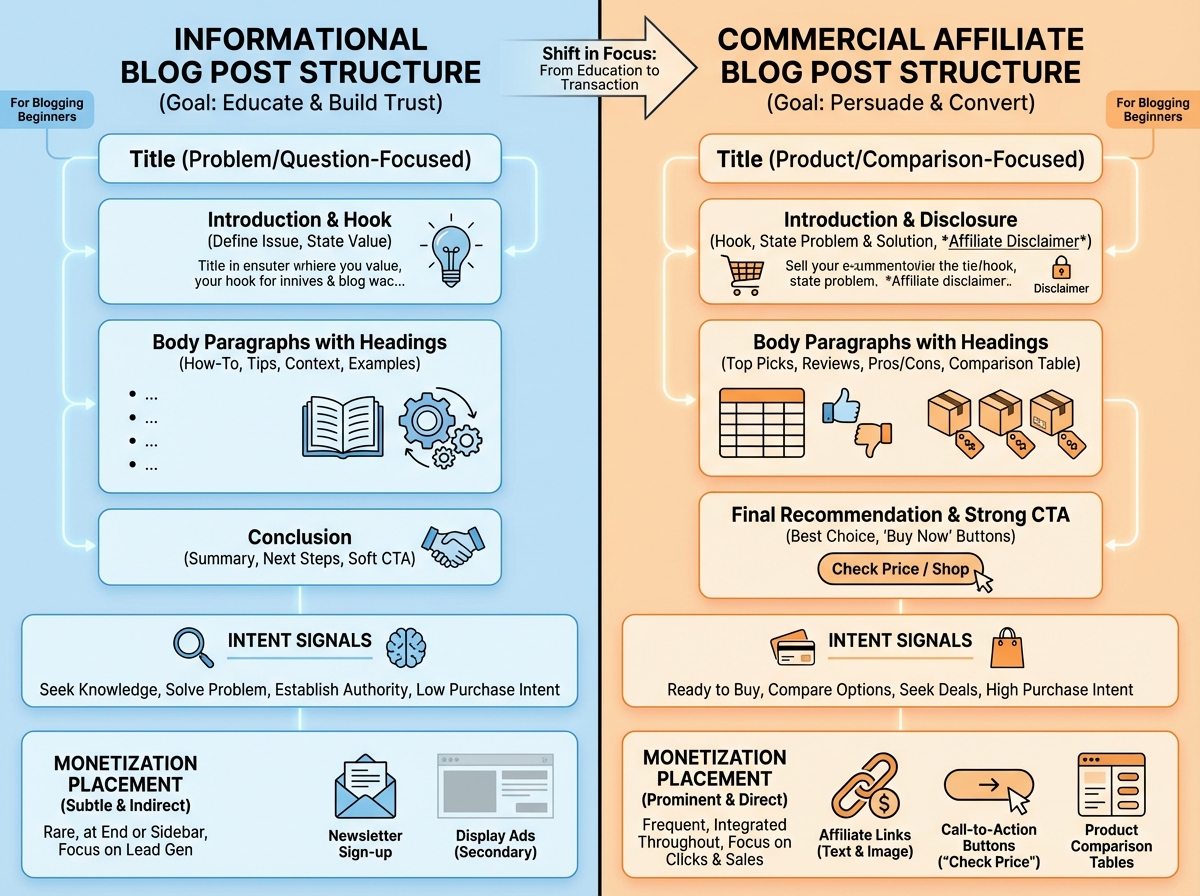
There are two main types of blog content you will work with:
| Type | Purpose | Example |
|---|---|---|
| Informational | Answers a question, builds traffic | How to prune a rose bush |
| Commercial | Drives purchase decisions, earns affiliate commission | Best pruning shears under $30 |
Beginners almost always write only informational content, then wonder why their AdSense earnings are cents per click. Commercial content — reviews, comparisons, best-of lists — is where affiliate income lives. You need both, in the right ratio, in the right niche.
Three Things That Will Surprise You
- Keyword difficulty matters more than search volume when you are a new site.
- A 2,000-word article on the wrong keyword outranks zero results regardless of quality.
- Your niche choice limits your income ceiling before you write your first sentence.
How Long Does Blogging Take to Work?
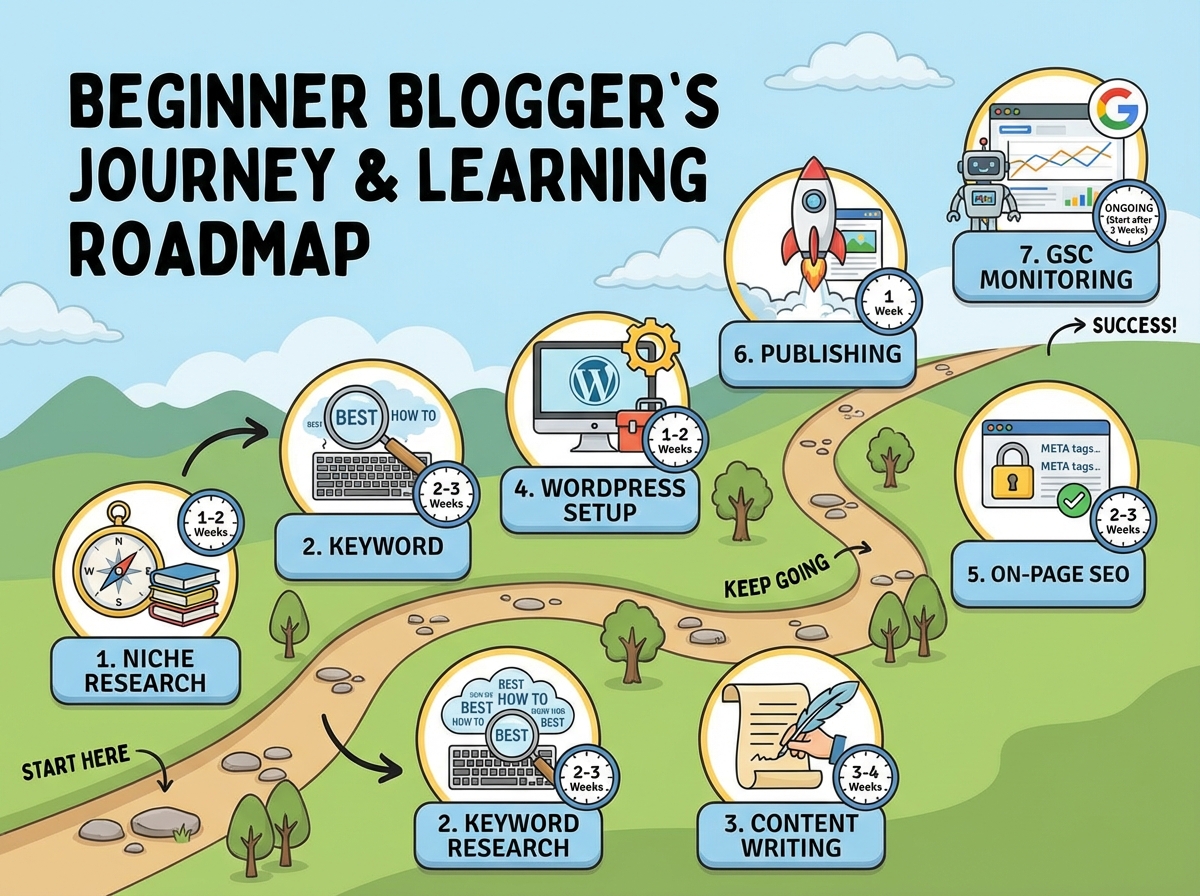
| Stage | What You Are Doing | Realistic Time |
|---|---|---|
| Foundation | Niche research, keyword research, domain and hosting setup | 2-3 weeks |
| Content Creation | Writing and publishing first 10-15 articles | 4-6 weeks |
| WordPress Configuration | Theme, plugins, on-page SEO, Google Search Console | 1-2 weeks |
| Traffic Trickle | First articles indexed, first organic clicks | 3-5 months |
| Monetization Milestone | First AdSense or affiliate earnings | 6-12 months |
| Total to First Real Income | 8-14 months |
The stage order matters more than how fast you move through it — skipping niche validation to publish faster is the single most reliable way to waste a year. If you are taking longer than the estimates above, that is completely normal; the algorithm does not care about your timeline, only the quality and relevance of what you have published.
The Niche Trap Almost Everyone Falls Into
I picked my first niche because I was passionate about it. That was my first mistake — and it is almost everybody’s first mistake. Passion does not mean people are searching for it, and search volume does not mean a new blog can compete for it. The niche research stage feels tedious until you realize it is actually the only decision that determines whether the next twelve months of work mean anything.
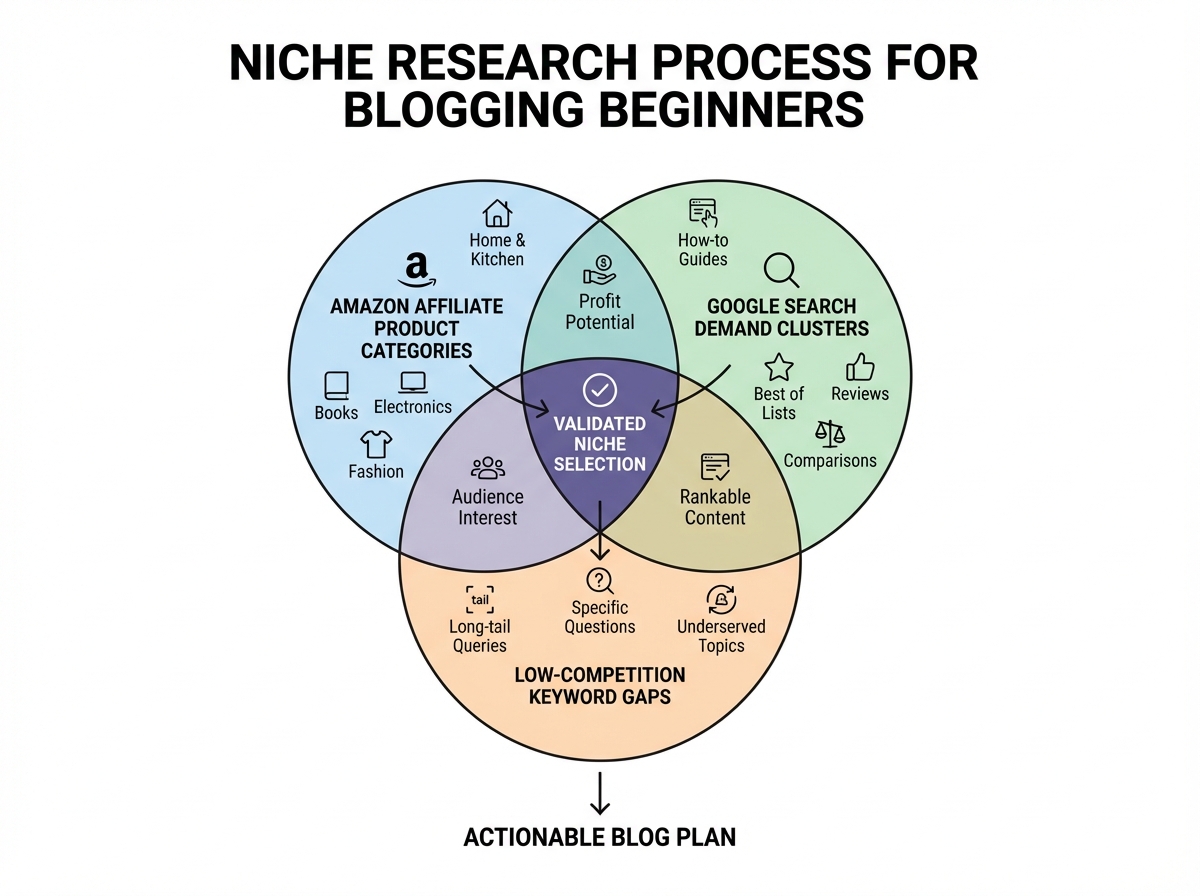
The method that actually works treats niche selection as a market research problem, not a personal interest exercise. You are looking for overlap between three things: topics with consistent search demand, topics where existing content is thin or outdated, and topics that connect to products people actually buy. A niche around a high-ticket Amazon affiliate category — outdoor gear, home improvement tools, pet products — consistently outperforms a niche built around general lifestyle writing, because there is a clear product layer beneath every informational question.
For affiliate blogging specifically, the research starts with Amazon’s bestseller categories and works backward into the questions buyers ask before they purchase. That process — going from product category to keyword cluster to content plan — is the opposite of how most beginners think about it. Most people think: I will write about things I like, then figure out how to monetize later. The approach that actually works reverses that entirely.
Once you have identified a niche, validate it with competitor analysis before writing a word. Find three to five blogs already ranking in that space, run their URLs through a free backlink and traffic estimator, and ask: are these sites getting real traffic? Are they monetized? If yes to both — that is your green light. Competition is proof of demand, not a reason to avoid the niche.
Keyword Research Is Where the Real Work Lives
The biggest mistake people make when learning to blog is treating keyword research as a one-time task they do before they start, rather than the ongoing intelligence system that shapes everything they publish. I spent weeks writing content before I understood what a keyword difficulty score actually meant — and I watched every one of those articles disappear into page eight of Google, never to return.
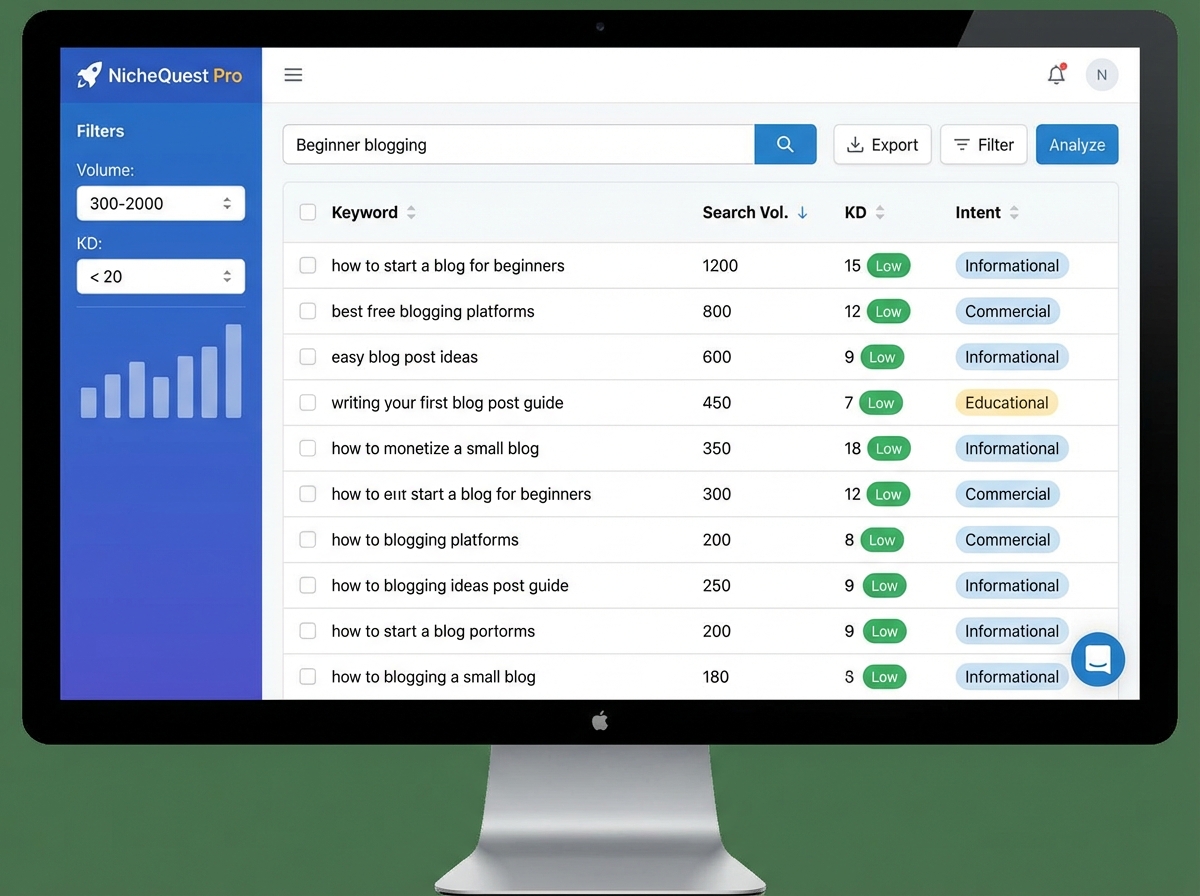
For a new domain with zero authority, targeting keywords with a difficulty score above 20 (on a 0-100 scale) is effectively throwing content into a void. You cannot outrank sites with hundreds of backlinks on a competitive query — not yet. The keyword research strategy that works for beginners focuses obsessively on long-tail keywords with low competition: three-to-five-word phrases that answer a specific question, have enough monthly search volume to matter (300-2,000 searches per month is a sweet spot for new blogs), and are not already dominated by high-authority domains.
Competitor keyword analysis is the shortcut most people skip. If a blog in your niche is already ranking for a cluster of keywords, you can reverse-engineer their content strategy by pulling their top-performing URLs and analyzing what keywords those pages rank for. This is not copying — it is understanding what the market has already validated. Then you write a better, more complete version of that content, optimized for a slightly less competitive variant of the same query.
One specific tool that changed how I approached this: the whatsmyserp browser extension, which lets you see ranking data directly in Google search results without switching between tabs. It made the research feel like a real-time feedback loop rather than a separate process disconnected from actual searching behavior. Small detail, but it genuinely changes how you think about keyword selection.
Writing Content That Google Actually Ranks
Content writing for blogging is a specific craft, and it is different from writing you have done anywhere else. The first time I wrote a proper blog article, I wrote it the way I would write an essay — with an introduction that built context slowly, arguments layered in the middle, and a conclusion that summarized everything. Google’s crawlers do not care about essay structure. Readers bounced within seconds. The article ranked for nothing.
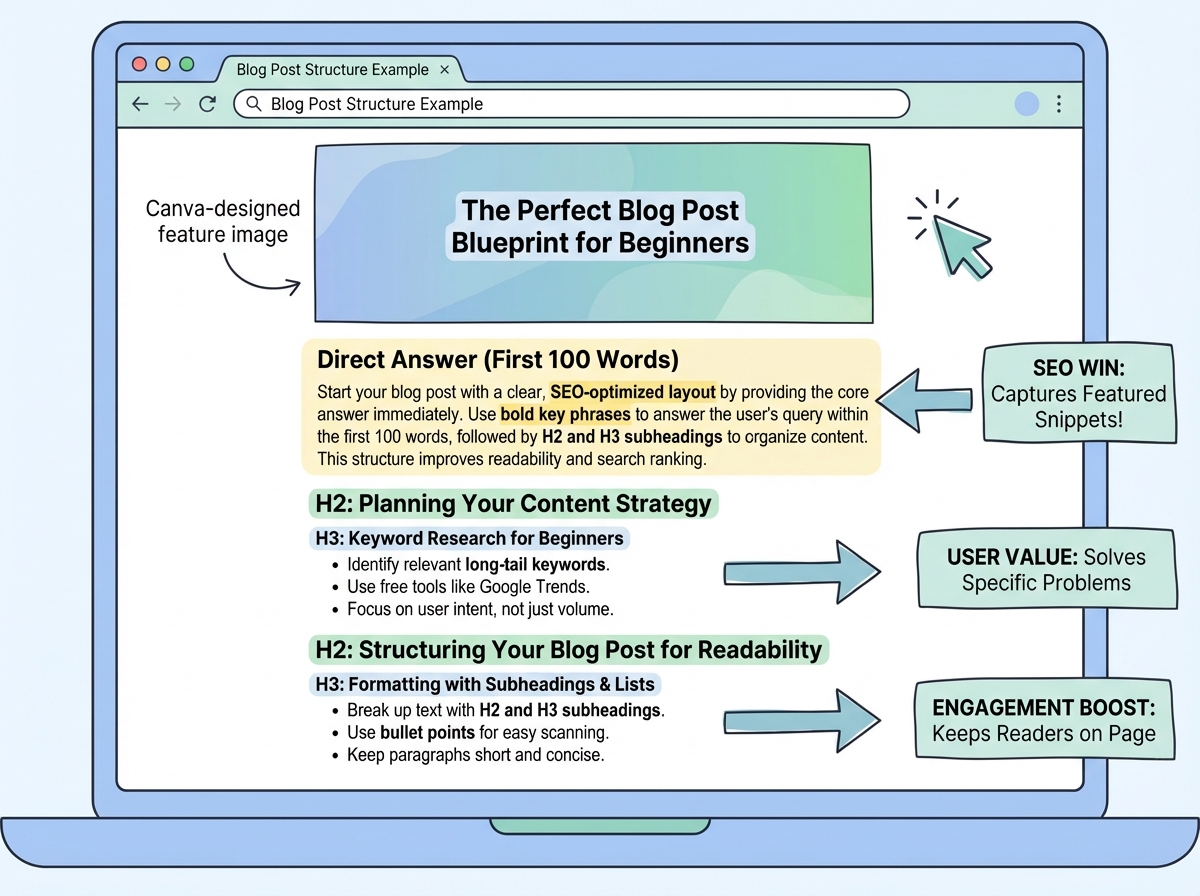
The structure that works for SEO-driven content follows a predictable pattern: answer the question in the first 100 words (this is what gets extracted as a featured snippet), then expand with supporting detail, then add practical specifics, then address related questions the reader might have next. Informational articles and commercial articles follow different templates, and confusing the two is a silent ranking killer. A review article written like an informational guide will not convert. An informational guide stuffed with affiliate links will get flagged.
The dressing stage of content writing — adding headers, bold text, bullet points, internal links, and images at the right intervals — is not decoration. It is a direct signal to Google about what is important on the page, and it determines whether someone who lands on your article from a search result stays long enough to matter. Dwell time is a ranking factor. A wall of text, no matter how accurate, loses readers.
For tools: you need a way to track your own SERP position (Google Search Console handles this for free), a grammar check (basic, but often skipped), and a visual creation tool for the feature image and in-article graphics. Canva covers the visual side entirely for beginners — it is free, the templates are good enough, and the time investment to produce a clean blog thumbnail or comparison graphic is genuinely under ten minutes once you know the workflow.
Setting Up WordPress Without Breaking Everything
WordPress customization is the section of the blogging journey that feels like it should take a weekend and somehow takes three weeks. The domain and hosting decisions feel high-stakes when you are making them, but they matter much less than the configuration decisions you make after installation — and almost nobody talks about that gap.
The plugin choices you make in the first week shape the technical SEO foundation of the entire site. A caching plugin, an SEO plugin (for on-page metadata and schema), and a security plugin are non-negotiable from day one. Theme selection matters for page speed, which is a Google ranking factor — heavy, feature-bloated themes look impressive in demos and destroy your Core Web Vitals scores in production. Start with a lightweight theme and customize it rather than choosing a complex theme because it looks professional out of the box.
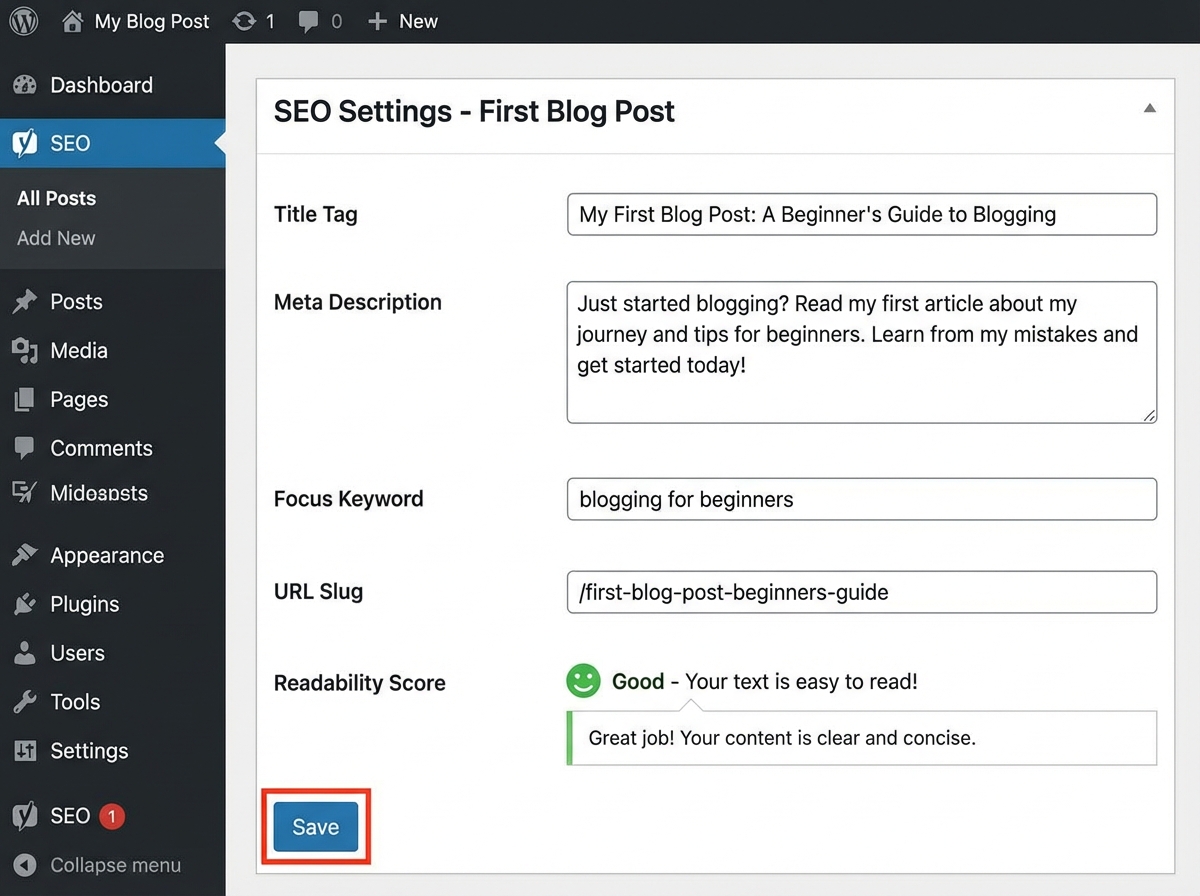
The on-page SEO configuration for each article — the title tag, meta description, URL slug, internal links, image alt text — takes about fifteen minutes per post when you know the pattern, but the first few times it takes an hour because every field feels unfamiliar. That is normal. The important thing is not to skip it. Publishing an article with no meta description, a vague URL slug, and no internal links is leaving ranking signals on the table for no reason.
Google Search Console and Google Analytics are both free, both essential, and both should be connected before you publish your first article — not after you have published twenty and are wondering why you have no traffic data. Search Console shows you which queries your pages are appearing for. Analytics shows you what visitors do when they land. Together, they are the feedback loop that tells you whether any of this is working.
Selling These Skills on Fiverr While Your Blog Grows
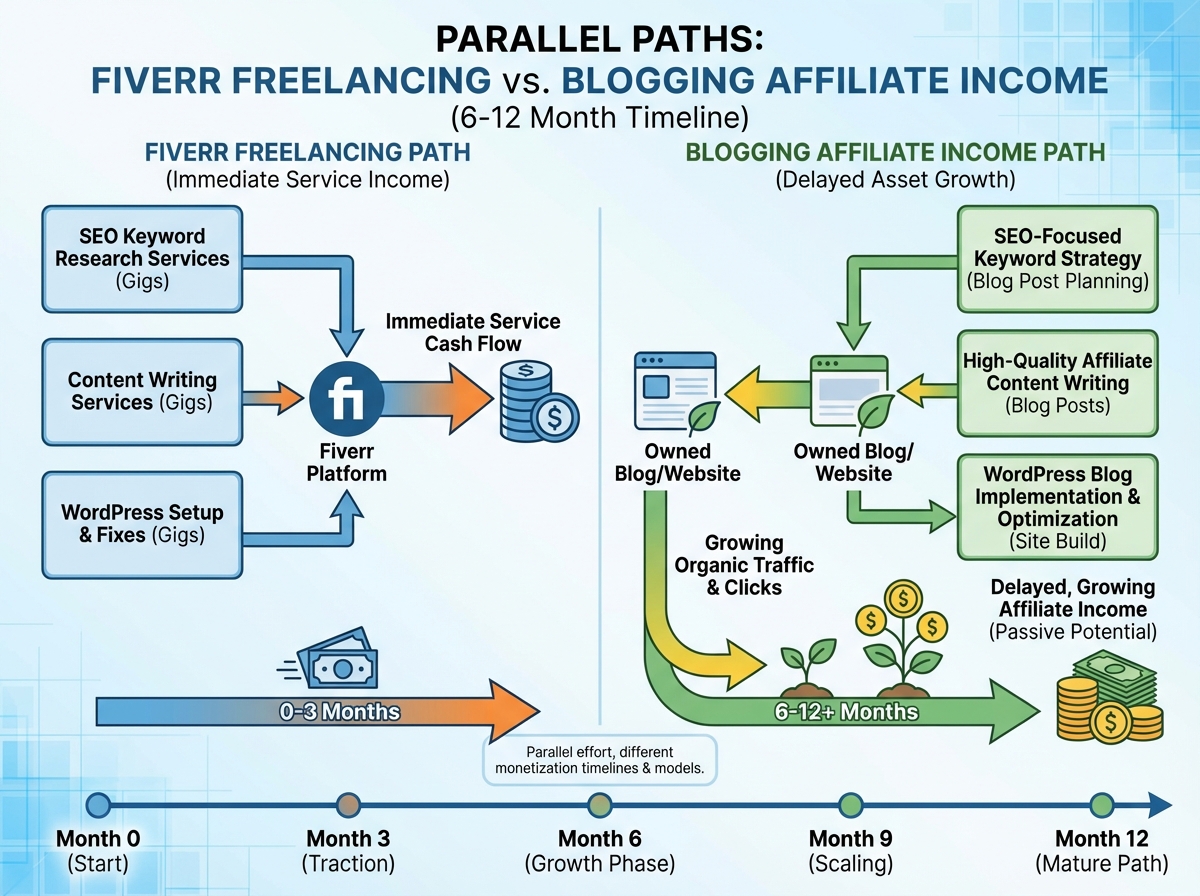
Here is the part nobody mentions in the standard blogging roadmap: your blog will take six to twelve months to generate meaningful income from traffic. That gap is real, and it is the reason most beginners quit before they see results. The practical solution is to monetize the skills you are building — niche research, keyword research, content writing, WordPress setup, Canva graphics — as freelance services on Fiverr while the blog compounds in the background.
Fiverr gig positioning for these skills follows a simple rule: specificity beats scope. A gig titled I will do SEO keyword research for your Amazon affiliate blog converts better than I will do keyword research — because it signals expertise to the exact buyer who needs it most. The same applies to content writing gigs. Niche-specific writers command higher rates than generalists, even if the actual skill level is similar, because buyers are paying for targeting accuracy, not just words.
The workflow between freelancing and blogging is also mutually reinforcing. Every keyword research project you do for a client sharpens your own niche research instincts. Every article you write for a client teaches you something about content structure that you bring back to your own blog. The two activities are not competing for your time — they are compounding the same underlying skill set from two different directions.
What I Would Actually Do Differently If I Started Over
Looking back, the blog I built in year one was not wrong — it was just unsequenced. The skills were real, the work was real, but the order was off in ways that cost me months. If you are starting now, you are starting with the map I did not have.
- Validate your niche with product research first, not passion. Pick a category with Amazon affiliate potential and check whether blogs in that space show traffic and monetization signs before you commit.
- Target keywords under KD 20 for your first 15 articles. Authority builds slowly. Competing above your domain’s current weight class is a guaranteed way to publish content that never ranks.
- Write the direct answer in your first 100 words, every article. Not as a strategy — as a discipline. Readers and crawlers both reward it immediately.
- Install Google Search Console before your first publish. You need baseline data from day one. Installing it after the fact means you have lost your earliest ranking signals.
- Keep informational and commercial article templates completely separate. Google’s intent classification is more rigid than most beginners expect. Mixing intent types in a single piece hurts both rankings and conversions.
- Set up Canva templates for your blog graphics on day one. Consistency in visual style is a brand signal that compounds, and it eliminates the I will design this later delay that pushes publishing dates back by days.
- Create your first Fiverr gig in the same week you start your blog. The skills you are building are immediately sellable. Do not wait until you feel expert enough — you will never feel expert enough at the start.
- Run competitor URL analysis before you finalize your content calendar. If a competing article on your target keyword is two years old, thin, and poorly formatted — that is your opening. If it is detailed, well-linked, and on a high-authority domain — find the long-tail variant of that query instead.
Leave a Reply