


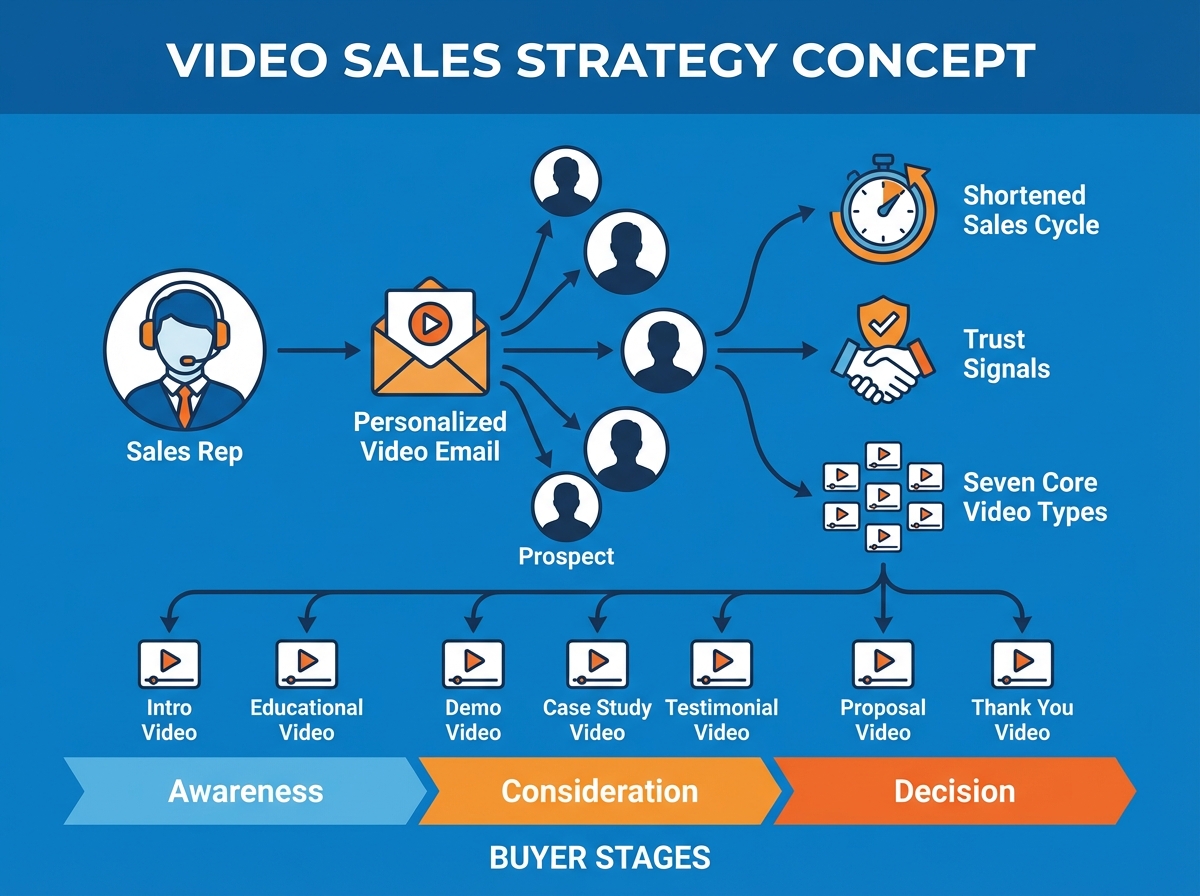
There’s a specific moment most sales reps can point to when they realized email wasn’t cutting it anymore. For me, it was sending a perfectly crafted follow-up — subject line tested, value prop tight — and watching it sit unread for eleven days.
If you’re looking to learn video sales strategy, the short answer is this: video isn’t a content format, it’s a trust mechanism. Used correctly, it compresses the relationship-building phase that used to take weeks of back-and-forth into a single two-minute watch. Sales teams that build a real video practice don’t just get more replies — they close faster, with less friction, against buyers who already feel like they know them.
- Video works best when it replaces the parts of your sales process that feel most impersonal — not when it’s added on top of them.
- The biggest mistake is producing video for volume. The teams that win with video produce fewer, more intentional assets that answer specific buyer questions at specific moments.
- If your sales cycle feels long, it’s usually because trust is being built too slowly — and video is the fastest tool available to fix that.
What “Video Sales Strategy” Actually Means
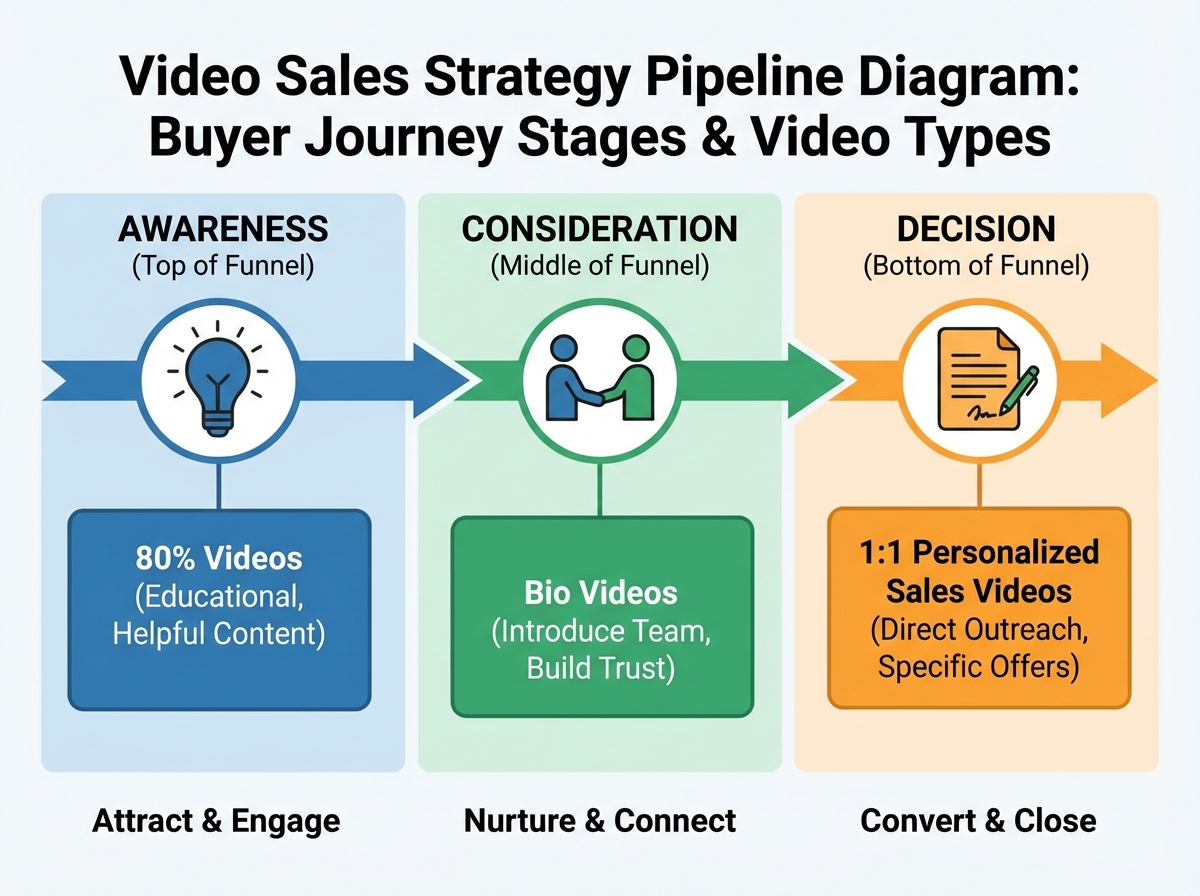
A video sales strategy is a deliberate system for using recorded or live video at specific points in the sales process to accelerate buyer trust and reduce time-to-close. It’s not a YouTube channel. It’s not posting product demos on LinkedIn and hoping.
The distinction matters because most sales teams treat video as a marketing hand-off — something the content team produces and the sales team occasionally shares. A real video sales strategy puts video directly in the hands of the rep, at the moment of the conversation, personalized to the person on the other end.
| Approach | Who Owns It | When It’s Used | Outcome |
|---|---|---|---|
| Marketing video | Content/marketing team | Top-of-funnel, brand awareness | Broad reach, low personalization |
| Sales enablement video | Shared asset library | Mid-funnel, objection handling | Consistent messaging, medium trust |
| 1:1 personalized video | Individual sales rep | Any stage, direct outreach | High trust, high response rate |
| The Selling 7 | Sales + marketing aligned | Specific buyer decision moments | Predictable pipeline acceleration |
Three things that will change how you see video in sales:
- Most buyers have already decided 70% of their purchase before they talk to a rep — your video can be in that 70%.
- A bio video viewed before a discovery call changes the entire dynamic of the first five minutes.
- Cost and pricing videos are the highest-converting single asset most sales teams never make.
How Long It Actually Takes to Build a Video Sales Practice
| Stage | What You’re Doing | Time |
|---|---|---|
| Foundation | Understanding buyer psychology, shifting to media-company thinking | Week 1 |
| The Selling 7 | Building out your core seven video assets | Weeks 2–4 |
| 1:1 Video Integration | Adding personalized video to email and daily outreach | Weeks 3–5 |
| Structure & Framework | Applying a repeatable structure to every sales video you record | Week 4–6 |
| Full Practice | Consistent, culture-embedded video usage across the team | Month 2–3 |
| Total | From zero to functional video sales system | 6–10 weeks |
The order here matters more than the speed — reps who skip straight to recording 1:1 videos without understanding the buyer-centric framework behind them produce video that feels awkward and performs poorly. If you move slower than this estimate, that’s fine; a video practice built carefully outperforms one built fast and abandoned.
The Shift That Has to Happen Before Anything Else Works
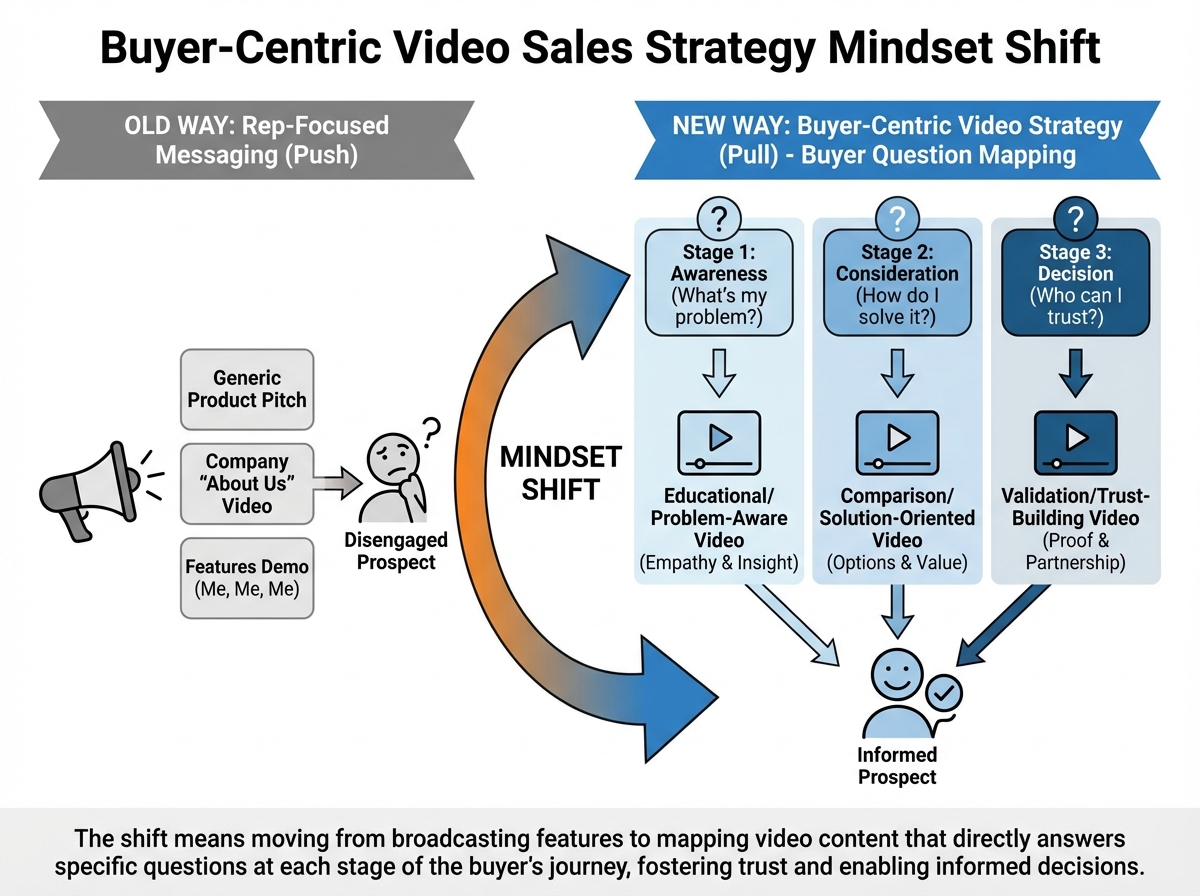
Most sales reps approach video the same way they approach cold email — they think about what they want to say. The buyer-centric shift is realizing that the only video worth making is one that answers a question the buyer is already asking, in the exact moment they’re asking it.
This is what it means to think like a media company. A media company doesn’t produce content because it wants attention — it produces content because it knows its audience has a specific question and it wants to be the best available answer. That reframe changes everything about how you decide what to record, how long to make it, and where to put it.
The five keys to building a culture of video inside a sales team all trace back to this one idea: the video isn’t about you, it’s about removing friction from the buyer’s decision. Teams that internalize this stop asking “should we make a video about our product?” and start asking “what is our buyer trying to figure out right now, and can we answer it on camera?”
Once that thinking is in place, video production stops feeling like a creative burden and starts feeling like the most efficient thing a rep can do with thirty minutes.
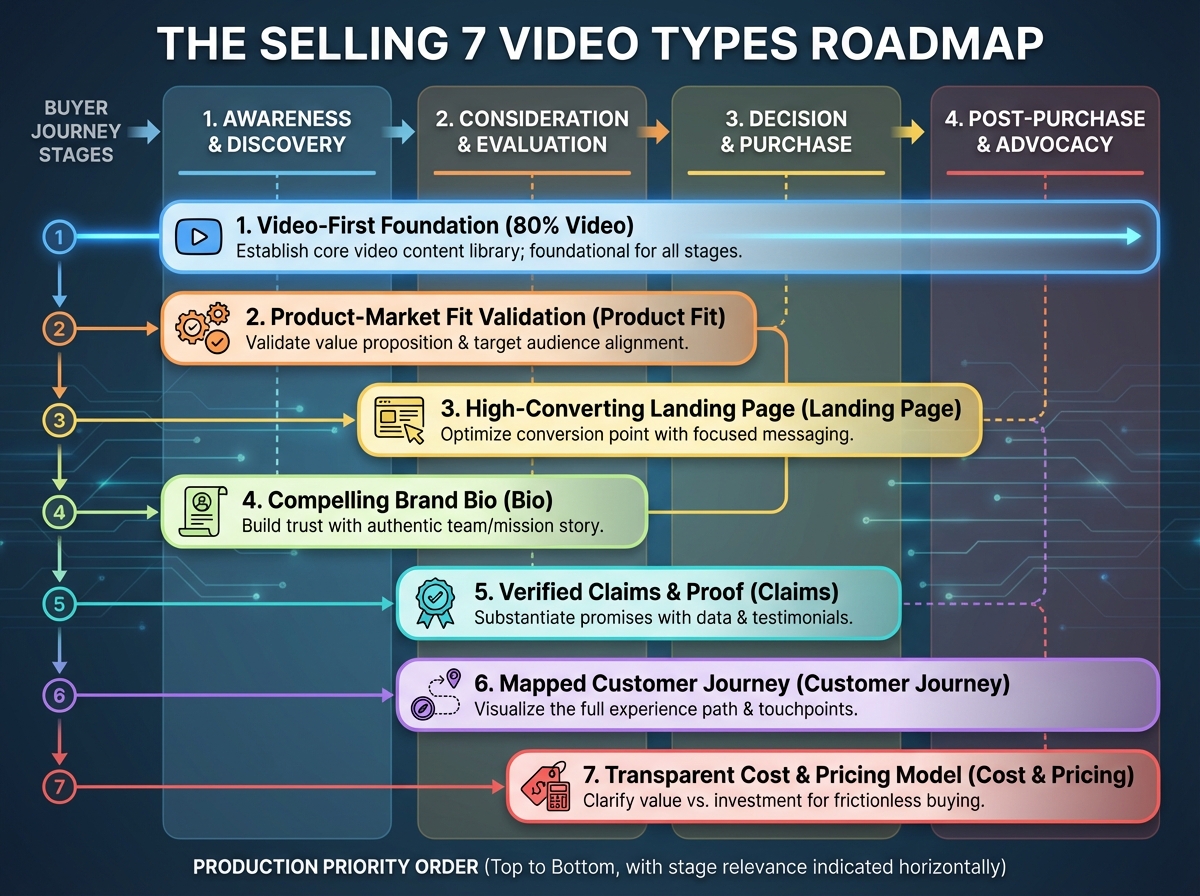
The Selling 7: Why Seven Specific Videos Beat a Hundred Random Ones
The biggest mistake sales teams make when they commit to video is treating it like a content calendar. They start producing — product overviews, company culture clips, rep introductions — and six weeks later they have a Dropbox folder full of assets no one uses because none of them were built for a specific moment in a specific conversation.
The Selling 7 is the antidote to that. These are seven video types that map to the exact questions buyers ask most often, and they’re designed to exist permanently — not as one-off campaigns. Each one earns its place in the sales process because it removes a friction point that previously required a phone call, a long email, or a slide deck that never got opened.
The 80% video is the one most teams should build first. It’s the video that answers the question your sales team gets asked most frequently — the one where every rep says, “I answer this on every single call.” Recording it once and making it available before the discovery call means you walk into that conversation with the buyer already past the basics. You’re not re-explaining your positioning — you’re having a real conversation about fit.
The cost and pricing video is the one most teams resist the longest and regret not making sooner. Buyers are already googling your pricing. They’re comparing you to competitors on review sites. The question isn’t whether they’re going to find out — it’s whether you’re going to be the one who gives them the honest, contextualized answer, or whether they’re going to form an opinion without you in the room.
What Personalized 1:1 Video Actually Does to a Sales Conversation
Sending a 1:1 video to a prospect for the first time feels strange. You’re staring at your own thumbnail, wondering if this is too much, if it’ll come across as trying too hard, if the prospect will find it weird. Almost everyone feels this before they send their first one.
Then the reply comes in twenty minutes. Not an auto-acknowledgment — an actual response that references something specific you said in the video. And you realize: this person watched it. The whole thing. Because it had their name on it, and it was clearly made for them, and that’s something almost no one in their inbox was doing.
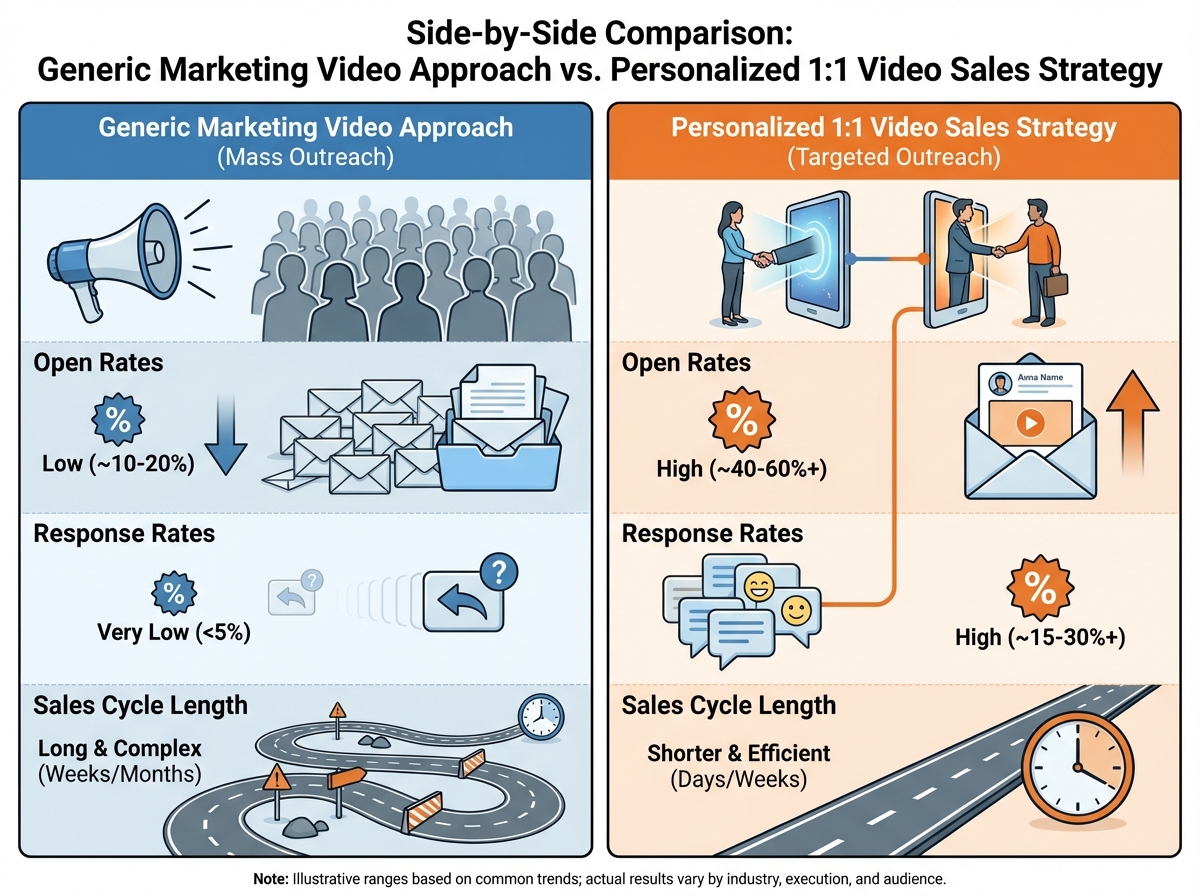
The four ways 1:1 video works in a sales process each solve a different version of the same problem: digital communication is low-trust by default. A plain-text email from a stranger asking for thirty minutes is easy to ignore. A thirty-second video where the rep is visible, specific, and clearly not reading from a template changes the social contract of the interaction. The buyer can see a real person. They can read tone. They can tell immediately whether this is a mass outreach or something made for them.
The rep’s face in the frame isn’t vanity — it’s signal. It communicates that a human being made a deliberate choice to spend time on this specific person. That’s the thing that gets responses.

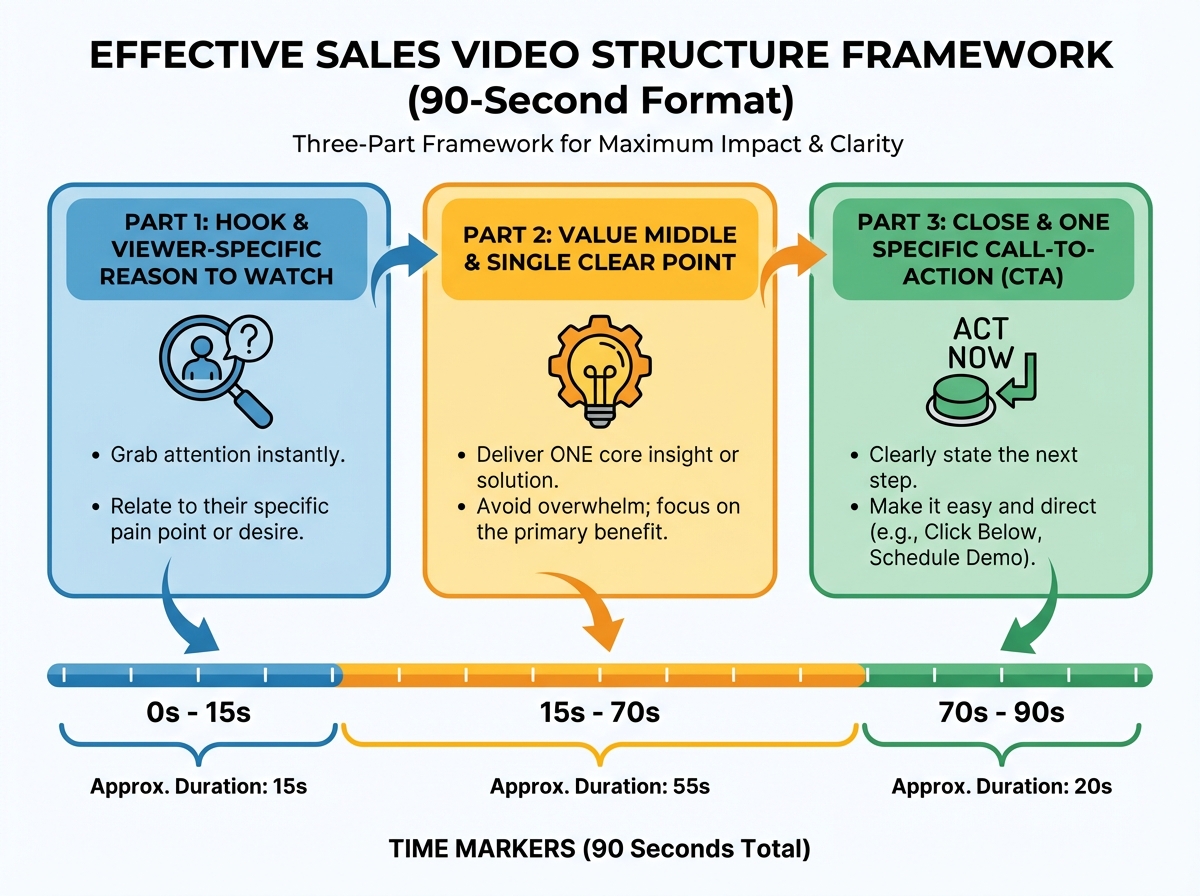
Why Most Sales Videos Feel Awkward (And What Structure Does to Fix That)
There’s a pattern in bad sales videos that’s easy to spot once you’ve seen it: the rep has no idea how to end. They say what they wanted to say, then trail off, then sort of wave at the camera, then say “so yeah, let me know” and stop recording. It’s not the content that’s the problem — it’s the absence of structure.
Having a framework for video communication isn’t about sounding scripted. It’s about knowing where you are in the video at every moment so that the viewer always knows where they are too. A properly structured sales video has a hook in the first five seconds that tells the viewer exactly why this is worth watching, a clear middle that delivers one specific thing, and a close that gives one specific next step. That’s it.
The application to 1:1 videos is where this gets practical. A 1:1 video with structure lands completely differently than one without it. The prospect watches it and they know what you’re asking, why it matters to them, and what to do next. There’s no ambiguity — and in sales, ambiguity is where deals go to die.
Once the structure is automatic, the creative part of making videos gets easier. You’re not starting from scratch every time — you’re filling in a proven form with specific, relevant content. The rep who records fifteen 1:1 videos a week with structure will always outperform the one who records two videos a week without it.
Landing Page Videos, Bio Videos, and the Trust You Build Before the Call Starts
Landing page videos are the easiest win most sales teams leave on the table. Every page that asks a buyer to take an action — book a call, request a demo, download something — is a moment where video can either remove doubt or let it linger. A thirty-second video on that page that explains exactly what happens next converts skeptical visitors into booked meetings, because it does the one thing a form can’t do: it shows a real person.
Bio videos operate on the same principle but at a more personal level. When a prospect is about to get on a discovery call with a rep they’ve never met, they will look that rep up. They’ll find a LinkedIn profile, a headshot, a title. Or they’ll find a sixty-second video where the rep introduces themselves, explains how they work, and makes it clear that the upcoming conversation is going to be worth the prospect’s time. That sixty seconds of video does more for first-call comfort than any amount of email preparation.
The claims videos and customer journey videos work together to handle the part of the sales process that used to require a reference call or a case study PDF that never got read. Claims videos address the specific “we’re the best at X” statements every company makes — and they address them visibly, with evidence, so the buyer doesn’t have to take the claim on faith. Customer journey videos show real buyers talking about a real experience, which is the only thing that lands once a prospect starts asking “but does this actually work?”

The Problems with Digital Sales Communication That Nobody Talks About Directly
Digital-first selling has a fundamental problem: it removes almost every signal that humans use to build trust. You can’t read body language in an email. You can’t hear enthusiasm in a subject line. You can’t tell if the person on the other side of a cold outreach is genuinely trying to help you or running a sequence on two hundred people simultaneously.
Sales teams that haven’t confronted this honestly keep optimizing the wrong things. They A/B test subject lines. They refine their call-to-action copy. They measure open rates and click rates and wonder why none of it translates into pipeline velocity. The optimization is real but it’s happening at the surface level — it doesn’t address the underlying trust deficit that digital communication creates by default.
Video is the only digital medium that reintroduces the human signals that text strips away. This isn’t a philosophical argument — it’s observable in reply rates, meeting show-up rates, and the texture of conversations that follow a well-made video versus a well-written email. The buyer who watched your 1:1 video before the call already trusts you slightly more than a stranger. That slight advantage, multiplied across every touchpoint in a sales cycle, is what shortens the cycle.
Looking back, the thing that took longest to accept was that video isn’t an add-on to a sales process — it’s a replacement for the parts of that process that were always slow because they were always impersonal. The reps who win with video aren’t the ones with the best cameras or the most polished delivery. They’re the ones who stopped asking “should I send a video?” and started asking “why would I send anything else?”
Here’s what you can do starting today:
- Record your 80% video this week. Identify the single question you answer on every discovery call and record a clear, two-minute response to it — then put it in your email signature and watch what happens to your first calls.
- Add your face to your next follow-up email. Don’t change anything else about the email — just record a thirty-second video version of your opening paragraph and embed the thumbnail. Compare the response rate to your last five text-only follow-ups.
- Write down the seven questions your buyers ask most before they buy. Map each one to a Selling 7 video type and decide which one you’d build first if you had to pick only one.
- Structure every video you record with a three-part frame. Hook in the first five seconds, one clear point in the middle, one specific next step at the end. Do this until it’s automatic before you worry about anything else.
- Put a video on your highest-converting landing page. Film yourself explaining exactly what happens after someone fills out the form — not a product pitch, just a clear human explanation of the next step.
- Record a bio video and send it to your next ten booked meetings. Include it in the calendar invite. Measure whether show-up rates change.
- Before you add any new video to your library, ask one question first. What specific buyer question does this answer, at what specific moment in their decision? If you can’t answer that clearly, don’t make the video.
- Audit your current sales email sequences for every place where trust is assumed rather than built. Those are the exact spots where a short video would perform better than the text currently sitting there.
Leave a Reply