


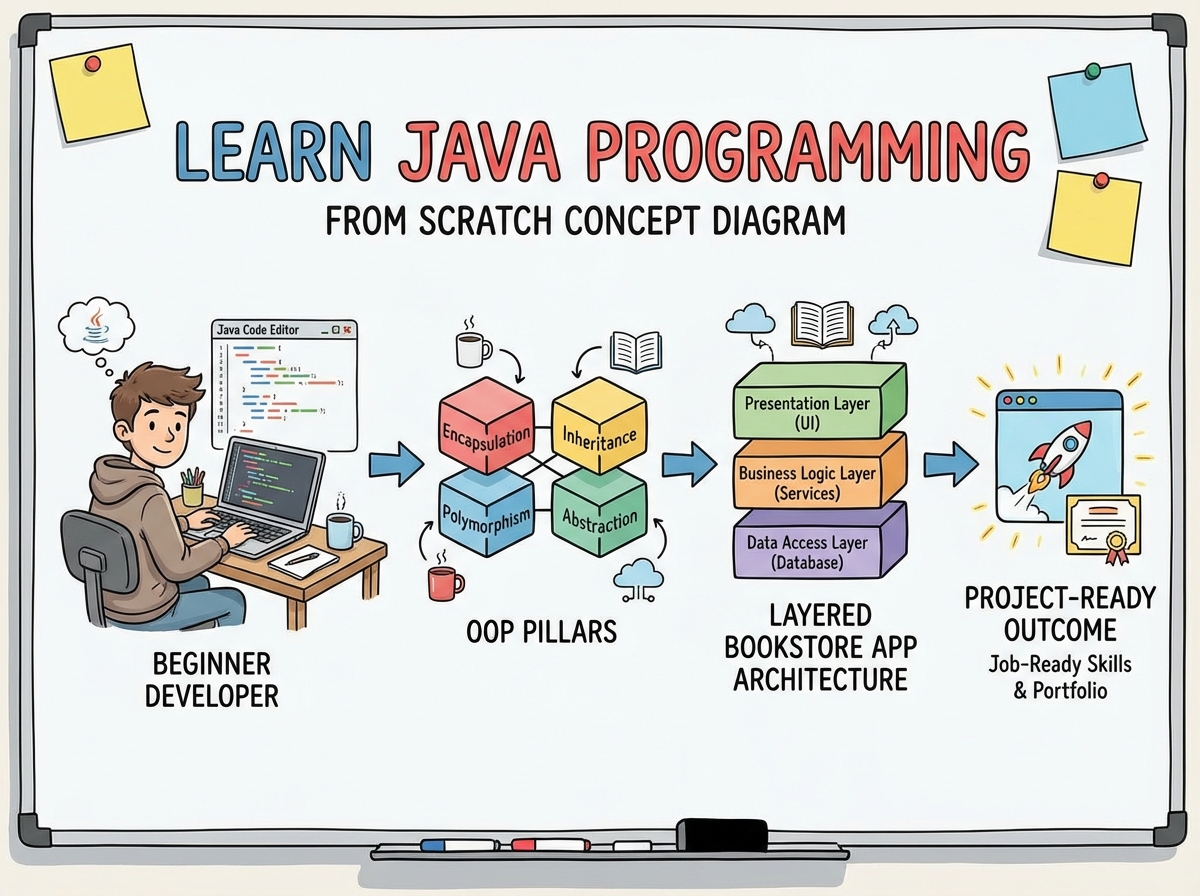
There’s a specific kind of frustration that hits when you’ve read three Java tutorials, understood none of them the same way twice, and still can’t write a program that does anything useful. That feeling isn’t a sign you’re bad at this — it’s a sign you started in the wrong place.
If you’re looking to learn Java programming from scratch, the honest answer is that the language itself isn’t the hard part. Java is verbose, yes, but it’s also extraordinarily consistent. The hard part is understanding why the language is built the way it is — and that only clicks when you’ve actually written broken code, watched it fail, and traced exactly what went wrong. Everything before that moment is just vocabulary without grammar.
- Java’s object-oriented design means you’ll write less code once you understand classes, but you’ll write a lot of confusing code before you do
- The payoff arrives around the time you build your first structured project — not during concept drills
- Complete beginners can go from zero to a working layered application in weeks, but only if they follow the right sequence
What Java Programming Actually Means for a Complete Beginner
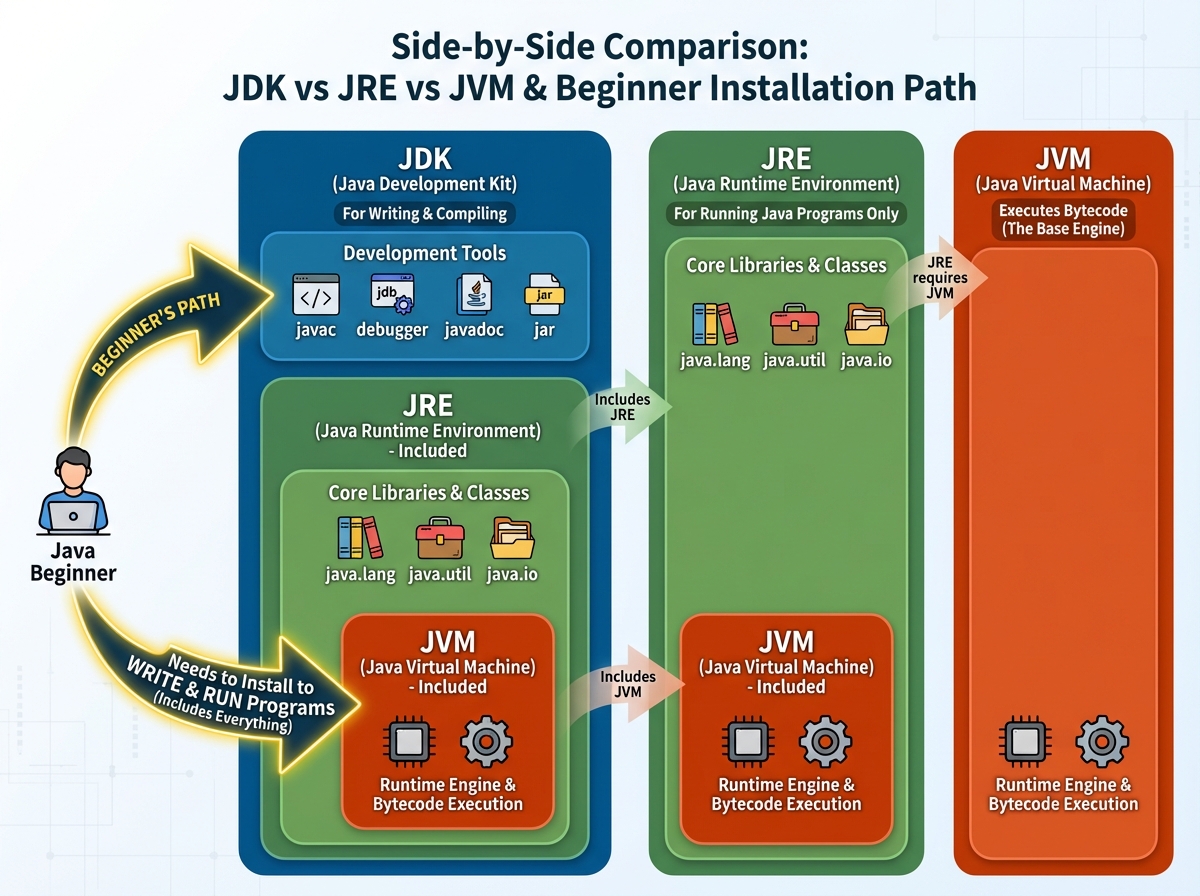
Java is a compiled, object-oriented, platform-independent programming language — meaning you write code once, compile it into bytecode, and the Java Virtual Machine (JVM) runs it anywhere. For someone starting out, what matters most is understanding this three-step life cycle: write .java source file → compile to .class bytecode → JVM executes.
There are a few things beginners often confuse early on:
| Term | What it actually is |
|---|---|
| JDK | The full toolkit: compiler + JVM + libraries. Install this first. |
| JRE | Just the runtime — you can run Java but not compile it |
| JVM | The engine that runs compiled bytecode on any OS |
| IDE | The editor (IntelliJ, Eclipse) — not Java itself |
Understanding this distinction saves hours of confusion. A lot of beginners install the wrong thing and spend their first evening wondering why their code won’t compile.
Three Things That Actually Surprised Me About Java
- The JVM, not the language, is why Java runs on any machine without rewriting code
- Static methods can be called without creating an object — which is why
mainworks at all - NullPointerException is the most common Java error in production code, not a beginner mistake
How Long It Actually Takes to Learn Core Java
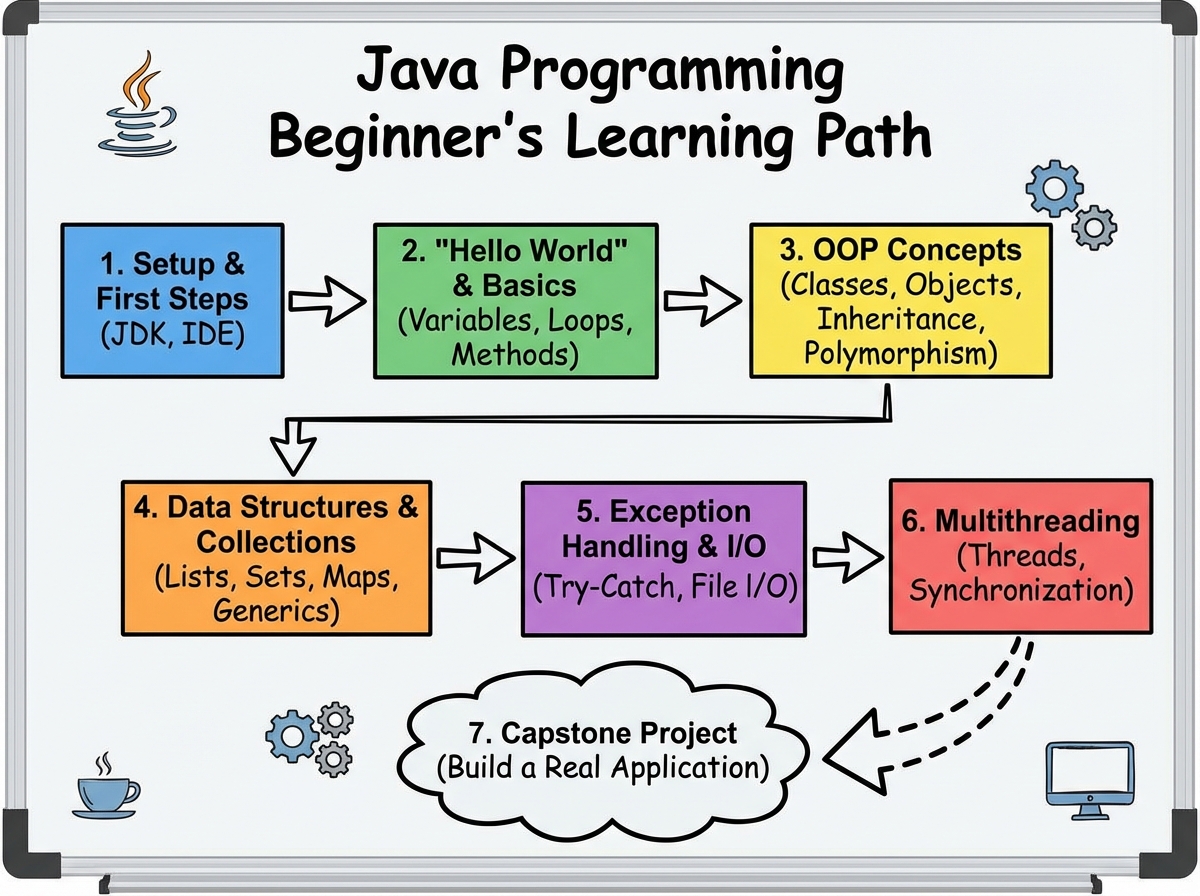
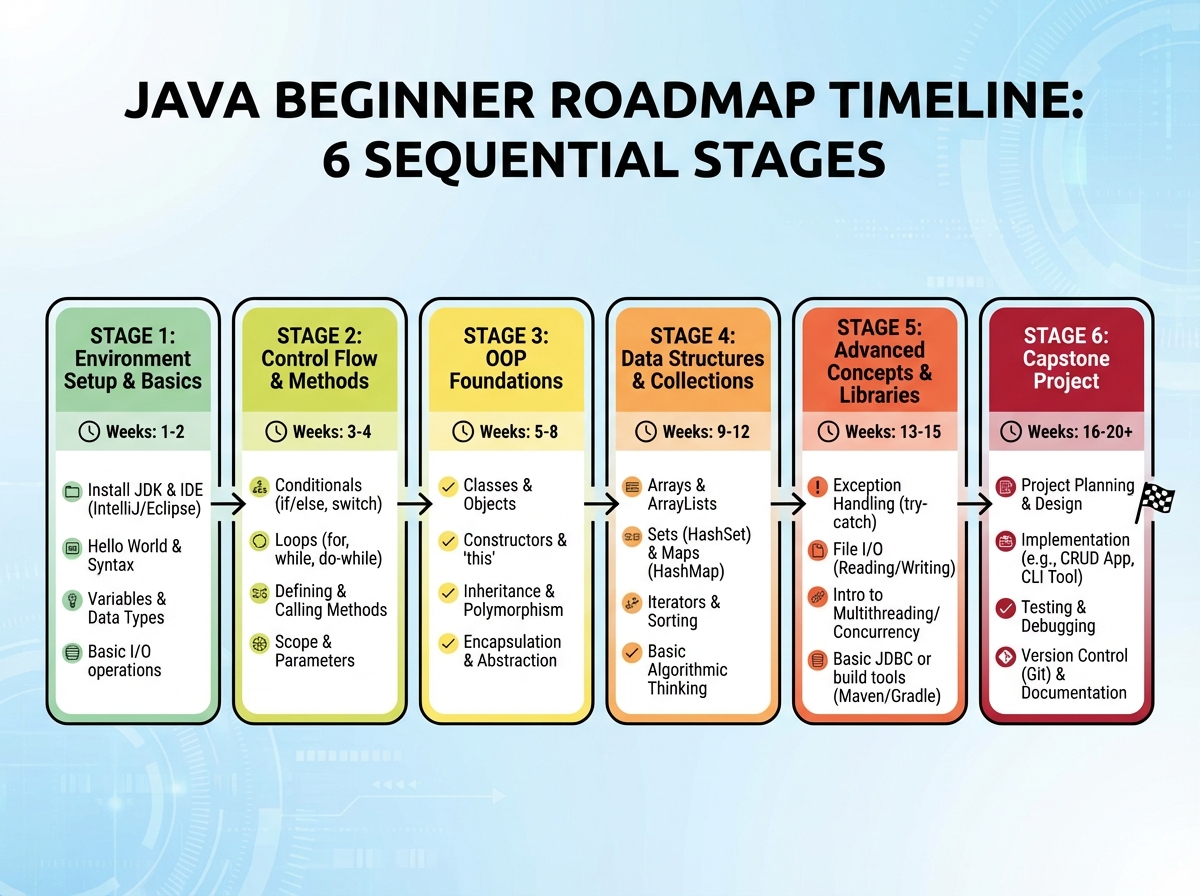
| Stage | Content | Time |
|---|---|---|
| Setup & first program | JDK install, IDE, compile/run cycle | 1–2 days |
| Basic constructs | Variables, operators, loops, conditionals, input | 1 week |
| OOP fundamentals | Classes, objects, inheritance, polymorphism | 1.5–2 weeks |
| Intermediate concepts | Arrays, interfaces, strings, collections | 1.5 weeks |
| Advanced topics | Exception handling, threads, file I/O, serialization | 2 weeks |
| Capstone project | Layered architecture, UML, debug full app | 1–2 weeks |
| Total | Complete core Java foundation | 7–10 weeks |
Order matters far more than speed here — skipping OOP before collections is the equivalent of learning multiplication before addition. And if you take twelve weeks instead of eight, that’s not falling behind; that’s actually writing the code instead of just watching it.
The First Week: Why Your First Program Feels Meaningless
Everyone’s first Java program is Hello, World. You type it, compile it, run it, and feel absolutely nothing — because there’s no way to connect System.out.println to something you actually want to build. That disconnect is real, and it’s worth naming.
What actually makes the first week worthwhile isn’t the output. It’s understanding the pipeline. When you type javac HelloWorld.java, something genuinely interesting is happening: the compiler is translating your human-readable code into instructions the JVM can execute on any machine. Once you understand that, every other step — even the boring ones — has a reason.
The mistake almost everyone makes here is rushing through environment setup. They download something, it half-works, they copy from a tutorial anyway, and they don’t actually know what’s installed where. Fifteen minutes spent verifying your JDK version in the terminal and understanding where your IDE is pointing prevents two hours of phantom errors later.
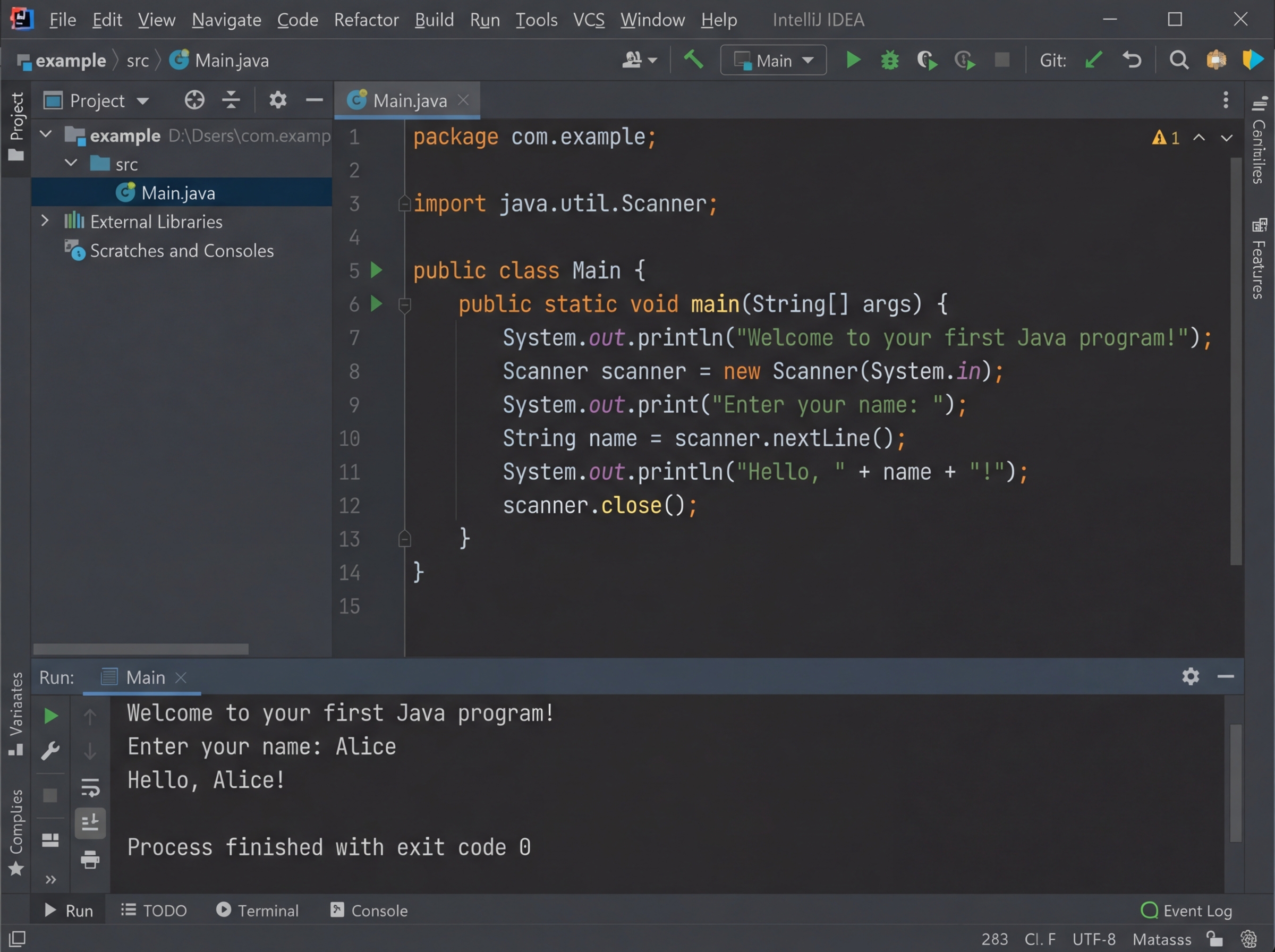
By the end of day three, you should be writing a program that takes keyboard input and produces different output depending on what you type. That’s the real milestone — not syntax memorization.
Basic Constructs: The Part Where Java Starts Feeling Real
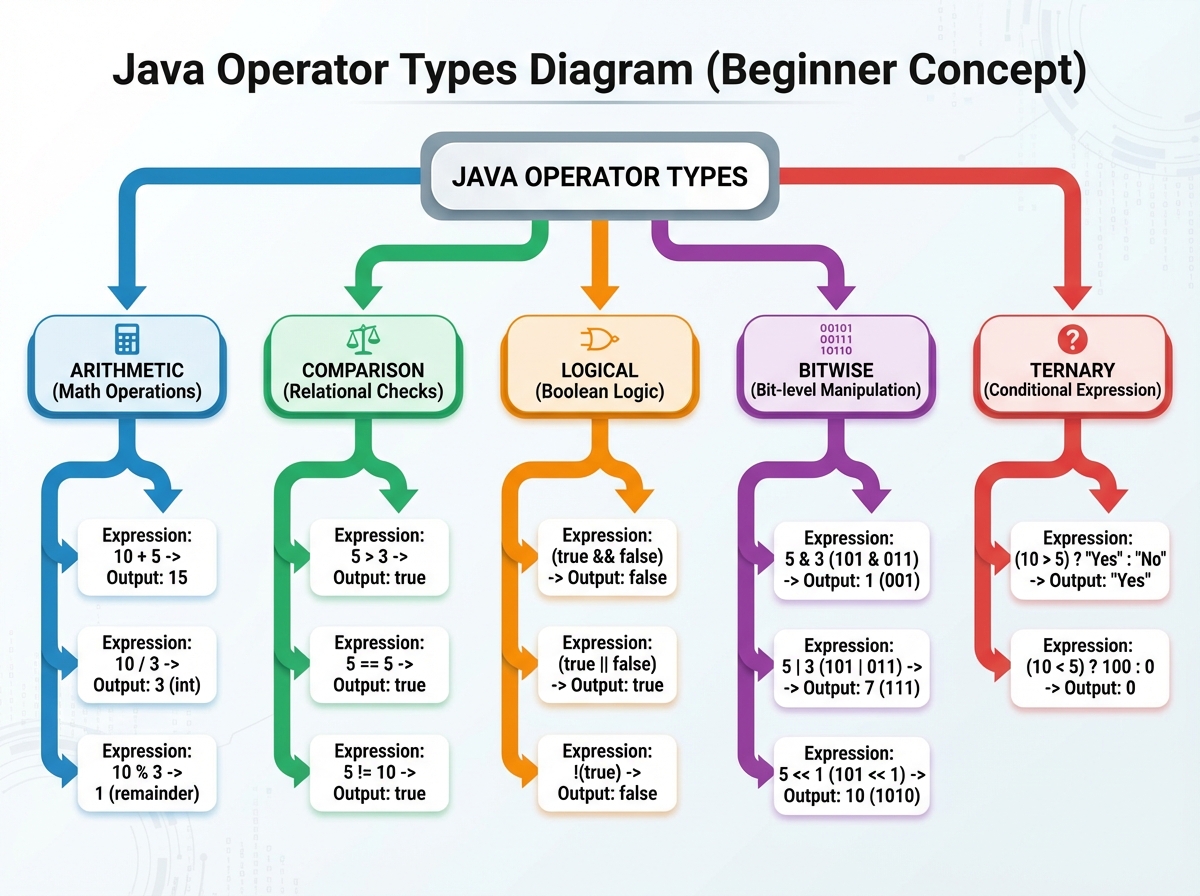
Variables, loops, conditionals — this is the grammar of every programming language, and Java’s version is strict. Java is statically typed, which means you declare what type of data a variable holds before you use it. int count = 0; is not negotiable. This feels limiting at first, and then you realize it’s the reason Java catches entire categories of bugs before your code ever runs.
Loops are where beginners spend the most time. The for loop, while loop, and do-while loop all accomplish similar goals, but the choice between them matters. A for loop when you know how many iterations you need. A while loop when you’re waiting on a condition. A do-while when the body must execute at least once — like keeping a program running until the user decides to exit.
The specific realization that changes everything here: operators aren’t just math. The == operator compares primitive values, but it does not compare object equality the way you’d expect. That lesson usually arrives painfully, at the exact moment you’re comparing two strings and the result makes no sense. When it happens, it means you’re ready for the next section.
Object-Oriented Programming: The Wall Most Beginners Hit
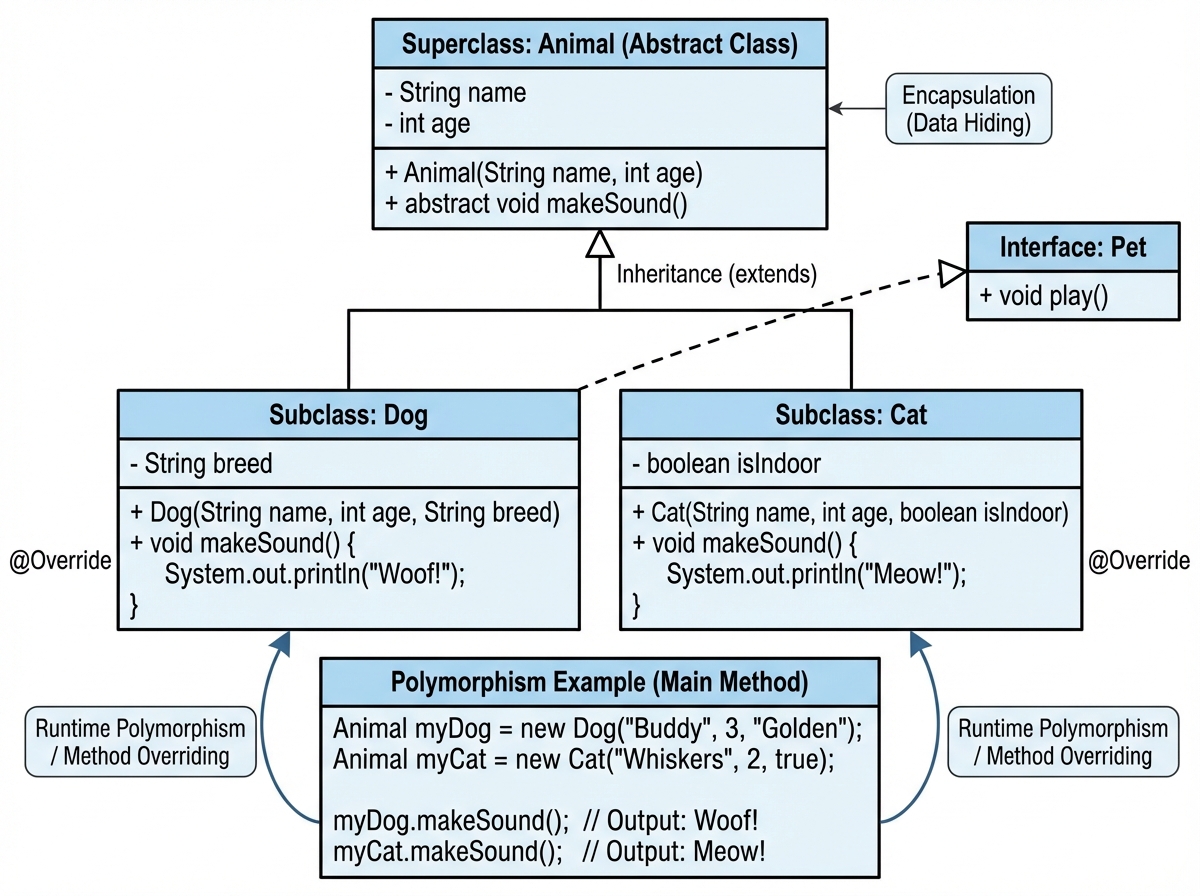
The single biggest mistake people make when learning Java OOP is memorizing the four pillars — encapsulation, inheritance, polymorphism, abstraction — without ever feeling why they exist. You can recite definitions and still write code that’s completely procedural dressed in class clothing.
The click moment is always the same: you write a program that manages something real — books, bank accounts, employees — and you realize that putting data and behavior together in one unit isn’t a rule, it’s a relief. A Book object that knows its own title, author, and price is easier to work with than three separate arrays trying to stay synchronized.
Inheritance makes sense the moment you have two classes that share behavior and you’re tired of copying code between them. Polymorphism makes sense when you have a list of different shapes and you want to call .area() on all of them without caring what shape each one is. These aren’t abstract concepts — they’re solutions to problems you’ll feel immediately once you’ve tried the wrong way first.
Abstract classes and interfaces are where this gets genuinely interesting. An abstract class says: here’s a partial blueprint — subclasses must fill in the rest. An interface says: here’s a contract — anything that implements me must provide these methods. The difference between them is one of the most common Java interview questions for a reason.
Arrays, Static, and the Concepts That Bridge Beginner to Intermediate Java
Arrays are Java’s oldest and most rigid data structure. Fixed size, single type, zero-indexed. Working with arrays teaches you something that collections frameworks later abstract away: memory allocation has to be intentional. When you declare int[] scores = new int[5], you’re reserving exactly five integer slots in memory. That concreteness is valuable, even if you’ll eventually use ArrayList for almost everything.
The static keyword is the source of more confusion than almost anything else in early Java. The instinct is to make everything static because it’s simpler — you don’t need to create an object to call a static method. The problem is that static methods can’t access instance variables, which breaks OOP entirely. The realization: static belongs to the class, not any particular object. Use it sparingly, and only when a method genuinely doesn’t need object state.
final is simpler but equally misunderstood. A final variable can’t be reassigned. A final method can’t be overridden. A final class can’t be extended. When you use final on a constant like PI, you’re not just preventing accidents — you’re communicating intent to every developer who reads the code after you.
Collections and Generics: When Java Gets Genuinely Useful
The Collections Framework is where Java for beginners starts feeling like actual development work. ArrayList, HashSet, HashMap — these are the data structures you’ll use in nearly every real project. The difference between them is the difference between different organizational systems: a list maintains order and allows duplicates, a set enforces uniqueness, a map connects keys to values.
Generics are what make collections type-safe. `ArrayList
` tells the compiler: this list holds only strings. Without generics, you get a raw `ArrayList` that holds anything — and you spend runtime figuring out what you put in it. The first time you see a `ClassCastException` from a raw collection, generics stop feeling like bureaucracy and start feeling like a seatbelt. The `HashMap` is worth slowing down for. It’s not just a lookup table — it’s a fundamentally different way of thinking about data. Instead of asking “what’s at index 3?”, you ask “what’s the value for key ‘ISBN-978-3′”. Once that mental model is in place, you’ll find yourself reaching for maps constantly in real applications.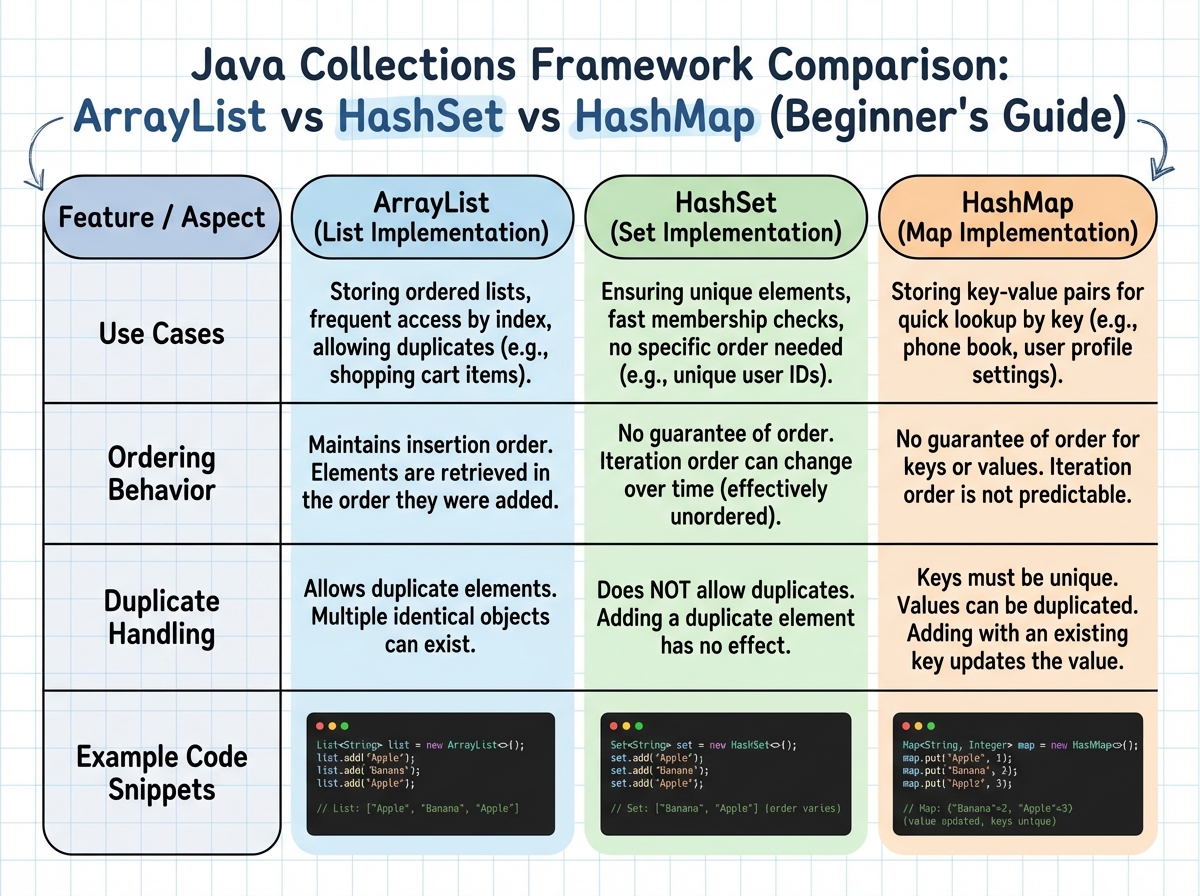
Leave a Reply