


The first time I tried to launch a YouTube ad, I spent two hours inside Google Ads and ended up with nothing but a headache and a $47 charge I couldn’t explain. The interface looked like it was designed for someone who already knew what they were doing — which, obviously, I didn’t.
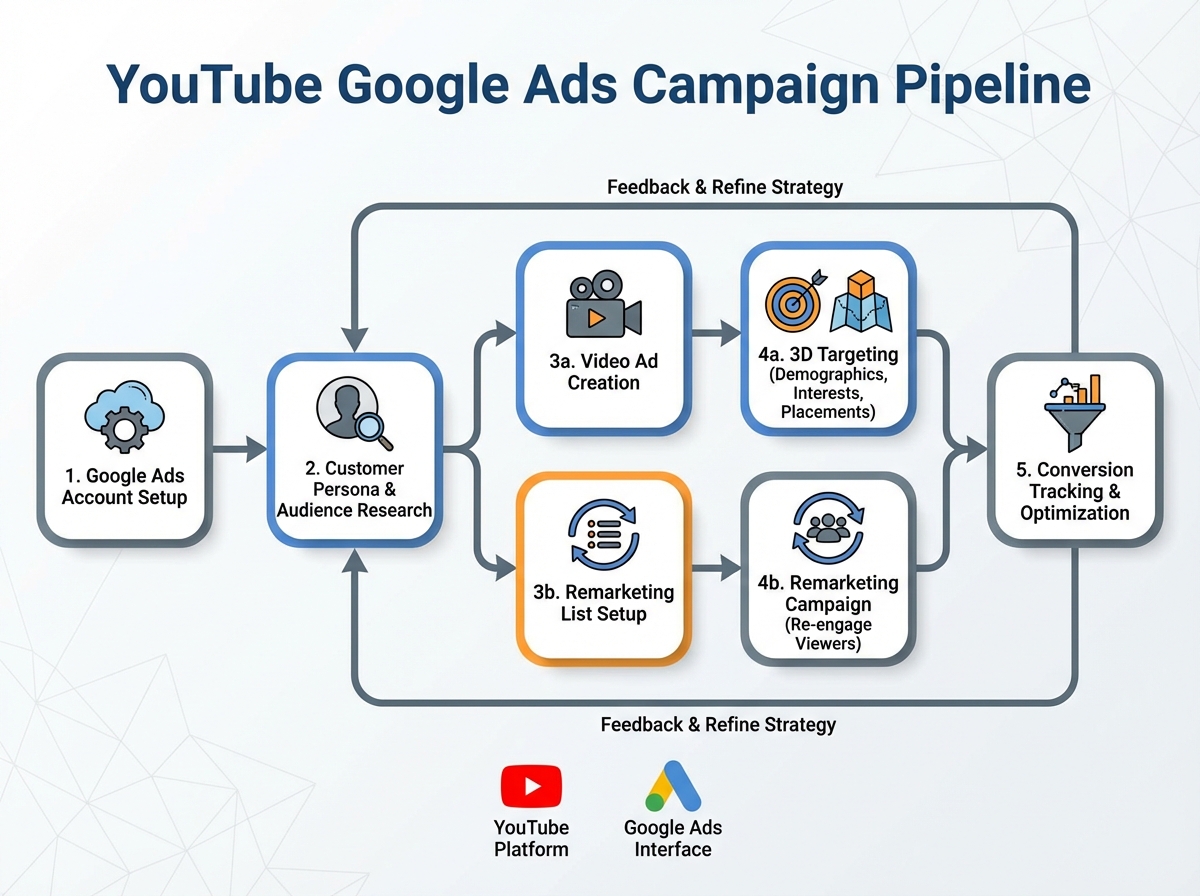
If you’re looking to learn YouTube Google Ads, the honest answer is that the platform itself isn’t your biggest problem — your biggest problem is not knowing what to ignore. Google Ads is built to take your money. It surfaces options that sound important but mostly exist to inflate your spend. Once you understand which settings actually move the needle, running profitable YouTube campaigns becomes genuinely straightforward. The whole system — from account setup to scaling — follows a repeatable structure that works whether you’re selling a product, generating leads, or building brand awareness.
- You don’t need a big budget to get results — you need the right targeting structure before you spend a single dollar
- Most beginners lose money on YouTube ads not because of bad creatives, but because they skip audience research and campaign structure entirely
- Once conversion tracking is set up correctly, the data tells you exactly where to scale and where to cut
What YouTube Google Ads Actually Is (and Isn’t)
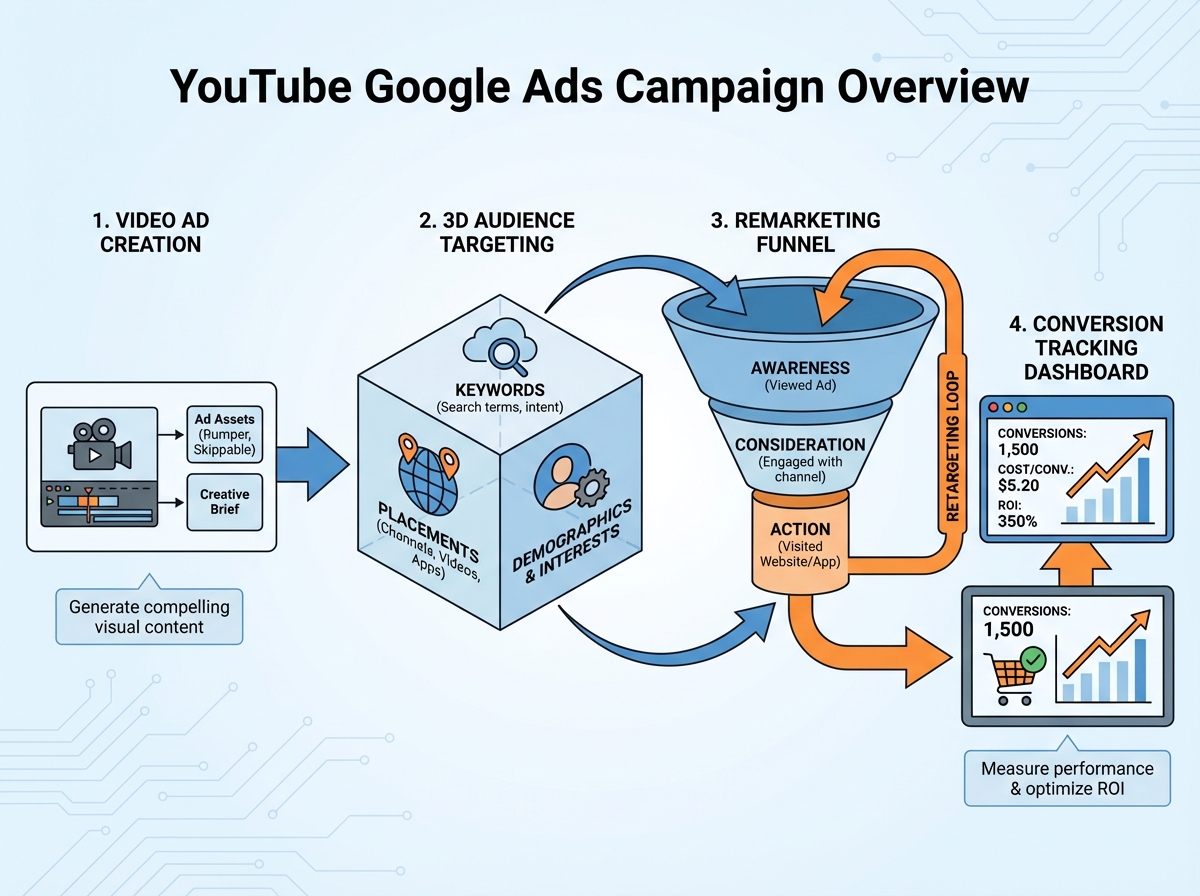
YouTube Google Ads is the system that lets you place video advertisements — skippable in-stream, non-skippable, bumper ads, and more — in front of specific audiences on YouTube and across Google’s video partner network. You manage everything through a Google Ads account, which means your YouTube campaigns live inside the same dashboard as any search or display campaigns you might run.
The biggest misconception beginners carry in is that YouTube ads work like social media boosted posts. They don’t. You’re not just paying for exposure to a vague interest category. You’re targeting based on what people watch, what they search for, which competitor channels they follow, and where they are in the buying journey. That specificity is both the power and the complexity of the platform.
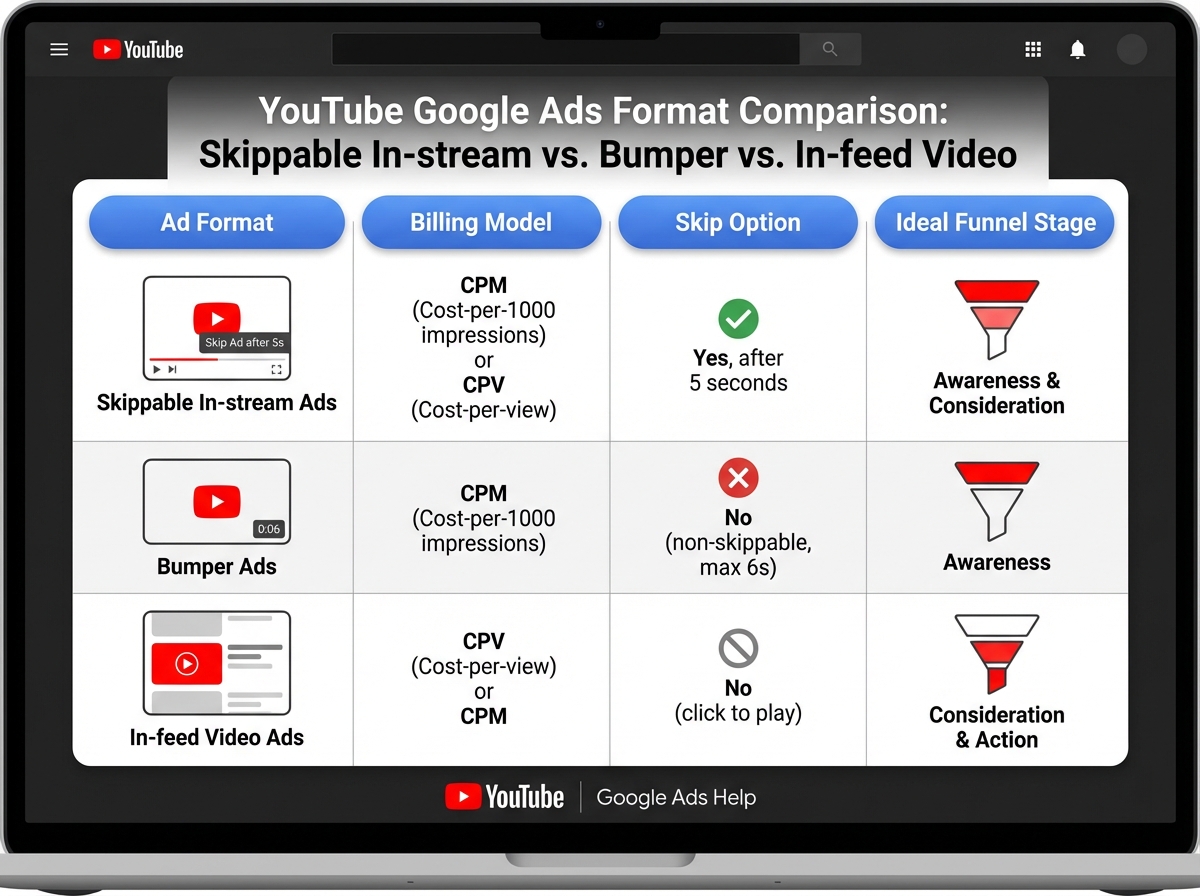
| Ad Format | Skippable? | When Charged | Best Use Case |
|---|---|---|---|
| Skippable In-Stream | Yes, after 5 sec | 30 sec view or engagement | Mid-funnel brand storytelling |
| Non-Skippable In-Stream | No | Per impression (CPM) | Awareness, short punchy message |
| Bumper Ad | No (max 6 sec) | Per impression (CPM) | Retargeting, brand recall |
| In-Feed Video | N/A | Per click on thumbnail | Discovery, cold audience testing |
| Sequence Campaign | Varies | Varies | Multi-touch storytelling funnel |
Three Sharp Observations Nobody Tells You Upfront
- Your first 5 seconds determine whether your CPV doubles or halves.
- Placement targeting beats interest targeting for cold YouTube audiences almost every time.
- A skipped ad still builds brand recall — skips aren’t always a loss.
How Long Does It Actually Take to See Results?
| Stage | What You’re Doing | Time |
|---|---|---|
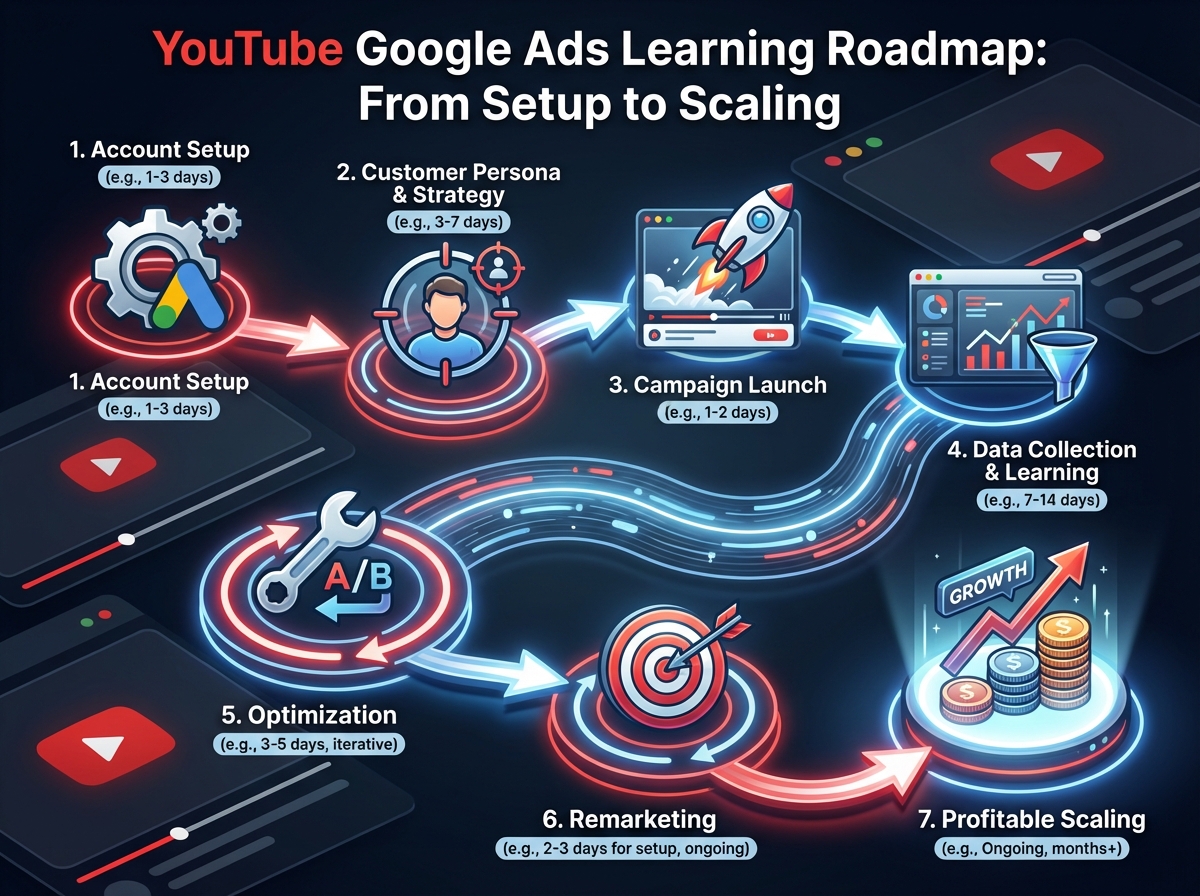
| Account setup & linking | Google Ads account, YouTube channel connection, conversion tracking | 1–2 days |
| Customer persona & ad copy | Audience research, AIDA-based hook writing, A/B test planning | 2–3 days |
| First campaign launch | 3D targeting setup, ad group structure, initial budget | 1 day |
| Data collection phase | Letting campaigns run, reading CPV and view-through rates | 7–14 days |
| Optimization round 1 | Killing poor placements, scaling winning audiences | 3–5 days |
| Remarketing layer | Building YouTube viewer audiences, launching retargeting sequences | 2–3 days |
| Profitable scaling | Applying sales psychology layers, sequence campaigns | Ongoing |
| Total to first profitable campaign | 3–5 weeks |
The order matters more than the speed — skipping audience research to get to the launch faster is exactly how most people burn their first budget. And if it takes you six or seven weeks instead of four, you haven’t failed; you’ve just spent more time in the data collection phase, which is the phase that actually teaches you the most.
Before You Touch the Ads Dashboard, Build the Persona
Every wasted ad dollar I’ve ever seen traces back to the same source: someone launched a campaign before they knew who they were talking to. Not vaguely — specifically. Age, income, what YouTube channels they already watch, what problem they’re trying to solve today versus six months from now.
The customer persona exercise isn’t a marketing exercise. It’s a targeting exercise. When you understand your buyer deeply enough, you can translate that understanding directly into placement targeting, keyword targeting, and custom audience creation. You’re not guessing — you’re matching. The persona tells you which competitor channels to target as placements. It tells you which search terms to layer in. It tells you what your hook line needs to say in the first three seconds.
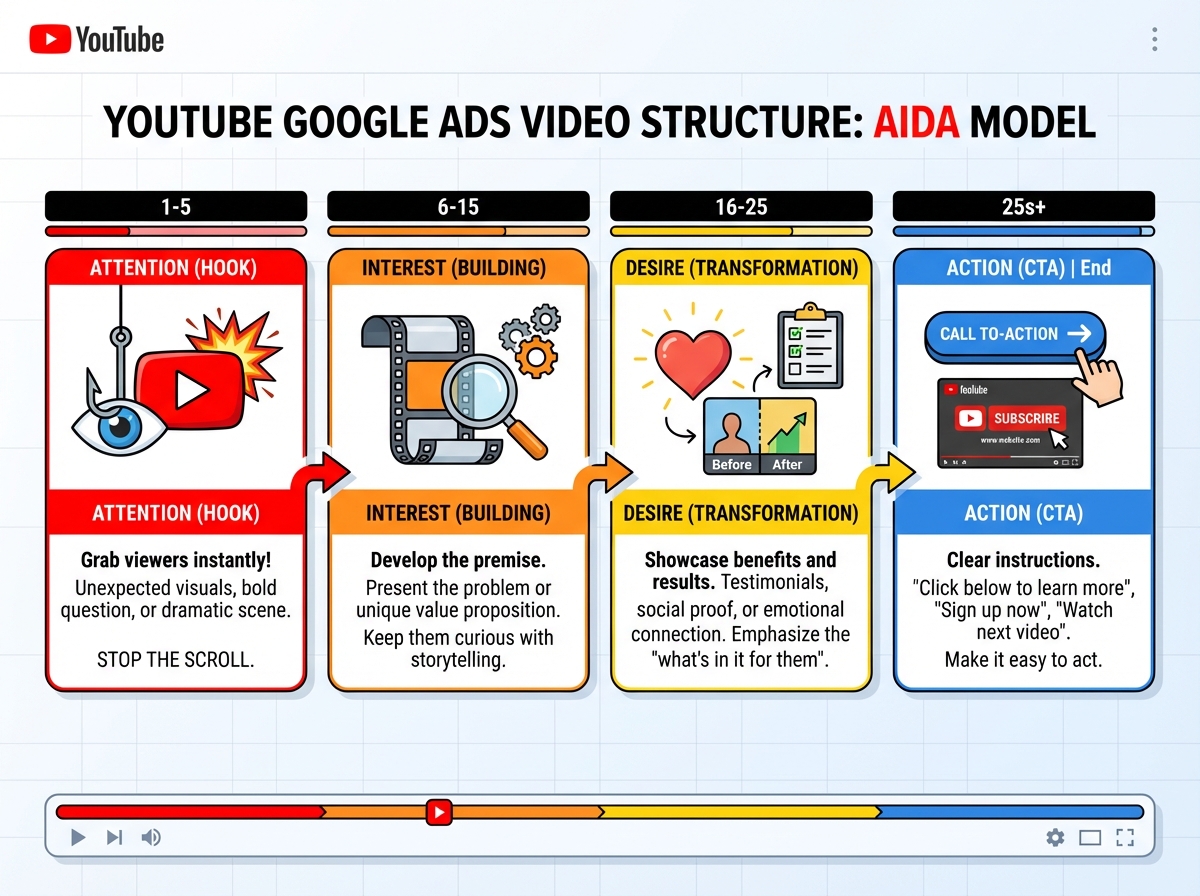
The AIDA model — Attention, Interest, Desire, Action — maps perfectly onto this. Attention is your hook (those first 5 seconds before the skip button). Interest is where you prove you understand their problem. Desire is where you show the transformation. Action is your call to action. When you understand your persona, you can write an ad copy that hits each stage in sequence without it feeling like a formula. When you don’t know your persona, every word feels generic — and generic ads get skipped.
Setting Up Google Ads Without Falling Into the Default Traps
The biggest mistake people make when starting YouTube Google Ads is letting Google’s setup wizard make decisions for them. That wizard is optimized for Google’s revenue, not yours. It will recommend Smart campaigns, auto-applied settings, and expanded targeting options that sound helpful and mostly aren’t — at least not when you’re starting out and trying to understand what’s actually working.
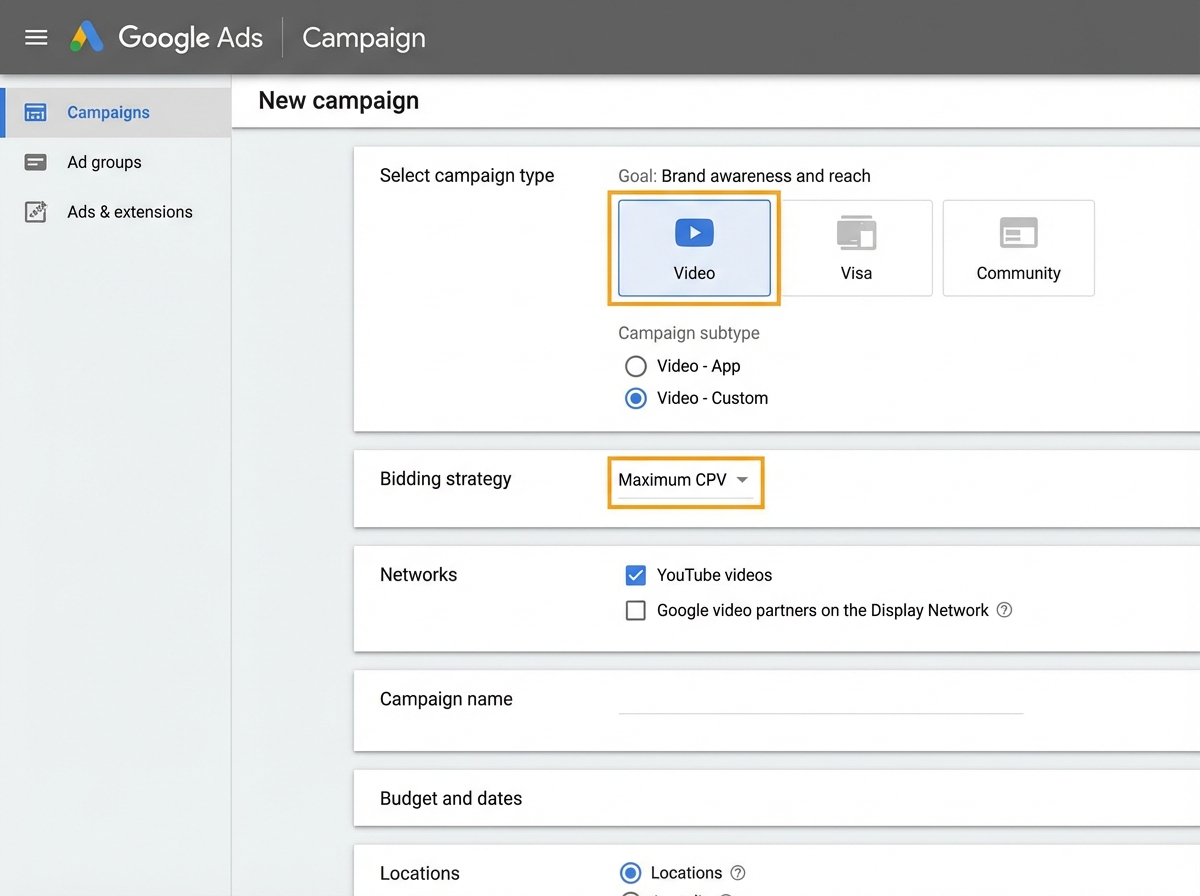
When you create your account from scratch, the first thing to do is switch to Expert Mode. This unlocks the full campaign interface where you control every variable. Then you create a campaign manually — no goal selected, or select the goal that matches your actual objective — so Google doesn’t start making bid adjustments before you’ve collected any real data. The new Google Ads interface has reorganized where these settings live, but the principle hasn’t changed: you want to own every decision until the data tells you to let the algorithm take over.
For YouTube specifically, you’ll be working inside Video campaign types. The core settings that actually matter at launch are your bidding strategy (start with Target CPV if you want view volume, or Maximum CPV if you want tighter cost control), your network settings (uncheck Google video partners until you have data on whether they convert for your offer), and your ad scheduling. Everything else is secondary until your first campaign has run for at least a week.
The 3D Targeting Method That Changes How You Think About Audiences
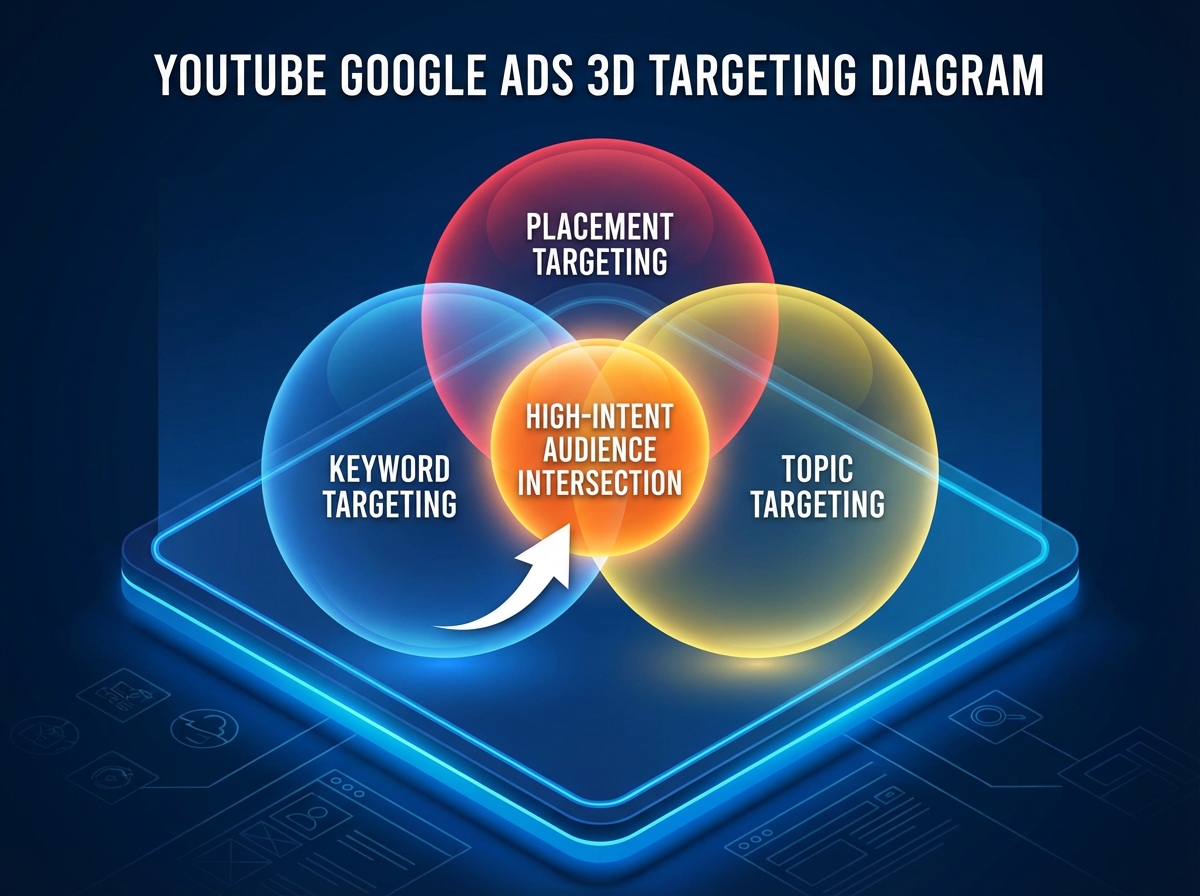
Most beginners treat YouTube targeting like a single layer: pick an interest category, set a budget, hope for the best. The 3D targeting approach stacks three layers simultaneously — keywords, placements, and topics — to create a much tighter audience filter. When all three align, you’re not just reaching people who might be interested. You’re reaching people who are actively consuming content related to your exact offer.
Keyword targeting on YouTube works differently from search. You’re targeting the keywords of the videos someone is watching, not what they’re typing into a search bar. So if your customer persona watches competitor product reviews and tutorial videos in your niche, you add those as keyword targets. Then you layer placements — specific YouTube channels or videos where your ideal customer hangs out. Then you add topics as the broadest filter. The result is an audience that’s simultaneously qualified by behavior, context, and category.
Competitor keyword research is where this gets interesting. You’re not just looking at what people search for — you’re looking at which YouTube channels your competitors are running ads against. That intelligence tells you exactly where the qualified audience is already congregating, and you use it to build your placement list before you spend a single dollar.
What YouTube Ad Formats Actually Do to Your Funnel
Skippable in-stream ads are the workhorse of YouTube Google Ads campaigns. They appear before or during a video, and the viewer can skip after five seconds. You only pay when someone watches at least 30 seconds or engages with the ad — which means every view you pay for is a self-selected, qualified view. That’s a fundamentally different dynamic than paying per impression and hoping someone noticed you.
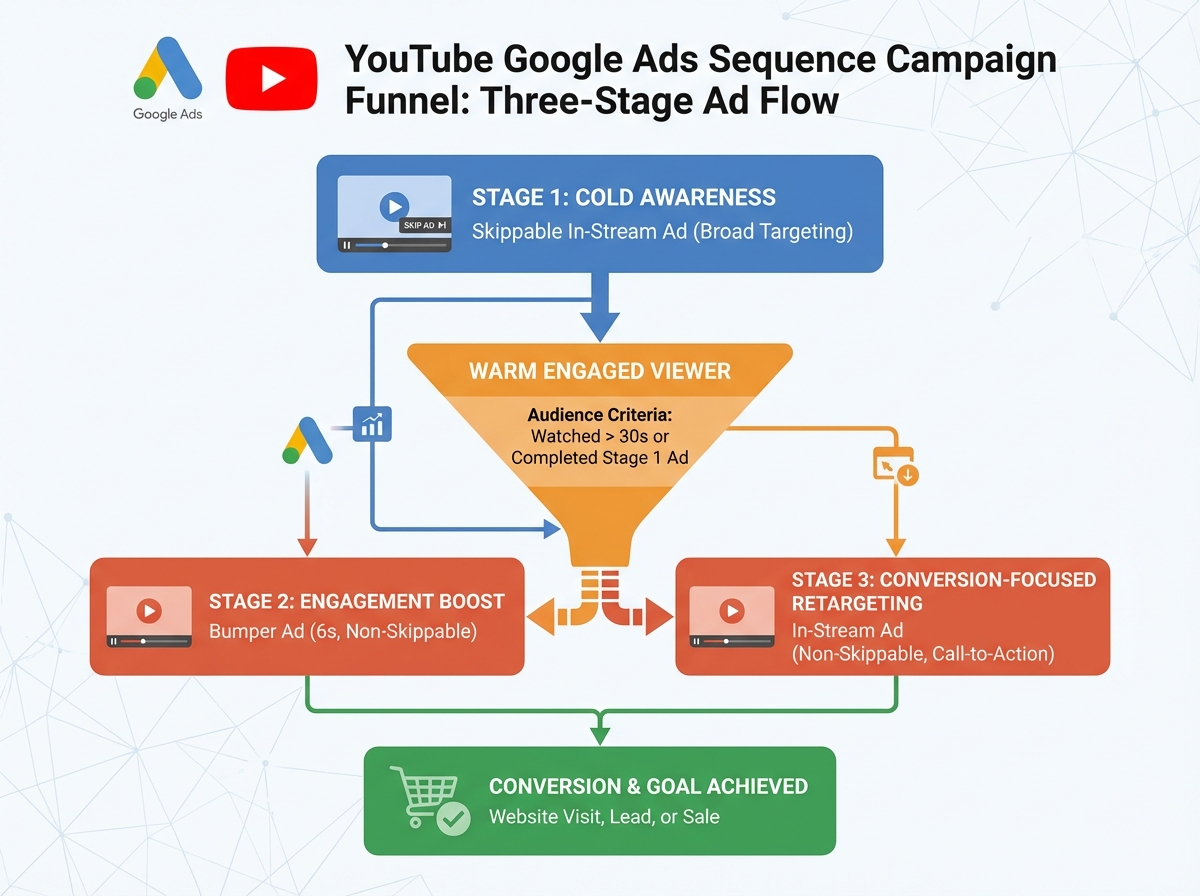
Sequence campaigns are where things get genuinely powerful for direct response advertisers. Instead of showing one ad repeatedly, you build a multi-ad sequence that walks a viewer through a narrative: awareness ad first, then a deeper product explanation, then a direct offer. Each ad in the sequence only shows to someone who watched the previous one. By the time someone sees your conversion ad, they’ve already been exposed to your brand twice, in a structured order. The conversion rates on sequence campaigns tend to be significantly higher than cold single-ad campaigns, but they require more planning upfront — you need to know your story arc before you build.
The mistake most people make here is running only one format and expecting it to handle the full funnel. Cold audiences need skippable in-stream to self-qualify. Warm audiences — people who watched 50% or more of a previous ad — need a tighter, shorter retargeting message. Mixing formats according to where someone is in your funnel is the difference between a campaign that slowly bleeds budget and one that compounds.
Remarketing: Where the Real Profit Lives
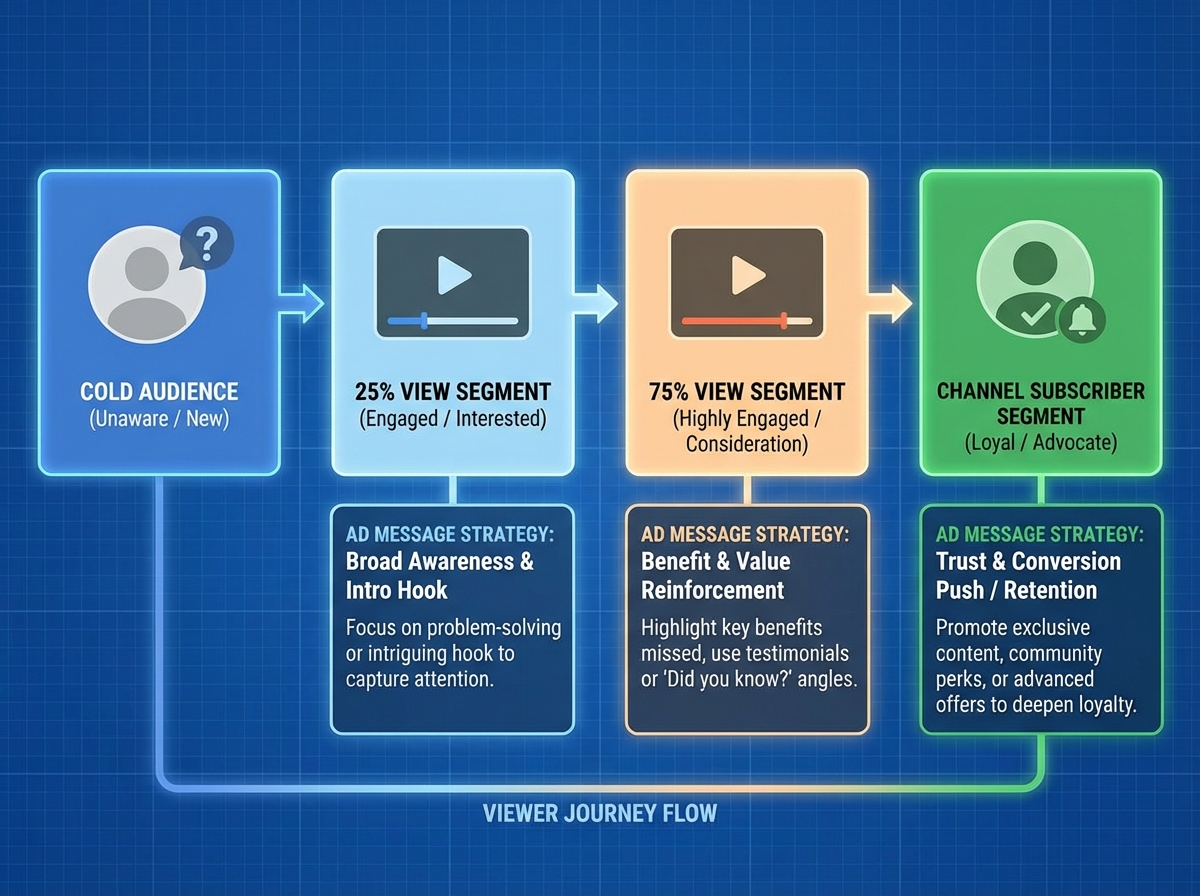
If I had to point to one place where most YouTube advertisers leave money on the table, it’s remarketing. They run cold campaigns, get some views, and move on. They never build the audience segment that’s already shown interest and circle back with a tailored message.
YouTube remarketing works by creating audience lists inside Google Ads based on how people have interacted with your channel or ads. Someone who watched 75% of your video is a fundamentally different audience than someone who bounced at 10 seconds. You can build separate lists for channel visitors, video viewers segmented by watch percentage, and even people who subscribed after seeing an ad. These lists then get attached to new campaigns with messaging calibrated to where that person already is in their decision-making process.
The mechanics are straightforward once your YouTube channel is linked to your Google Ads account. You navigate to Audience Manager, create a new YouTube users segment, and define the criteria. But the strategy behind which segments to create — and what to say to each one — comes entirely from knowing your persona and your funnel. A person who watched 75% of your product demo video doesn’t need another awareness ad. They need a reason to commit. That’s a completely different script, a completely different offer, and often a completely different CTA.
Sales Psychology Is the Layer Most Advertisers Skip
You can have perfect targeting, a clean campaign structure, and a well-produced video, and still run ads that don’t convert — because the message itself doesn’t move people. Sales psychology isn’t manipulation. It’s understanding the emotional mechanics behind why people say yes.
Reciprocity works in video ads through value-first content: when your ad teaches the viewer something genuinely useful in the first 15 seconds, they feel a micro-obligation to hear you out. Scarcity and urgency work in the CTA, but only when they’re real — manufactured countdown timers read as fake and damage trust. Social proof, when specific (a real number, a real outcome, a real name), does more work in three seconds than a paragraph of feature explanations. Curiosity is the engine behind a strong hook: the best-performing YouTube hooks create an information gap that the viewer physically wants to close before hitting skip.
The buyer persona you built at the start comes back here in a specific way. Each psychological trigger lands differently depending on where someone is in their journey. A cold viewer needs curiosity and reciprocity to earn their attention. A warm retargeted viewer already trusts you — they need scarcity or social proof to get off the fence. Knowing this, you can architect each ad in your sequence to use the right trigger at the right stage, which is how the whole system starts to compound.
Using AI to Build Campaigns Faster Without Losing Control
AI tools — particularly ChatGPT and generative AI prompting — have changed how fast you can build the scaffolding of a YouTube Google Ads campaign. Ad copy variations that used to take an afternoon to write can be generated, evaluated, and refined in thirty minutes. Customer persona documents that used to require research calls can be bootstrapped with well-structured prompts and then validated with real data.
The practical workflow looks like this: you prompt an AI tool to generate ten hook variations for your video ad based on your persona’s core problem. You identify the two or three that most directly create the curiosity gap or emotional hit you’re looking for. You test those against each other in your first campaign as A/B variants. The AI didn’t make the strategic decision — you did — but it compressed the generation time dramatically.
For keyword research, AI-assisted prompts can surface competitor angles, objection language, and search intent clusters that take much longer to find manually. The key is treating AI output as raw material, not finished strategy. Every prompt output needs to be filtered through your understanding of the persona and the offer before it touches a live campaign.
What Actually Matters, Looking Back
Running YouTube Google Ads profitably isn’t about mastering the platform’s complexity — it’s about respecting the sequence. The persona comes before the campaign. The campaign structure comes before the budget. The data comes before the scaling. Every shortcut around that sequence costs you more than the time it saved.
Build your customer persona before opening Google Ads. Targeting decisions made without a clear persona are guesses, and guesses at scale are expensive.
Switch to Expert Mode immediately when creating your account. The Smart campaign defaults are optimized for Google’s revenue, not yours — you want full visibility before the algorithm takes over.
Uncheck Google Video Partners in your first campaigns. The traffic quality is inconsistent, and you want clean YouTube-only data before expanding your network.
Stack all three targeting layers — keywords, placements, and topics — in every cold campaign. Single-layer targeting on YouTube produces broad, expensive audiences that rarely convert.
Build YouTube viewer audience segments before you need them. Audience lists take time to populate — create them at launch so they’re ready when you start your remarketing campaigns.
Write your skippable in-stream hook to work in 5 seconds or less. Everything after the skip button is a bonus. If your hook doesn’t land before second five, assume most viewers won’t be there for second six.
Use sequence campaigns for any offer above $100. Multi-touch storytelling dramatically outperforms single cold ads for considered purchases — structure the narrative before you build the ads.
Set up conversion tracking before spending a dollar. Without it, you’re flying blind — you can’t optimize what you can’t measure, and early campaign data without conversion signals is nearly useless.
Leave a Reply