


The first time you open a Google Ads account, you don’t feel like a marketer. You feel like someone who accidentally walked into an airplane cockpit and is now expected to fly.
Every tab has sub-tabs. Every setting has a tooltip that explains nothing. And the moment you click “New Campaign,” you’re asked to pick a goal before you even understand what the goals mean.
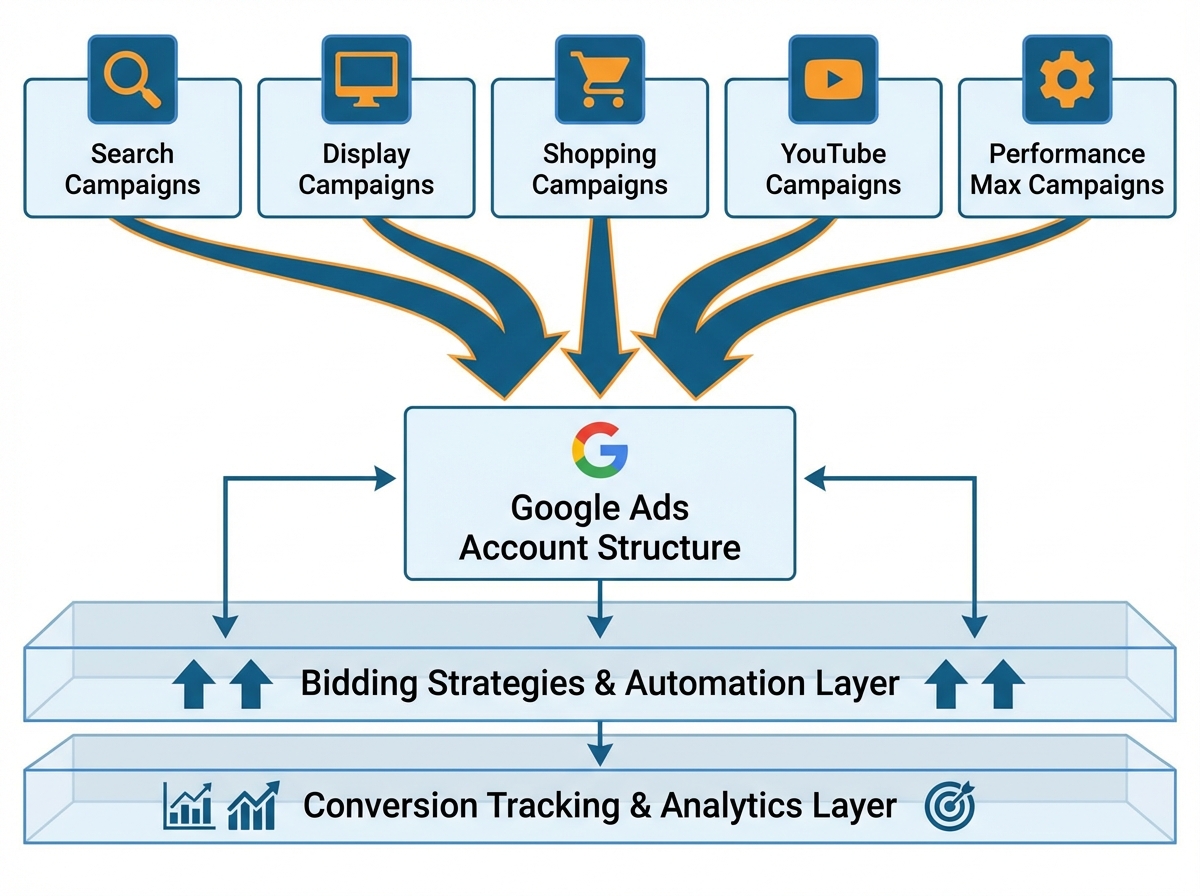
If you’re looking to learn Google Ads from scratch or level up your existing PPC knowledge, the honest answer is this: the platform rewards people who understand the logic underneath it, not just the buttons on top. Google Ads is a pay-per-click advertising system that lets you place ads across Google Search, YouTube, Gmail, and millions of partner websites — but the real skill isn’t setting up campaigns, it’s knowing why you’re setting them up a specific way, and what levers to pull when performance drops.
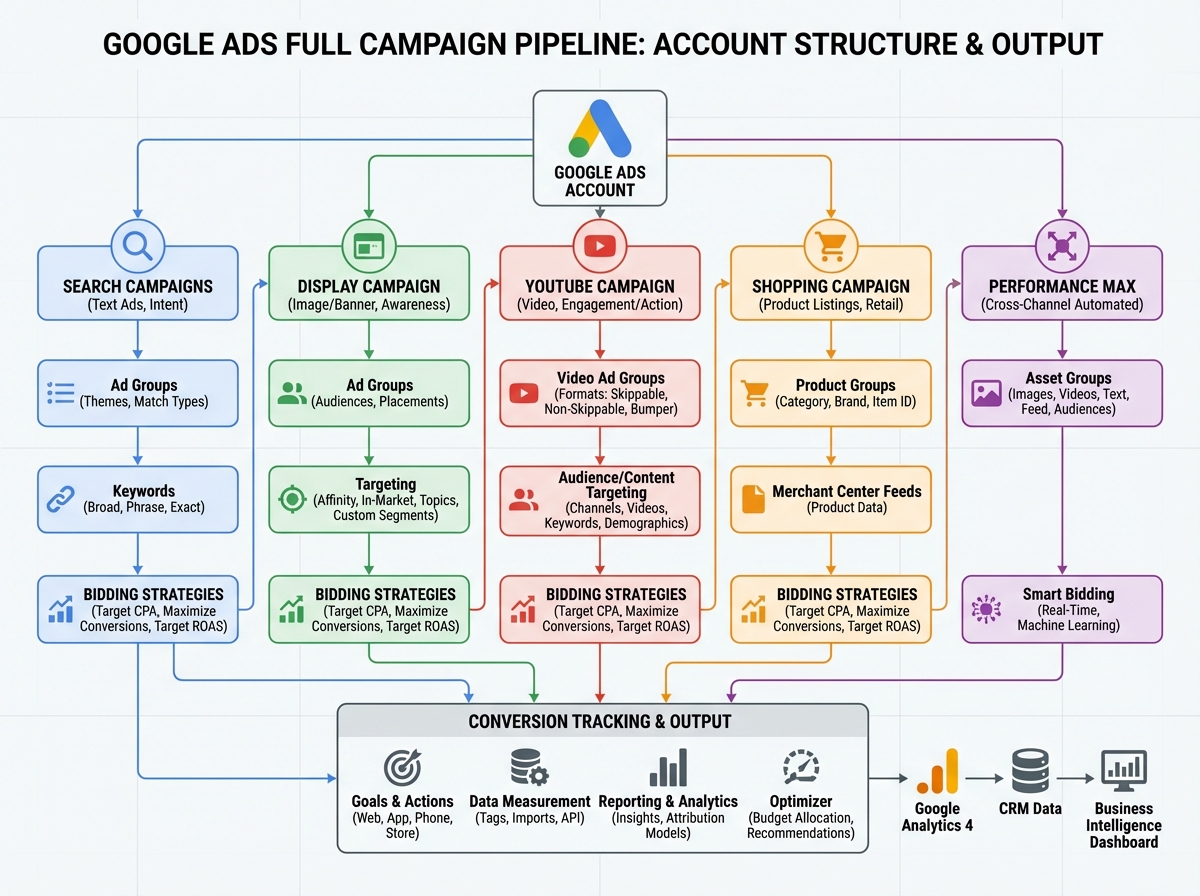
- Google Ads works across Search, Display, YouTube, Shopping, and Performance Max — each channel needs a different targeting and bidding approach
- The biggest waste of budget comes from mismatched intent: showing the wrong ad type to the wrong audience at the wrong stage of the funnel
- Conversion tracking must be set up before you spend a single dollar on automated bidding — without it, the algorithm is flying blind
What Google Ads Actually Is (And What It Isn’t)
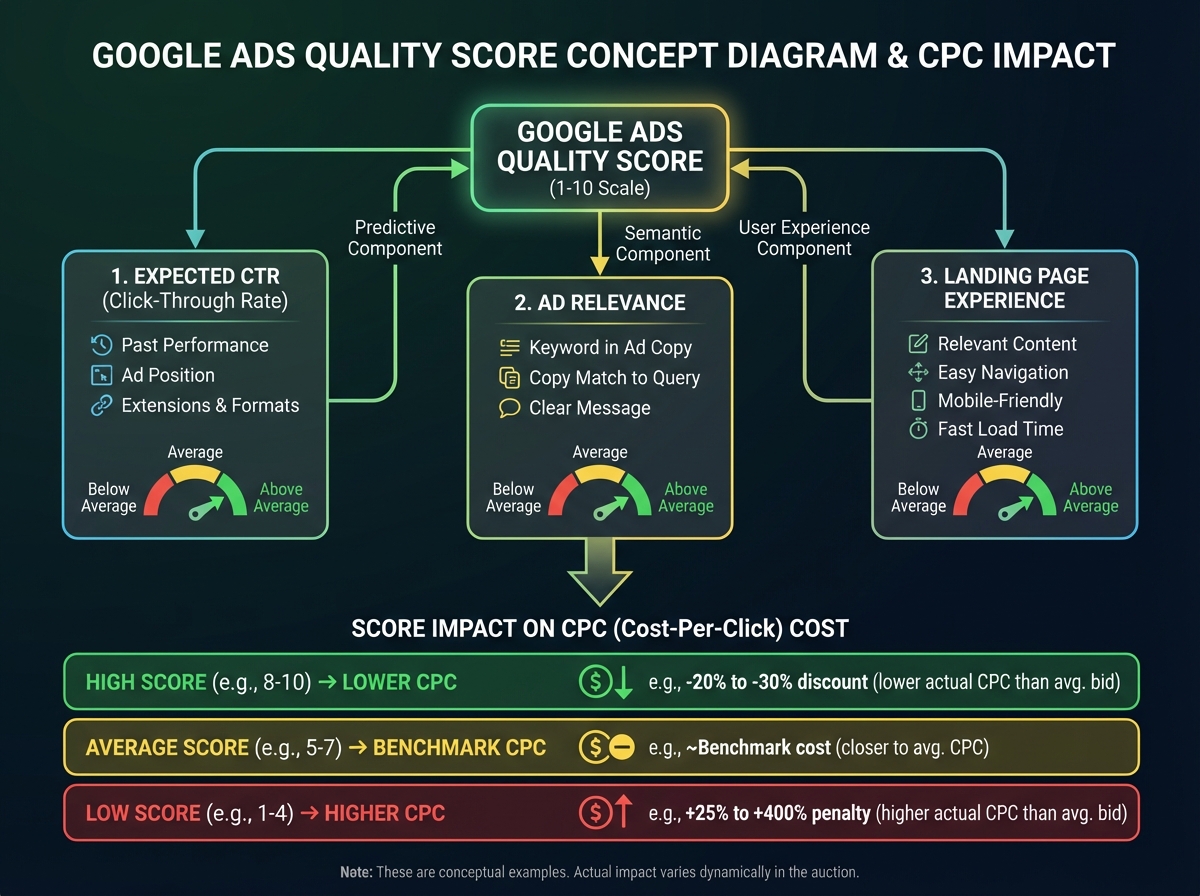
Google Ads is not a magic traffic machine. It’s an auction — one where relevance matters as much as money. Every time someone searches a query, Google runs a real-time auction among advertisers competing for that placement. Your Ad Rank determines where you show up, and Ad Rank is calculated from your bid, your Quality Score, and the expected impact of your ad extensions. You can bid lower than a competitor and still win the top position if your ad is more relevant.
Quality Score is built from three components: expected click-through rate, ad relevance, and landing page experience. A score of 7 or above on a keyword means you’re paying less per click than someone with a score of 4 bidding the same amount. That gap compounds over thousands of clicks.
For the entrepreneurs and young digital marketers entering this space: the platform is not intuitive by design. It is functional by design. Everything is there for a reason — but the reason isn’t always explained to you.
Sharp Observations Before You Start
- Broad match keywords without a negative keyword list will quietly drain your budget in 48 hours.
- A campaign with no conversion tracking is just a donation to Google.
- Performance Max campaigns are powerful only after you’ve fed the algorithm real conversion data.
How Long It Takes to Actually Get Good
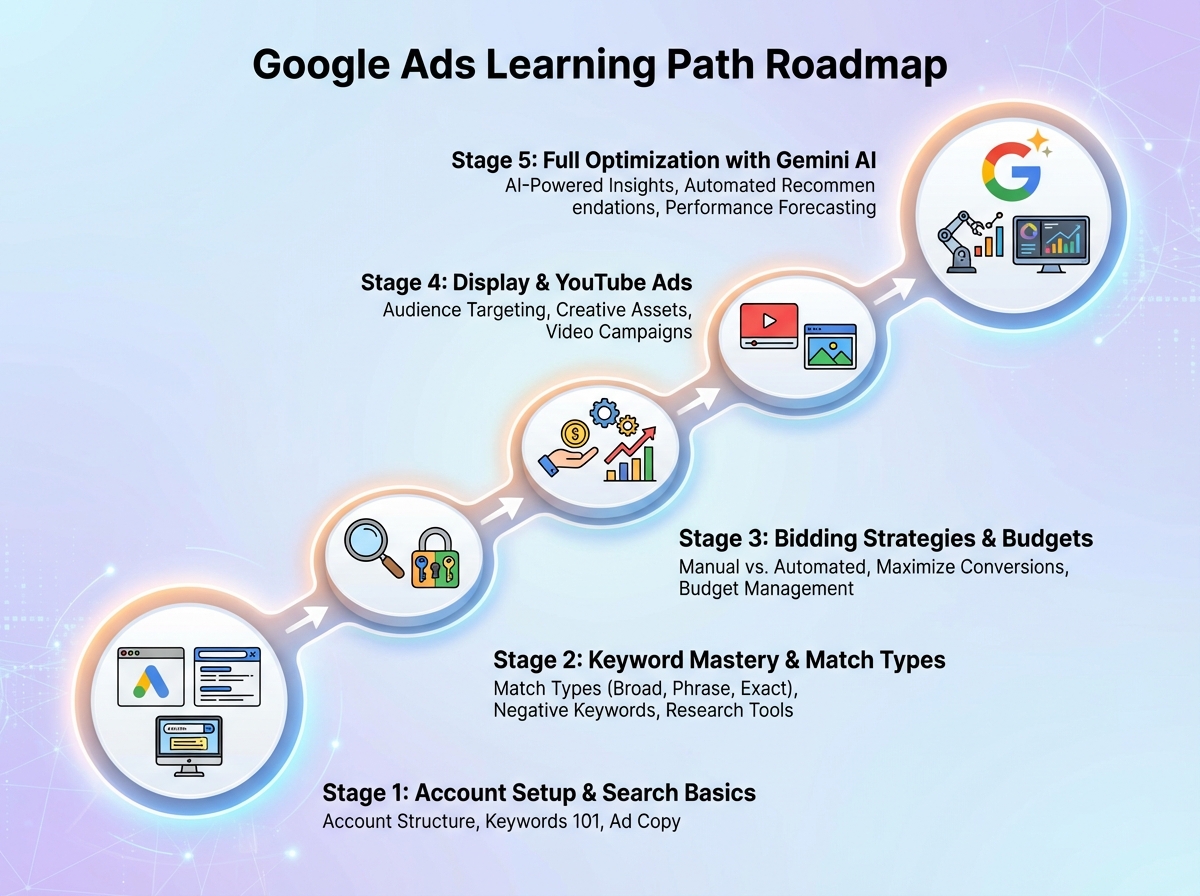
| Stage | Content | Time |
|---|---|---|
| Foundation | Account structure, auction logic, Quality Score, first Search campaign | Week 1–2 |
| Keywords & Ads | Match types, negative keywords, RSAs, ad extensions | Week 2–3 |
| Bidding Strategies | Manual CPC → Maximize Clicks → Target CPA → Target ROAS progression | Week 3–4 |
| Advanced Targeting | Display, Remarketing, YouTube, Shopping, Performance Max | Week 4–7 |
| Full Optimization | Conversion tracking, scripts, experiments, Gemini AI, Editor | Week 7–10 |
| Total | End-to-end campaign management with optimization | 8–10 weeks |
The order you learn these in matters more than how fast you get through them — skipping conversion tracking to jump to Performance Max is the most common reason campaigns fail quietly.
If you’re moving slower than this timeline, that’s completely normal. The platform changes frequently, and understanding why something works always takes longer than learning where the button is.
The Search Campaign Is Where the Logic Lives
Every experienced Google Ads practitioner will tell you the same thing: start with Search, even if you eventually run every other campaign type. Search is where user intent is most explicit. Someone typing “best CRM software for small business” is telling you exactly what they want. Your job is to be there with the right message at the right moment.
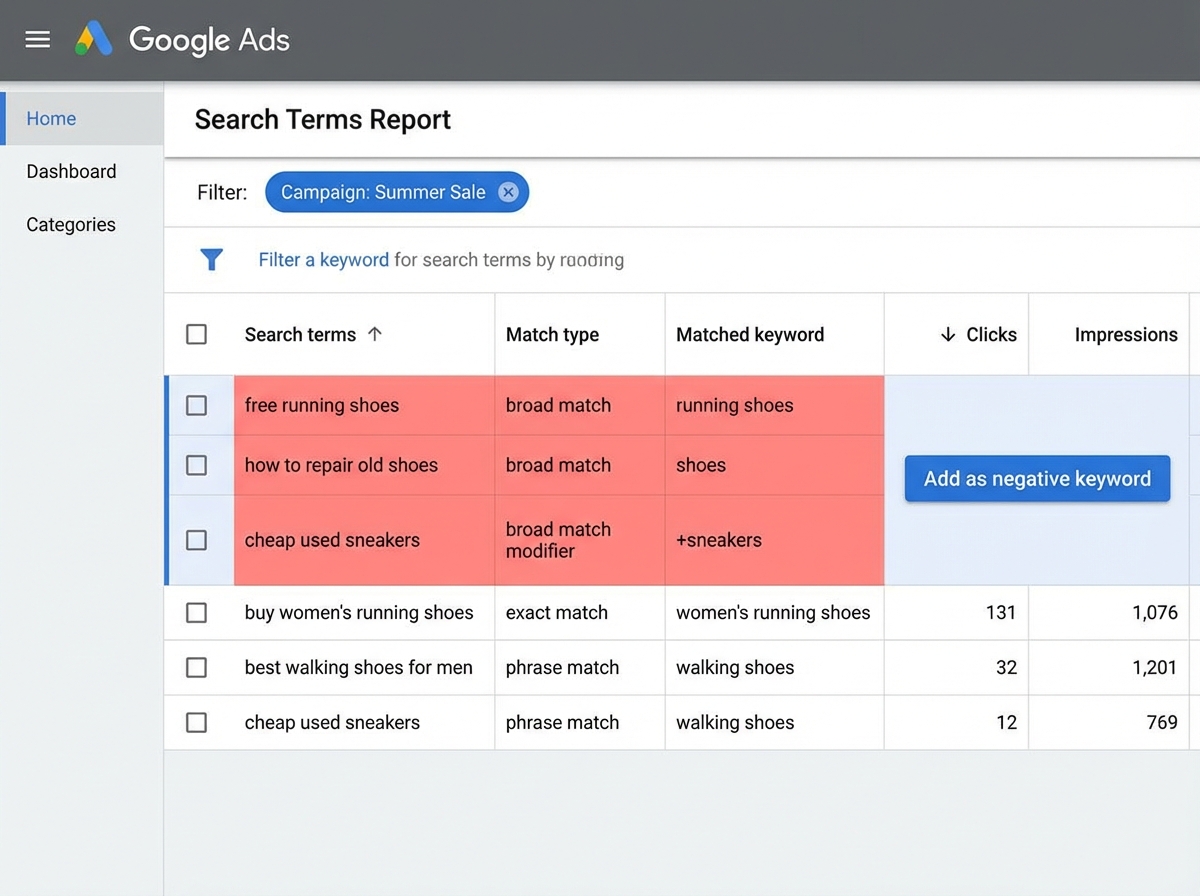
Setting up your first Search campaign feels straightforward until you hit keyword match types. Most beginners add broad match keywords, watch their impressions spike, and assume the campaign is working. Then they check the Search Terms report two weeks later and find their ads have been showing for completely irrelevant queries. The budget is gone. The clicks meant nothing. This is the mistake almost everyone makes when starting Google Ads — treating keyword selection as a one-time task rather than an ongoing filtration system.
Negative keywords are not optional. They are the filter that keeps your campaign surgically focused. Build a negative keyword list before your first campaign goes live, and add to it weekly using the Search Terms report. Keywords you block are just as valuable as keywords you bid on.
The Keyword Planner tool gives you search volume, competition, and bid estimates — but its real value is revealing how people phrase their intent. Different phrasings signal different stages of the buying journey, and understanding that changes which landing page you send traffic to.
Responsive Search Ads, Extensions, and the Real Job of an Ad
A Responsive Search Ad is not a creative exercise — it’s a relevance optimization exercise. You write up to 15 headlines and 4 descriptions, and Google’s algorithm mixes and matches combinations to find what gets the highest engagement for each query. The temptation is to write clever headlines. The smarter approach is to write specific headlines that mirror the exact language your audience uses.
Ad extensions are where most beginners leave performance on the table. Sitelink extensions, callout extensions, structured snippets, call extensions, lead form extensions — each one increases your ad’s real estate on the results page and provides additional signals to Google about your offer’s relevance. An ad with six extensions doesn’t just look more authoritative; it mathematically has more opportunities to match what someone is looking for. Set them all up. Google will show the combination that performs best.
Dynamic Search Ads deserve a mention here, especially for businesses with large websites. Instead of bidding on specific keywords, you let Google crawl your site and automatically generate ads for relevant searches. It’s powerful for capturing long-tail traffic you haven’t thought to target — but it needs guardrails. Without tight negative keyword management and page feed exclusions, DSAs will find their way to pages you don’t want advertised.
Bidding Strategies: The Progression That Most People Skip
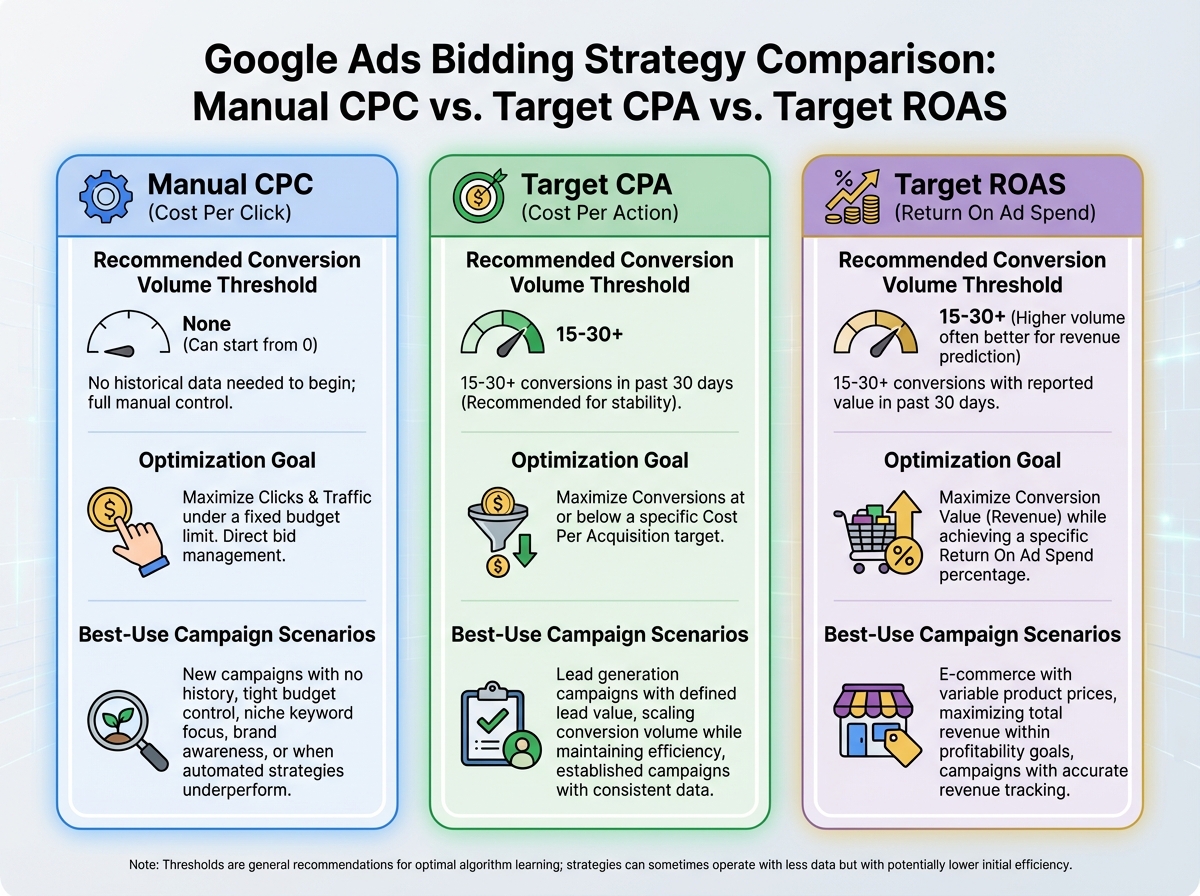
Here’s how the bidding journey actually goes for most people running Google Ads campaigns: they start with Manual CPC because it feels safe and controllable. Then they get overwhelmed managing individual bid adjustments across hundreds of keywords. Then they switch to Maximize Clicks because it’s easy. Then they realize Maximize Clicks doesn’t care about conversions — only traffic. Then they try Target CPA without enough conversion data and watch CPCs inflate. Then they wonder why nothing is working.
The correct progression is sequential for a reason. Manual CPC first — not because it’s optimal, but because it forces you to understand what a reasonable bid looks like for your industry. Once you have 30–50 conversions per month, Target CPA becomes viable because the algorithm has enough signal to work with. Target ROAS requires even more data — ideally 50+ conversions per month with reliable revenue values attached.
Enhanced CPC sits in an interesting middle ground: it applies a multiplier to your manual bids in real time based on conversion likelihood. It’s a useful transition between full manual control and fully automated bidding. CPM bidding applies to Display and YouTube — you pay per thousand impressions rather than per click, which makes sense for brand awareness but is a waste for direct response.
Display, Remarketing, and Following the Right People
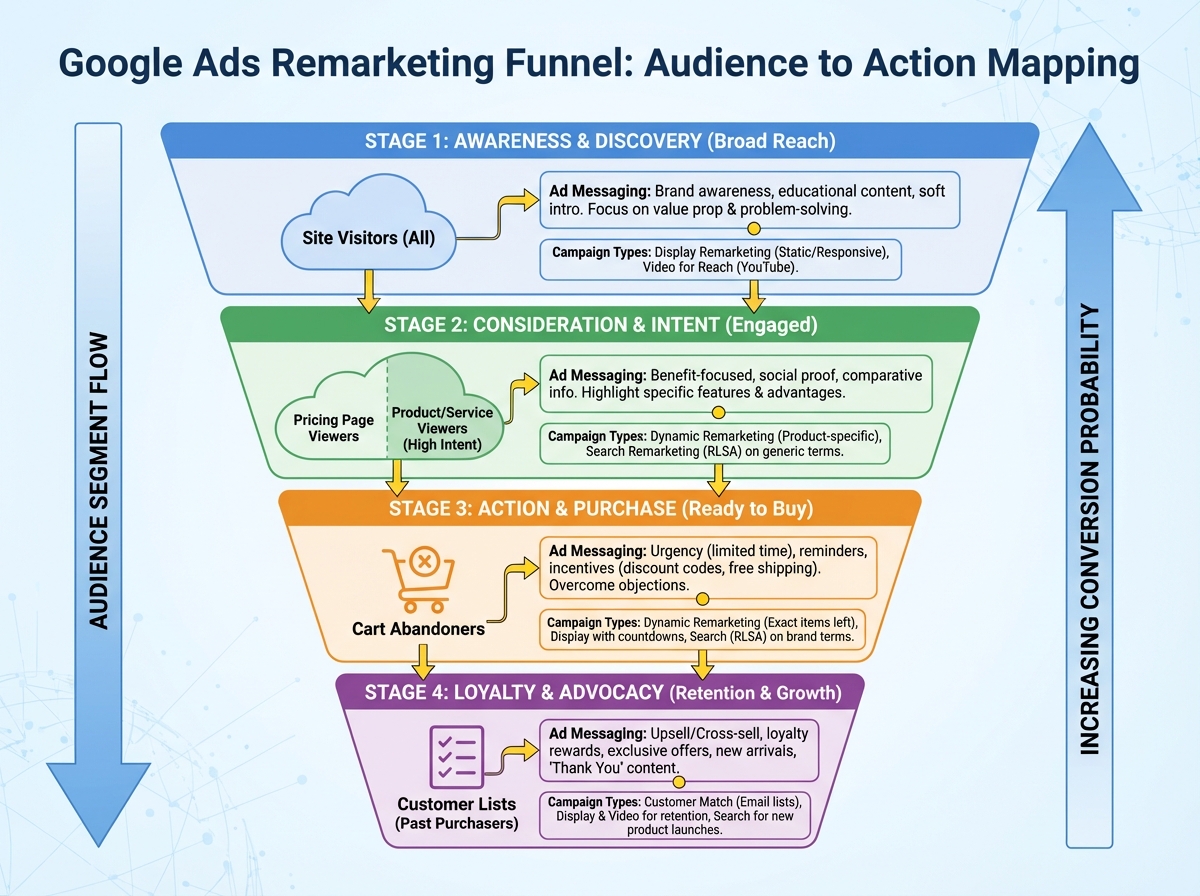
Display campaigns exist on a completely different logic from Search. There is no explicit intent signal. You’re interrupting someone who is reading an article or watching a video — so the targeting has to compensate for what the absence of a search query removes. Audience targeting on Display is layered: affinity audiences for top-of-funnel reach, in-market audiences for people actively researching a purchase, custom audiences built from your own keyword and URL inputs, and combined audiences that layer conditions on top of each other.
Remarketing is where Display becomes genuinely powerful. Once someone has visited your website, added a product to a cart, or watched 50% of a YouTube video, you can follow them with specific messages tailored to where they dropped off. A person who viewed your pricing page but didn’t convert needs a different ad than someone who never made it past your homepage. Audience Manager is where you build these segments — and the more granular you get with your conditions, the more relevant your remarketing becomes.
Customer list remarketing is underused. Uploading your existing email list to Google and creating a campaign specifically for those people — with messaging that acknowledges the relationship — consistently outperforms cold traffic campaigns. The audience already knows you. The friction is lower.
YouTube and Video Campaign Types You Need to Know
YouTube is the second-largest search engine in the world. Running video campaigns inside Google Ads means you’re reaching people mid-search, mid-discovery, and mid-entertainment — and each format matches a different moment. In-stream skippable ads run before or during videos and allow you to tell a story before someone skips at 5 seconds. The first 5 seconds are not optional — they’re the entire battle. If you don’t hook attention in that window, the impression cost you nothing, but it also did nothing.
Bumper ads are 6-second non-skippable ads. They don’t sell — they reinforce. Use them for brand recall after someone has already seen a longer ad. Ad Sequence campaigns let you script a multi-ad journey: someone sees your awareness ad first, then your consideration ad, then your conversion ad — all in a deliberate order across multiple YouTube sessions. For businesses with longer sales cycles, this format maps onto how people actually make decisions.
Shorts Ads are increasingly important as YouTube Shorts grows. In-Feed ads appear in YouTube search results and on the homepage — they’re closer in intent to Search campaigns than most video formats, because people are actively looking for content. Target Frequency campaigns are the underappreciated one: instead of optimizing for clicks or conversions, you set a target number of times you want a single user to see your ad per week, which is the correct metric for building genuine brand recognition.
Shopping Ads and the Merchant Center Setup Nobody Warns You About
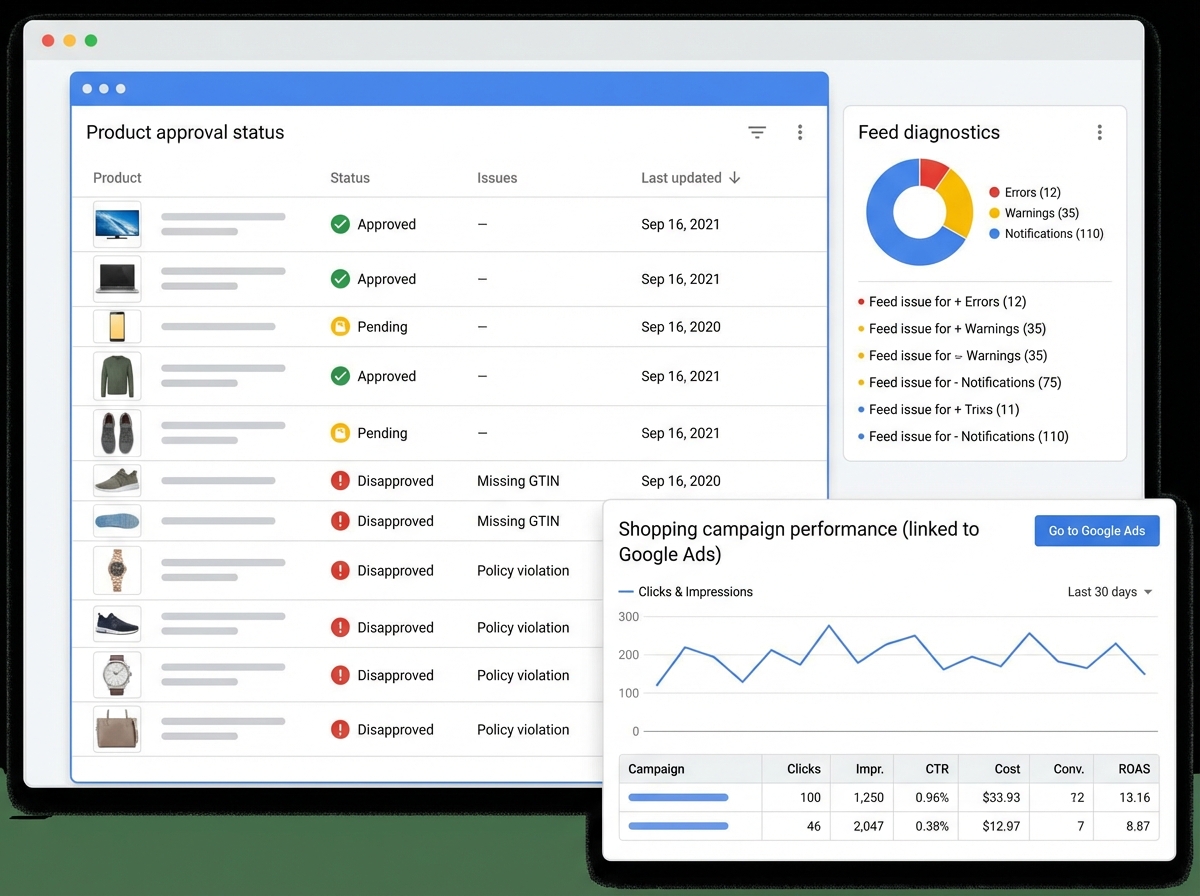
Shopping campaigns don’t use keywords the way Search campaigns do. Google reads your product feed from Google Merchant Center and matches products to relevant searches automatically. This means the quality of your product titles, descriptions, and images in the feed determines your Shopping campaign performance more than anything you do inside Google Ads itself.
Merchant Center setup is where most e-commerce beginners lose a week. Product disapprovals, feed errors, mismatched landing page prices, missing GTIN codes — the list of rejection reasons is long and the error messages are sometimes cryptic. Spend time getting the feed right before you create the Shopping campaign. A campaign running on a clean, well-structured feed will outperform one running on a messy feed at twice the budget.
Performance Max replaced Smart Shopping campaigns and now represents Google’s most automated campaign type. It runs across Search, Display, YouTube, Gmail, and Maps simultaneously, using your asset groups — headlines, descriptions, images, videos — as raw material for the algorithm to build combinations from. It requires the least manual setup and the most patient optimization window. Without strong conversion signals feeding it, it will spend broadly and inefficiently for the first 4–6 weeks while it learns.
Conversion Tracking, Scripts, and the Tools That Separate Professionals
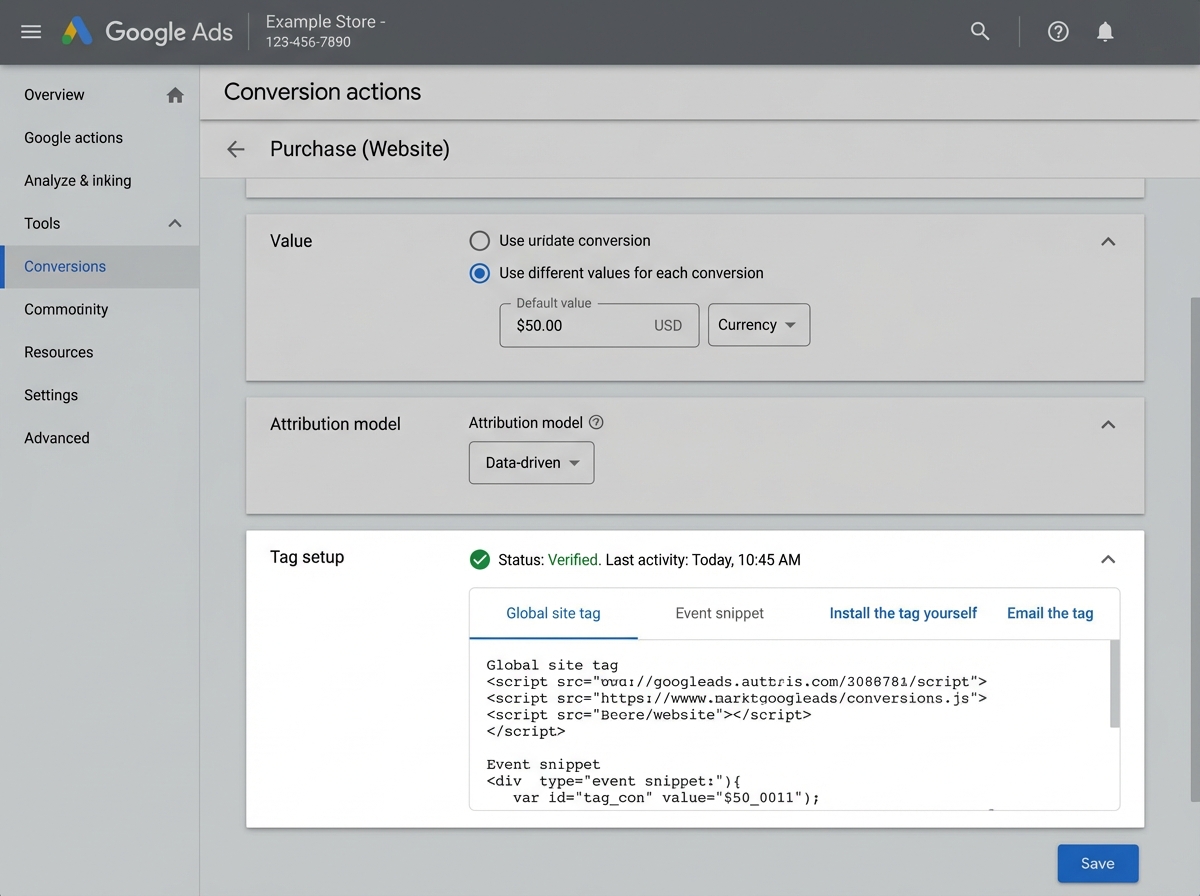
Conversion tracking is not a technical afterthought. It is the foundation that every automated bidding strategy, every Performance Max campaign, and every optimization decision is built on. Setting it up means telling Google what a successful outcome looks like — a form submission, a purchase, a phone call, a page visit — and assigning a value to it. Without that signal, you are running campaigns with no feedback loop.
Value Rules are a feature that most practitioners discover too late. They let you adjust the reported value of conversions based on conditions — device, location, audience membership. If mobile users convert at 70% of the desktop rate for your business, you can tell Google’s algorithm to value those conversions accordingly, which shifts bidding behavior to reflect your actual business economics rather than raw conversion counts.
Scripts inside Bulk Actions are where Google Ads starts to feel like a platform for people who take it seriously. Scripts are JavaScript functions that automate routine tasks — pausing underperforming keywords, adjusting bids based on weather, sending email alerts when a campaign exceeds a budget threshold. You don’t need to write them from scratch. Google’s script library and the community are extensive. But knowing they exist — and knowing what triggers to automate — separates someone managing five campaigns manually from someone managing fifty campaigns efficiently.
The Google Ads Editor deserves its own mention. Making bulk changes inside the browser interface is painfully slow. The Editor lets you download your entire account, make changes offline in a spreadsheet-like environment, and upload them in a batch. For anyone managing multiple accounts or large campaigns, it’s not optional.
Gemini AI, Asset Studio, and Where the Platform Is Heading
Google Gemini AI integration inside Google Ads is not a gimmick — it changes how campaign creation works at the asset level. Instead of writing every headline variant manually, you describe your business and your offer, and Gemini generates headline and description suggestions calibrated to your landing page content. The output isn’t always publish-ready, but it compresses the drafting phase significantly.
Asset Studio consolidates image creation, product image generation, video creation from static images, and voice-over addition into one workspace inside Google Ads. For small business owners and entrepreneurs who don’t have a dedicated creative team, this closes the gap between having a budget and having the assets to spend it effectively. Creating a video from a set of product images, adding a voice-over, and deploying it to YouTube in the same session used to require three different tools and a freelancer.
Drafts and Experiments is the feature that professional PPC managers rely on for testing. Instead of making a change directly to a live campaign and hoping it improves performance, you create a draft version of the campaign with the change applied, run it in parallel with the original, and let the data tell you which version wins before committing. It removes opinion from optimization.
Looking back, the thing that made the biggest difference wasn’t learning more features — it was slowing down long enough to understand why the platform works the way it does. The auction logic, the Quality Score mechanics, the conversion data dependency of automated bidding — those three principles explain 80% of what happens in any Google Ads account, good or bad.
Here’s what to do immediately:
- Set up conversion tracking before spending a cent — every automated bidding strategy requires this signal; without it, you’re optimizing for clicks, not outcomes.
- Build your negative keyword list on day one — add to it weekly from the Search Terms report; it is the single highest-ROI maintenance task in the platform.
- Run Manual CPC first on every new Search campaign — not because it scales, but because it teaches you what realistic bids look like before handing control to automation.
- Write 10+ headlines for every Responsive Search Ad — give the algorithm real variation to test; seven headlines of the same idea produce nothing useful.
- Set up all available ad extensions before launching — sitelinks, callouts, structured snippets, and call extensions cost nothing to add and directly expand your ad’s presence.
- Use the Search Terms report as your weekly optimization ritual — it shows you exactly what queries triggered your ads and where your budget actually went.
- Don’t activate Target CPA until you have 30+ conversions per month — below that threshold, the algorithm doesn’t have enough data and will make expensive guesses.
- Learn Google Ads Editor before you scale past three campaigns — bulk edits, offline drafts, and multi-account management through the browser interface is a trap that wastes hours per week.
Leave a Reply