


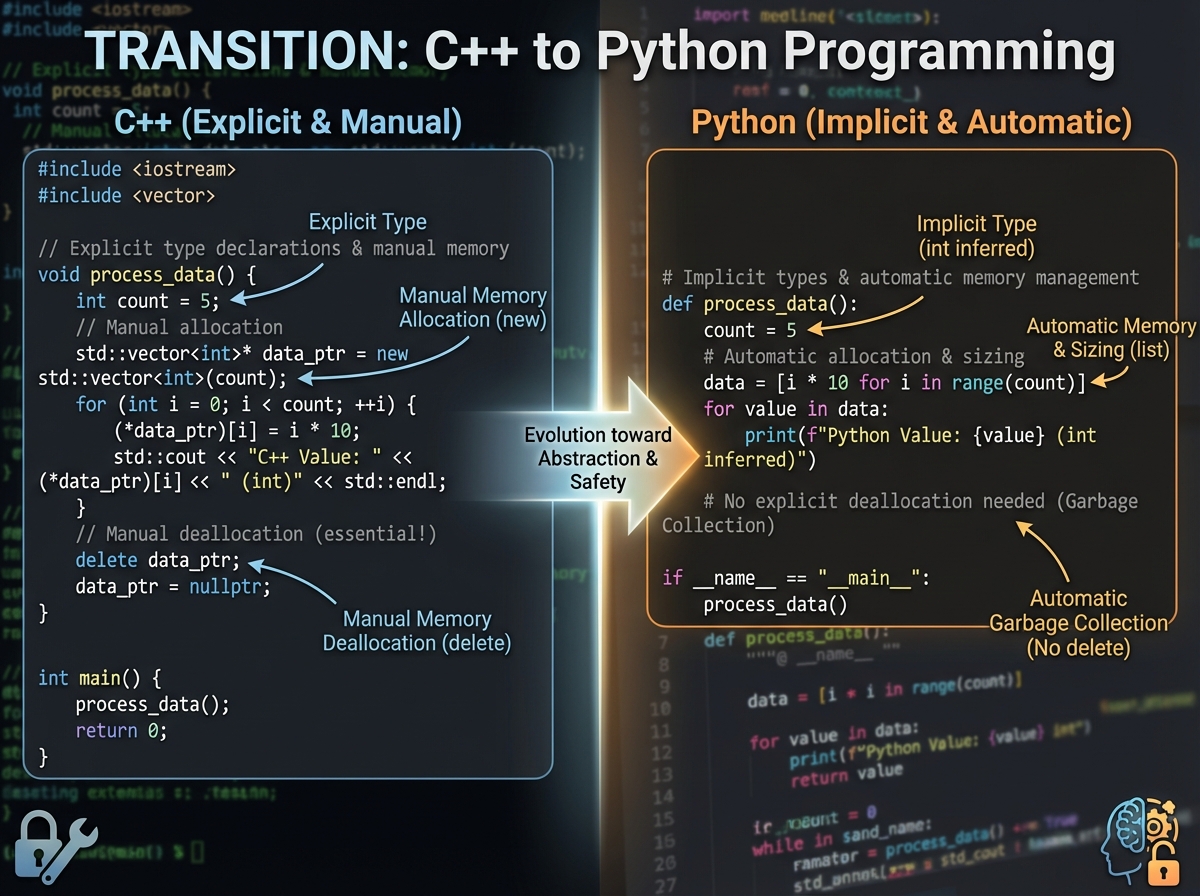
The first time you open a Python file after years of C++, something feels wrong. Not wrong like broken — wrong like you walked into your own house and someone moved all the furniture.
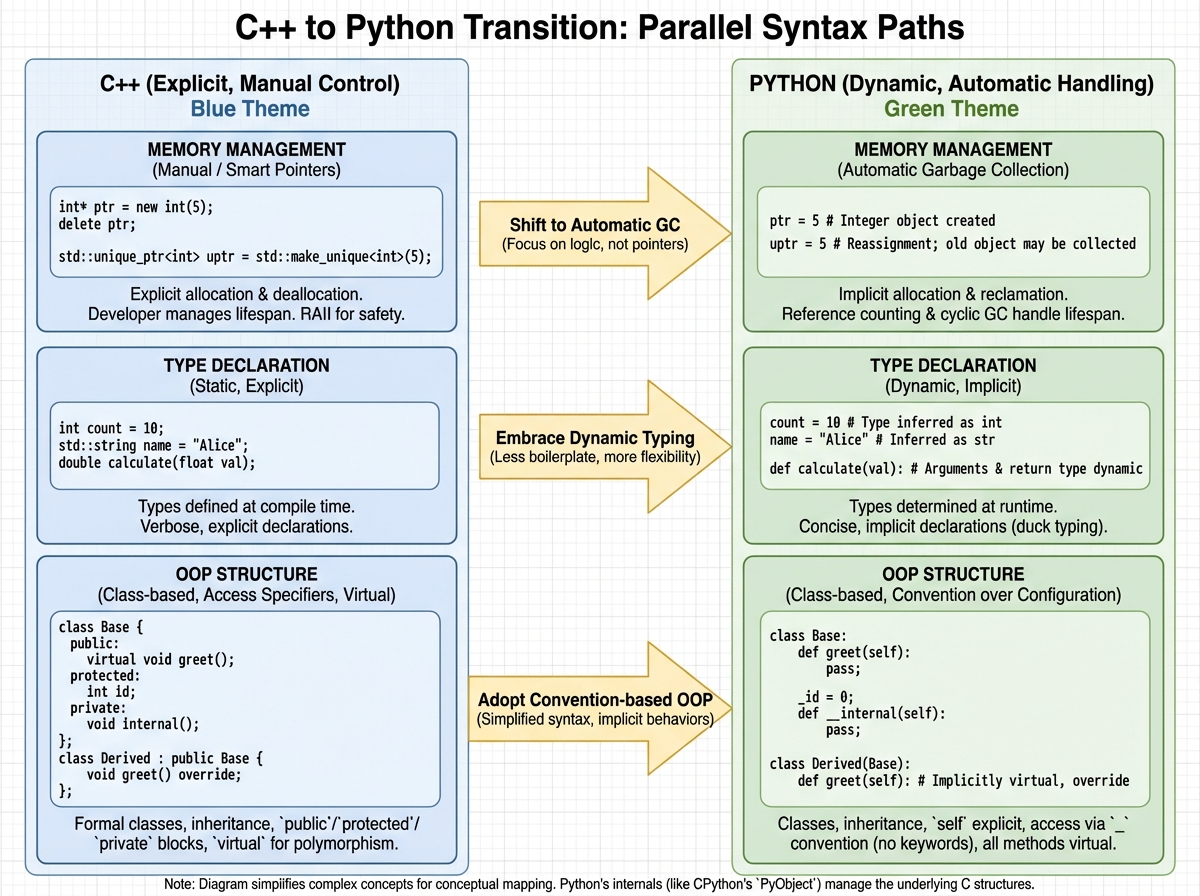
If you’re looking to learn Python after C/C++, the honest answer is: you’ll pick up the syntax in days, but unlearning your mental model will take weeks. That’s the part nobody talks about. Python isn’t just C++ with cleaner syntax — it’s a fundamentally different way of thinking about what code is supposed to do. The developers who transition fastest aren’t the ones who memorize new syntax. They’re the ones who figure out, early, which C++ instincts to trust and which ones to throw out.
- C/C++ developers already understand logic, OOP, and data flow — Python rewards that foundation directly
- The biggest friction isn’t learning Python; it’s resisting the urge to write C-style code in Python files
- Once you reach NumPy and Pandas, your systems-programming mindset becomes a genuine advantage
What “Learning Python After C++” Actually Means
Python is a high-level, dynamically typed, interpreted language. For a C++ developer, each of those words means something was taken away from you — and replaced with something you didn’t ask for. No type declarations. No header files. No manual memory management. No compile step. Variables just exist when you assign them. Memory cleans itself up. The interpreter runs your code line by line, not as a compiled binary.
For total beginners, that sounds like freedom. For you, it sounds like losing control — and that discomfort is completely valid.
| Feature | C / C++ | Python |
|---|---|---|
| Type system | Static, explicit | Dynamic, inferred |
| Memory management | Manual (pointers, heap) | Automatic (garbage collected) |
| Compilation | Required before execution | Interpreted at runtime |
| Syntax verbosity | High | Minimal |
| OOP model | Class-based, rigid access | Class-based, flexible access |
| Standard library | Lean, system-level | Extensive, batteries included |
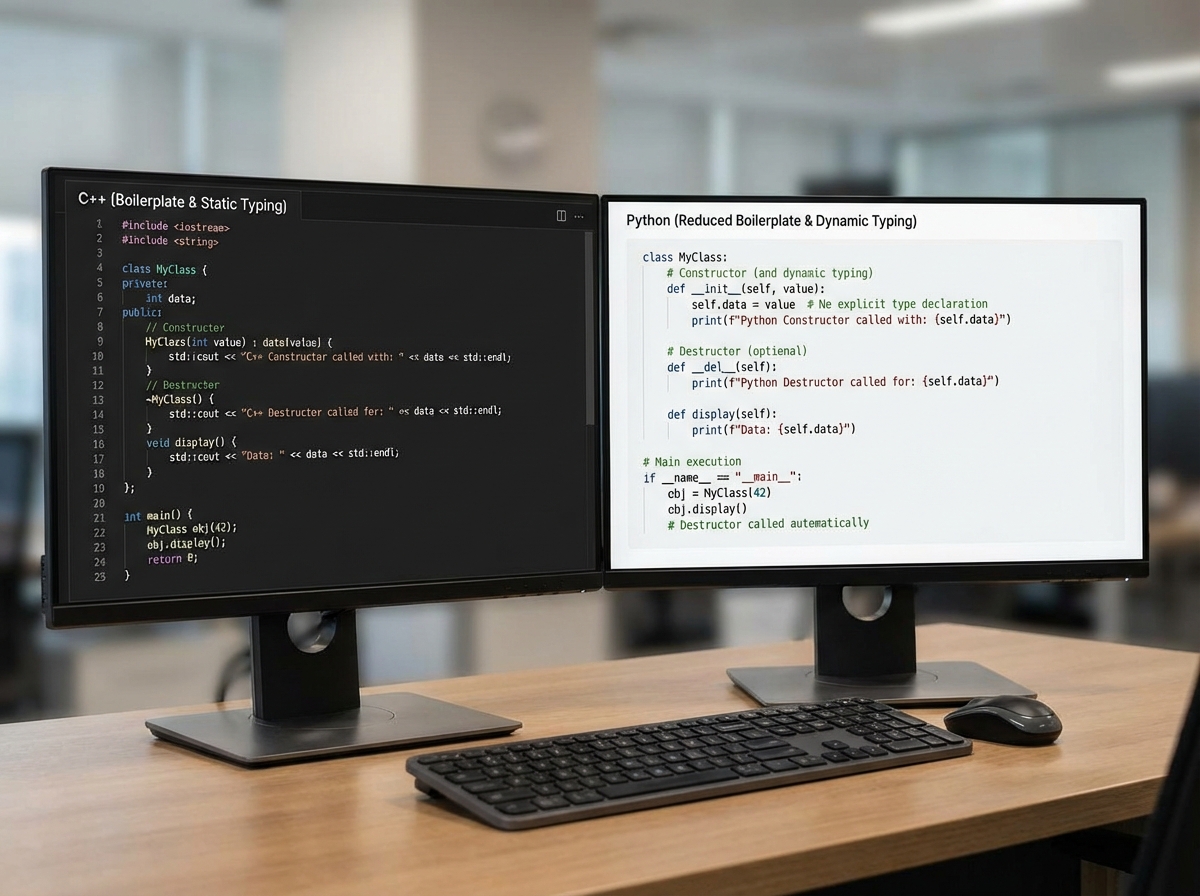
Keep this table in mind. Every friction point in your Python learning maps to one of these differences.
Three things that will surprise you immediately:
- Indentation isn’t style in Python — it’s syntax. A misplaced space breaks your program.
- Python’s
inthas no overflow. It grows to fit whatever number you throw at it. - There are no private members by default. The
__prefix is a convention, not enforcement.
How Long the Transition Actually Takes
| Stage | Content | Time |
|---|---|---|
| Syntax orientation | Variables, data types, I/O, comments | 1–2 days |
| Control flow retraining | Loops, conditionals, Pythonic iteration | 3–5 days |
| Functions and scope | Arguments, defaults, return patterns | 3–4 days |
| OOP in Python | Classes, inheritance, self, super |
5–7 days |
| Libraries and modules | Standard lib, pip, custom modules | 3–5 days |
| File handling and exceptions | File modes, try/except, robustness | 2–3 days |
| Data analysis basics | NumPy arrays, Pandas DataFrames | 5–10 days |
| Total estimate | Full transition to productive Python | 3–5 weeks |
The order here matters more than the speed. Jumping to Pandas before you’re comfortable with how Python handles objects will create confusion that takes twice as long to untangle. If you’re slower than this table suggests, it almost always means one thing: you’re still mentally compiling your Python before you run it. That habit fades — let it.
The Setup Stage Feels Familiar, Then Doesn’t
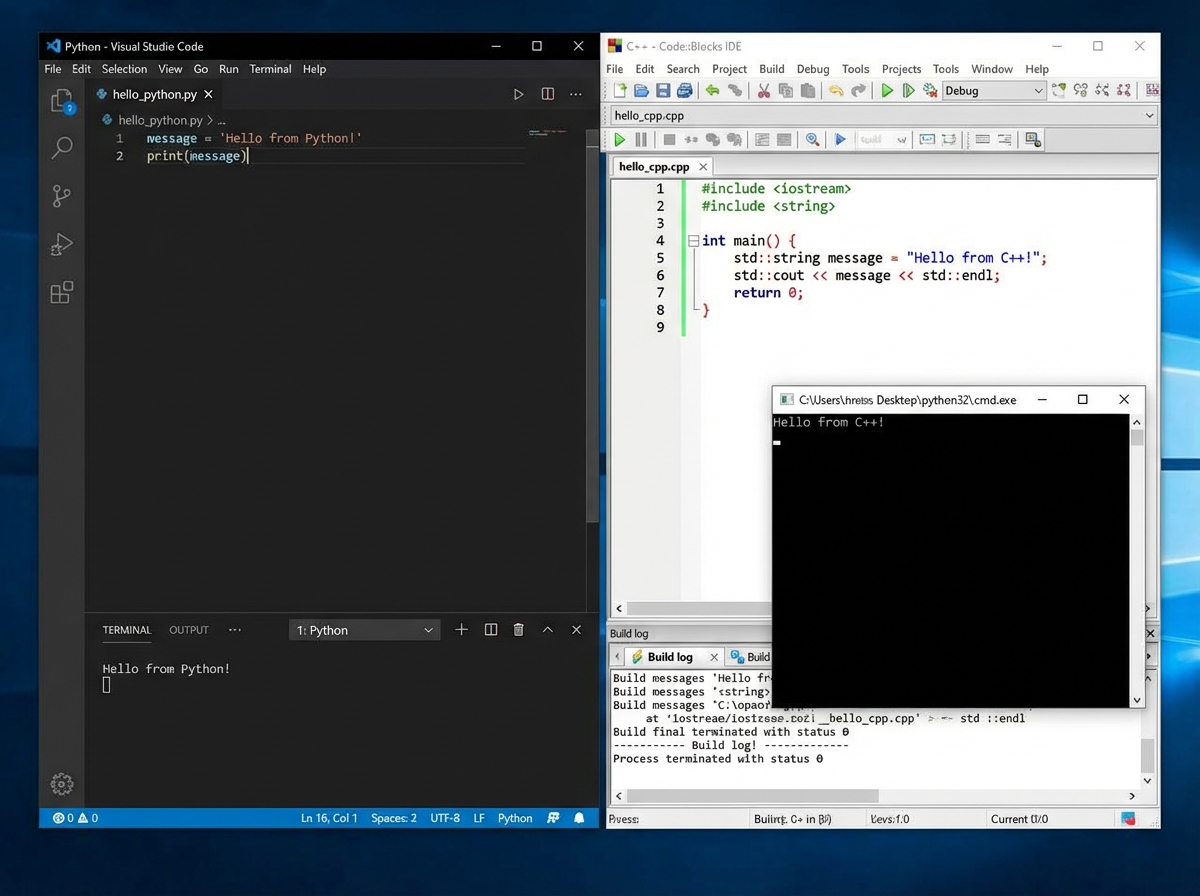
Installing Python and running a Hello World takes ten minutes. You’ve done environment setups before. You know what a PATH variable is. This part goes smoothly, and it gives you false confidence that the whole transition will feel this comfortable.
Then you try to declare a variable and your hands type int x = 5; out of muscle memory. Python doesn’t complain — it just ignores the type annotation you were about to write. You stare at x = 5 and something feels incomplete. That feeling is the whole first stage of this transition: adjusting to code that doesn’t need you to say what type something is, because Python figures it out when the line runs.
Input and output are where the first real friction appears. scanf and printf gave you explicit control over formatting and type. Python’s input() returns a string. Always. Every time. You will, at least once, try to do math on something the user typed and get a TypeError because you forgot to wrap it in int(). That bug is a rite of passage. It teaches you something C’s type system did silently for years: type handling doesn’t disappear in Python, it just moves to where you read data in.
The honest shift at this stage isn’t learning new syntax. It’s accepting that Python is going to handle things you used to handle yourself — and trusting that it does so correctly.
Where Your C++ Instincts Actually Help
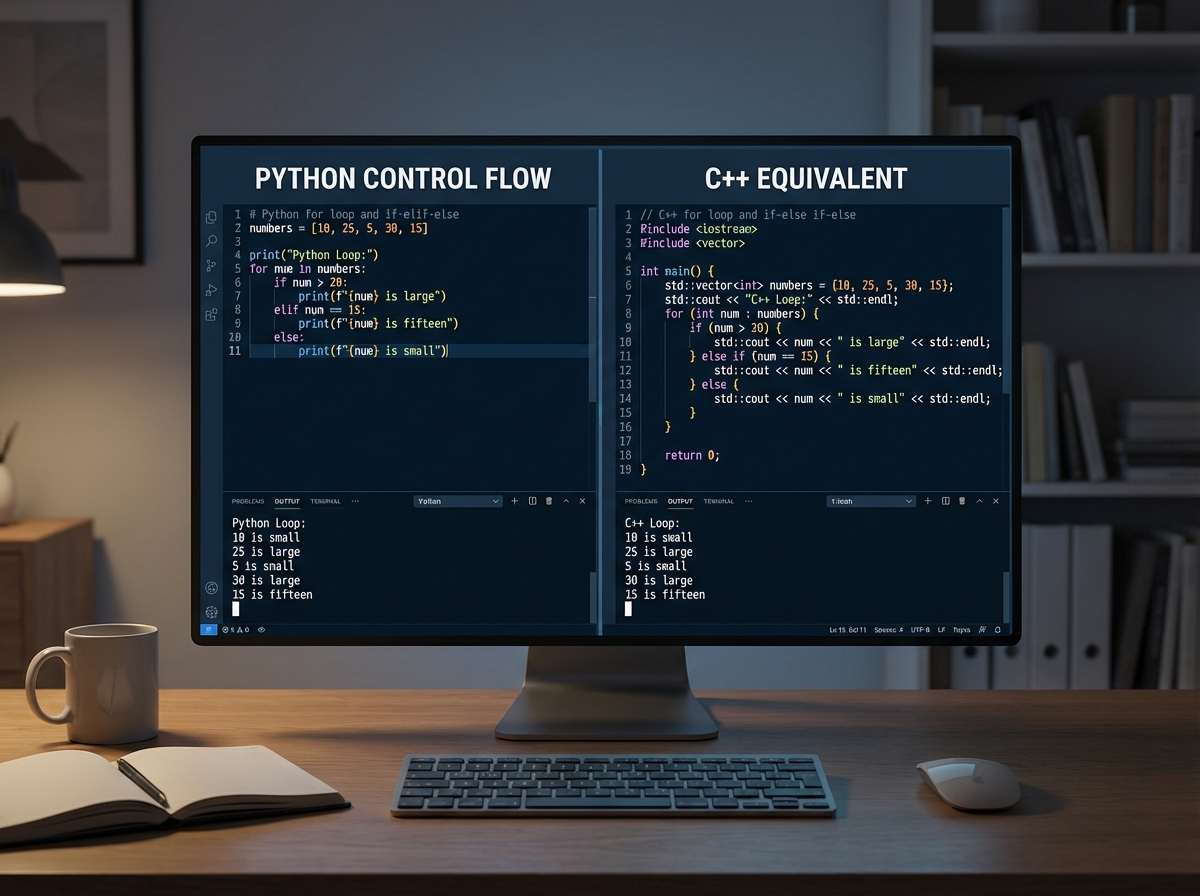
Control flow — loops, conditionals, logic — is where your C/C++ background pays its first real dividend. The concepts are identical. The syntax is shorter. A for loop in Python doesn’t need an index variable, an increment, or a comparison. for item in collection does what a C++ range-for does, but it works on nearly everything.
You’ll spend a day or two fighting the urge to write for (int i = 0; i < n; i++) style loops. Once you stop, Python loops start feeling like a relief rather than a loss of control. The while loop is nearly identical conceptually — the difference is Python has no do-while, which you’ll notice once and then never think about again.
Decision-making syntax is minimal but logical. if, elif, else — no curly braces, no parentheses required around the condition. The structure you already know maps directly. What changes is Python rewards you for writing conditions that read like English. if score > 90 and passed_exam: is valid, idiomatic Python. That kind of readability felt like a trade-off before; here, it’s the default.
Functions Are Where Python Starts Feeling Different
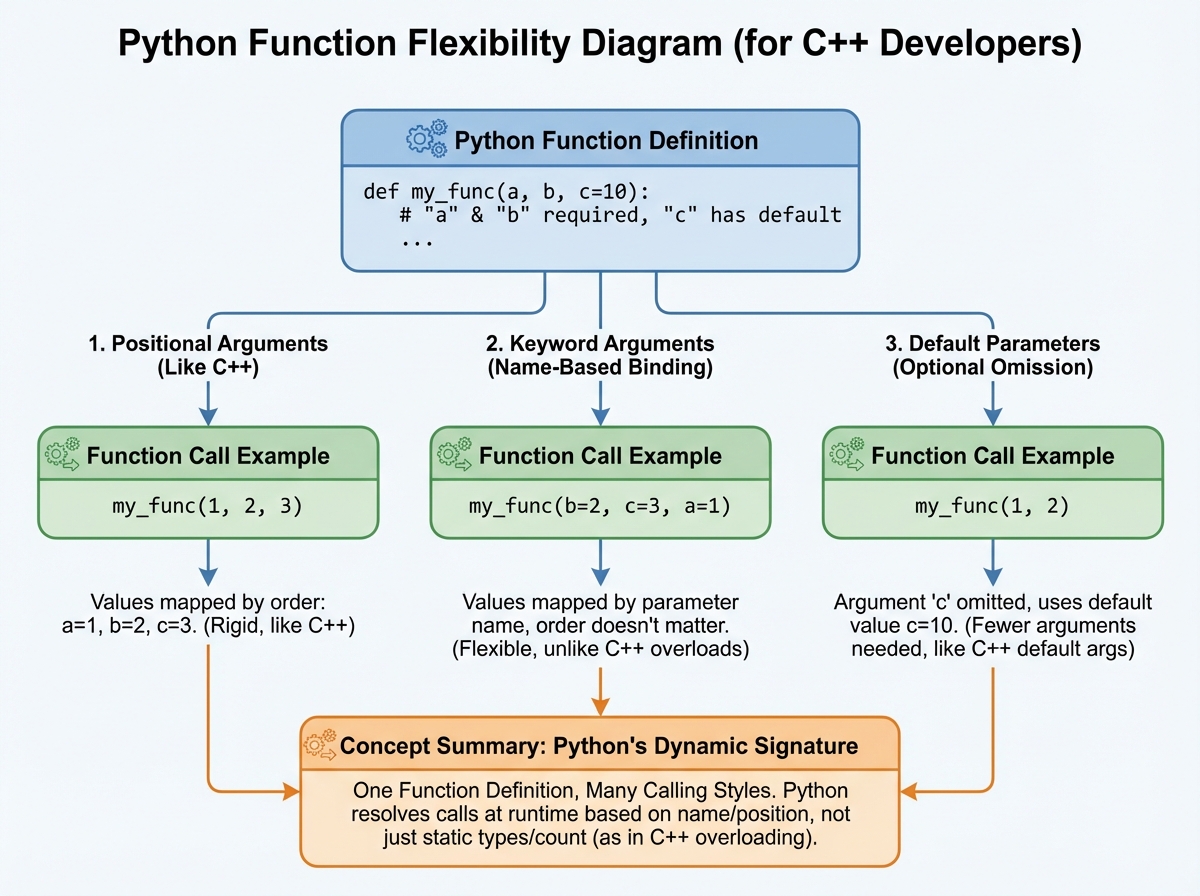
The single biggest mistake people make when learning Python after C++ is treating Python functions like C functions — writing one function per task, passing everything by value in your head, and ignoring the language features that make Python functions genuinely powerful.
Default parameters, keyword arguments, and the *args/**kwargs patterns are the first moments Python feels like it was designed by someone who got tired of writing boilerplate. In C++, giving a function a default parameter value is possible but limited. In Python, you can call the same function a dozen different ways with the same definition, and it stays readable each time.
The return keyword works the same, but Python lets you return multiple values as a tuple without any extra structure. The first time you write return x, y and unpack it as a, b = some_function(), it clicks: Python is treating your function’s output as data, not just a type contract. That shift — from thinking about function signatures to thinking about what data flows through — is the mental model change that defines the middle stage of this transition.
The pass keyword will confuse you once. It means “do nothing here” — a placeholder for a function or block you haven’t implemented yet. In C++ you’d leave an empty body {}. In Python, empty indented blocks are syntax errors, so pass exists specifically to satisfy the interpreter while you stub something out. Use it constantly while building.
OOP in Python Feels Familiar and Uncomfortable at the Same Time
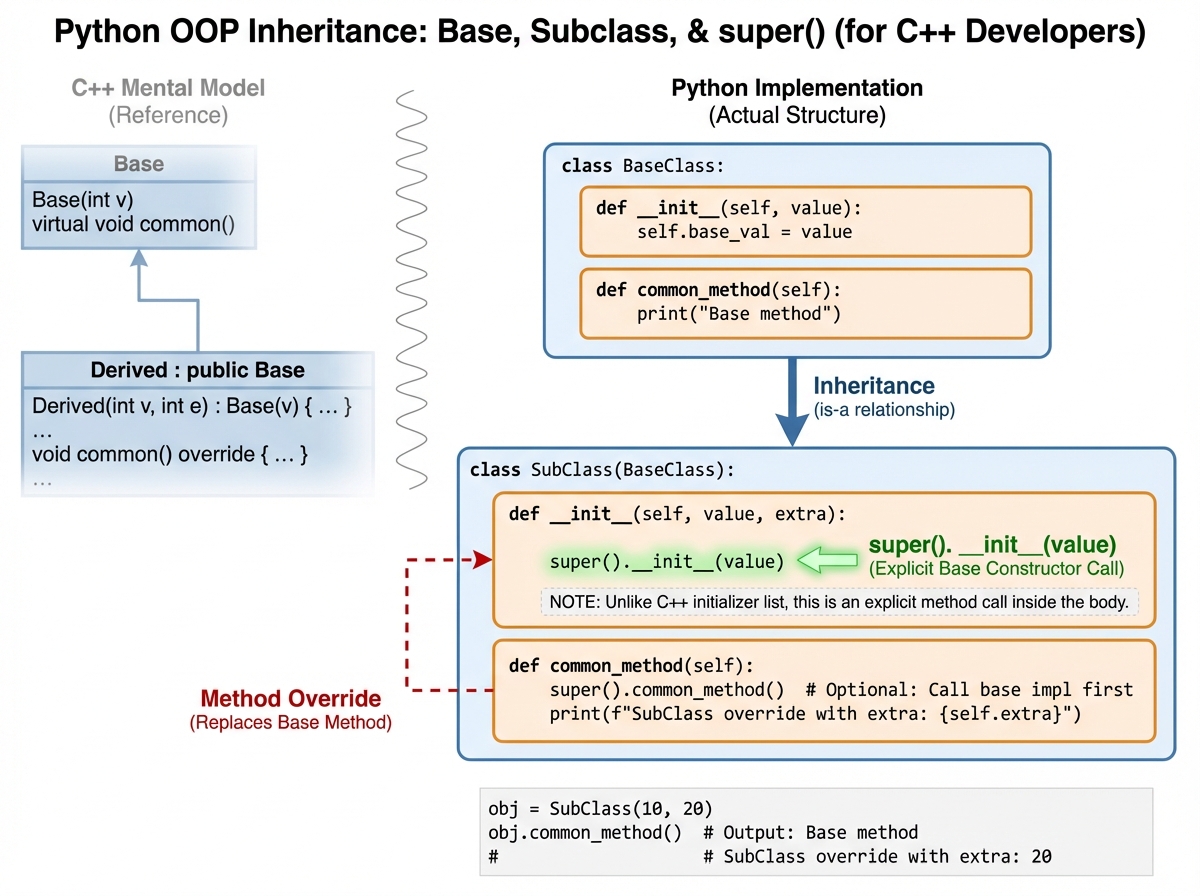
You know classes. You know inheritance. You know encapsulation. Python has all of that — but it enforces almost none of it. There are no public, private, or protected keywords with real compiler enforcement. The convention is a single underscore prefix for “please don’t touch this” and a double underscore for name mangling, which Python calls privacy. But nothing stops another developer from accessing it anyway.
For a C++ developer who relied on access specifiers as a correctness guarantee, this is unsettling. The Python community’s answer is that access control should come from design and documentation, not from the compiler. You can disagree with this philosophy — many C++ developers do — but the faster you stop fighting it, the faster you start writing clean Python OOP.
The self keyword is the other adjustment. In C++, member functions operate on the current object implicitly. In Python, self is an explicit first parameter on every instance method. It’s not optional, and forgetting it produces one of the most confusing errors a new Python developer encounters: a TypeError about the wrong number of arguments when you only passed one. That error catches everyone once.
The super() function in Python’s inheritance model is cleaner than C++’s explicit base class calls. super().__init__() reads clearly and works correctly across single and multiple inheritance. Python actually supports multiple inheritance with a well-defined method resolution order (MRO), which C++ developers sometimes discover mid-project and have strong opinions about.
The Library Ecosystem Is Where Python Earns Its Reputation
In C++, using an external library means locating headers, compiling with flags, managing dependencies, and hoping nothing breaks across platforms. In Python, it means typing pip install libraryname. That’s it. The difference in developer experience is so large it’s almost unfair.
Python’s standard library — the modules that ship with the interpreter — covers more ground than C’s standard library by a significant margin. File handling, regular expressions, date/time manipulation, HTTP requests, JSON parsing, CSV reading: these are all built in. You can write real, useful programs without installing a single external package.
Custom modules work the way you’d expect: a .py file is a module. Import it by name. This is where Python’s project structure becomes important — understanding how Python resolves import paths saves you from a category of error that trips up C++ developers who expect something more like header file mechanics.
Best practices for library management matter early. Virtual environments (venv) keep project dependencies isolated the way you’d want. Skipping this step and installing everything globally creates dependency conflicts that are annoying to untangle. Set up a virtual environment before you install your first package on a real project.
File Handling and Exceptions Make Error Management Explicit
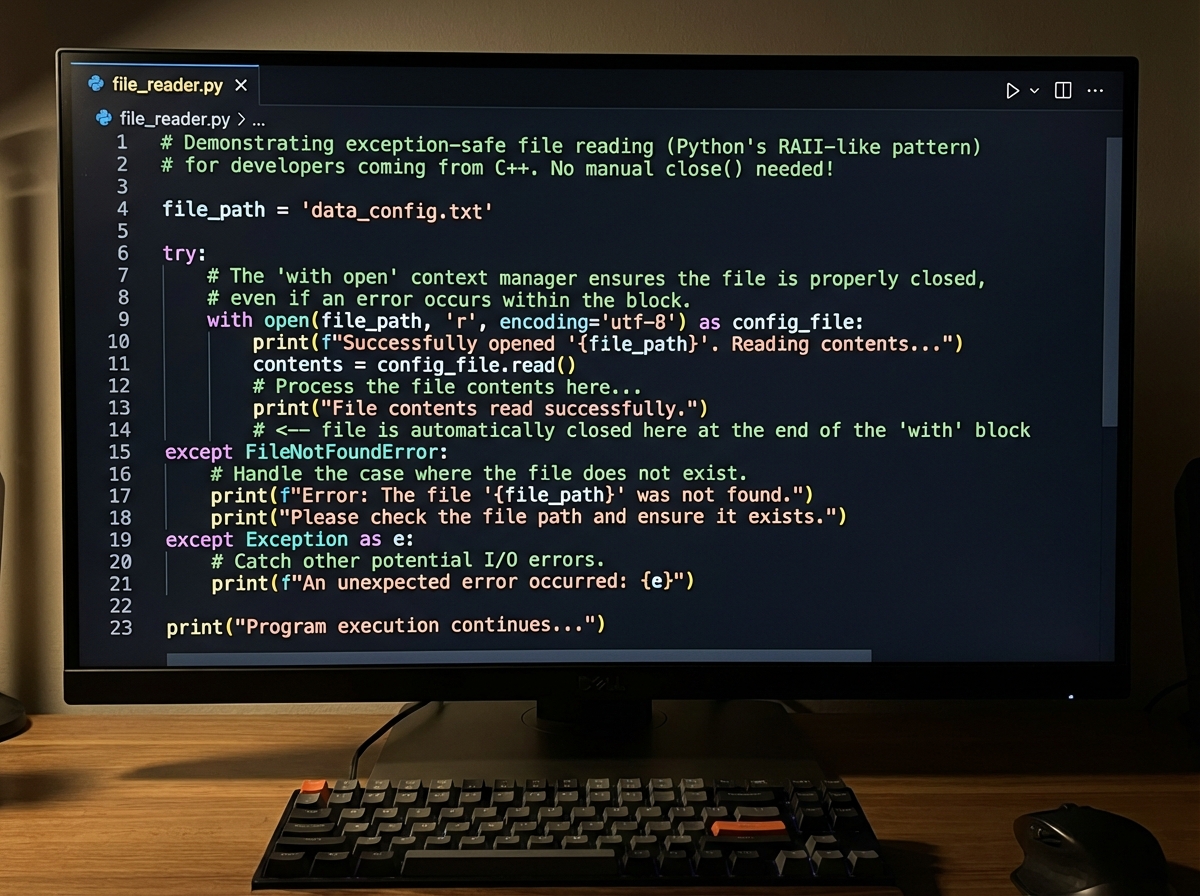
In C++, error handling is a design decision. You might use return codes, exceptions, or both. Consistency across a codebase requires discipline. Python makes exceptions the default and standard. Everything from a missing file to a division by zero raises an exception. The try/except block is not optional boilerplate — it’s how Python expects you to write robust code.
File handling in Python is genuinely cleaner than C-style fopen/fclose. The with open(filename, mode) as f: pattern handles the file close automatically, even if an exception occurs inside the block. It’s Python’s version of RAII — automatic resource management without writing a destructor.
File modes will feel familiar: 'r' for read, 'w' for write, 'a' for append. The append mode especially is worth learning properly — it doesn’t overwrite existing content, which makes it useful for logging and incremental data writing. The exception handling layer wraps around file operations cleanly: if the file doesn’t exist, you get a FileNotFoundError. Catch it specifically, not with a blanket except: that hides every other error.
NumPy and Pandas Are Where the Transition Pays Off
By the time you reach NumPy and Pandas, you’ve rebuilt your programming instincts enough to actually appreciate what these libraries do. NumPy arrays are contiguous memory blocks optimized for numerical operations — which is a description that makes immediate sense to a C++ developer. You already understand why avoiding Python loops over large data sets matters. NumPy does those operations in compiled C under the hood. You’re not trading performance for expressiveness; you’re getting both.
Array operations in NumPy are vectorized. Instead of looping through elements and operating on each one, you operate on the entire array at once. array * 2 doubles every element. array[array > 0] filters to positive values. If you’ve done any linear algebra work in C++, the mental model for NumPy array operations is a direct translation — minus the pointer arithmetic.
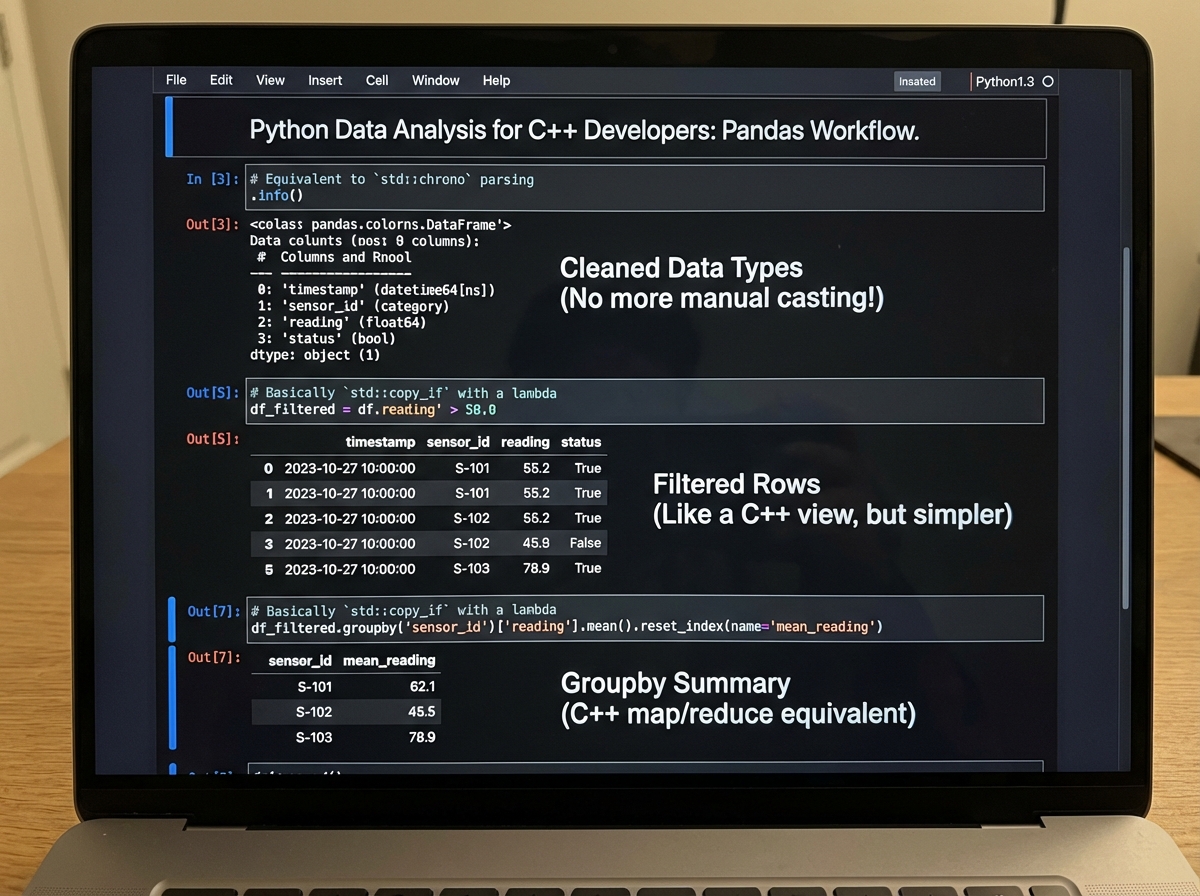
Pandas DataFrames are where Python makes data analysis genuinely fast to write. A DataFrame is a table: rows and columns, each column typed. Loading a CSV, cleaning missing values, filtering rows, and grouping by column — operations that would take hundreds of lines in C++ are a handful of readable method calls in Pandas. Data cleaning specifically, which is the unglamorous reality of any data project, becomes manageable rather than painful.
Your systems-programming background makes you a better Pandas user than most. You already think about memory layout, data types, and performance trade-offs. When a Pandas operation is slow, your instinct to look at what’s happening under the hood — whether you’re triggering copies, whether you’re using the right dtype, whether you should be using NumPy directly — is exactly the right instinct.
Looking back at the full arc — from writing x = 5 and feeling unsettled, to slicing a NumPy array and feeling at home — the transition isn’t really about syntax at all. It’s about learning to trust a language that makes different decisions than the one you came from, and discovering that those decisions were made thoughtfully.
Immediately actionable steps:
- Write one small Python script every day for the first two weeks — not to learn syntax, but to build the physical habit of not typing semicolons and curly braces.
- Deliberately use
enumerate()instead of index-based loops — this single habit signals to your brain that Python iteration works differently, and forces you out of C-style loop patterns. - Use
with open()for every file operation from day one — never write a bareopen()call; the context manager pattern protects you from resource leaks without needing to think about it. - Read Python error messages fully before Googling — Python’s tracebacks are unusually informative, and learning to parse them quickly cuts debugging time in half compared to cryptic C++ compiler errors.
- Build one class hierarchy that mirrors something you built in C++ — the act of translating a known structure into Python OOP forces you to confront exactly where the models differ, rather than discovering the differences accidentally.
- Install NumPy and run array operations on something you’d normally loop over — experience the performance difference directly; it’s the moment Python stops feeling like a toy language and starts feeling like a serious tool.
- Set up a virtual environment before your first real project —
python -m venv venvtakes thirty seconds and saves hours of dependency debugging later. - Use Python’s interactive shell (REPL) to test unfamiliar syntax before adding it to a script — C++ developers often forget they can test a single expression instantly without compiling anything; use that freedom constantly.
Leave a Reply