


There’s a specific kind of frustration that hits when you’ve watched every React tutorial, built a few todo apps, and still freeze the moment someone asks you to explain the difference between controlled and uncontrolled components in an interview. You know React. Sort of. But knowing it and being able to articulate it under pressure are two completely different things.
If you’re looking to learn React JS beyond surface-level tutorials, the real work starts when you stop consuming and start being tested. React isn’t hard to pick up — but it’s genuinely difficult to master because the gaps in your understanding stay invisible until someone asks exactly the right question. This guide maps out that journey honestly: what trips people up, when things finally click, and what you actually need to be confident calling yourself a React developer.
- React knowledge without active recall is fragile — it disappears the moment you’re under pressure
- The order in which you learn React concepts matters more than the speed at which you cover them
- Most self-taught developers plateau at hooks without ever understanding what hooks replaced or why
What React JS Actually Is (And What It Isn’t)
React is a JavaScript library for building user interfaces — not a full framework, not a language, not a replacement for JavaScript. That distinction matters because a lot of beginners expect React to handle routing, state management at scale, and server communication out of the box. It doesn’t. What it does exceptionally well is give you a component-based mental model for breaking down any UI into isolated, reusable pieces that manage their own state.
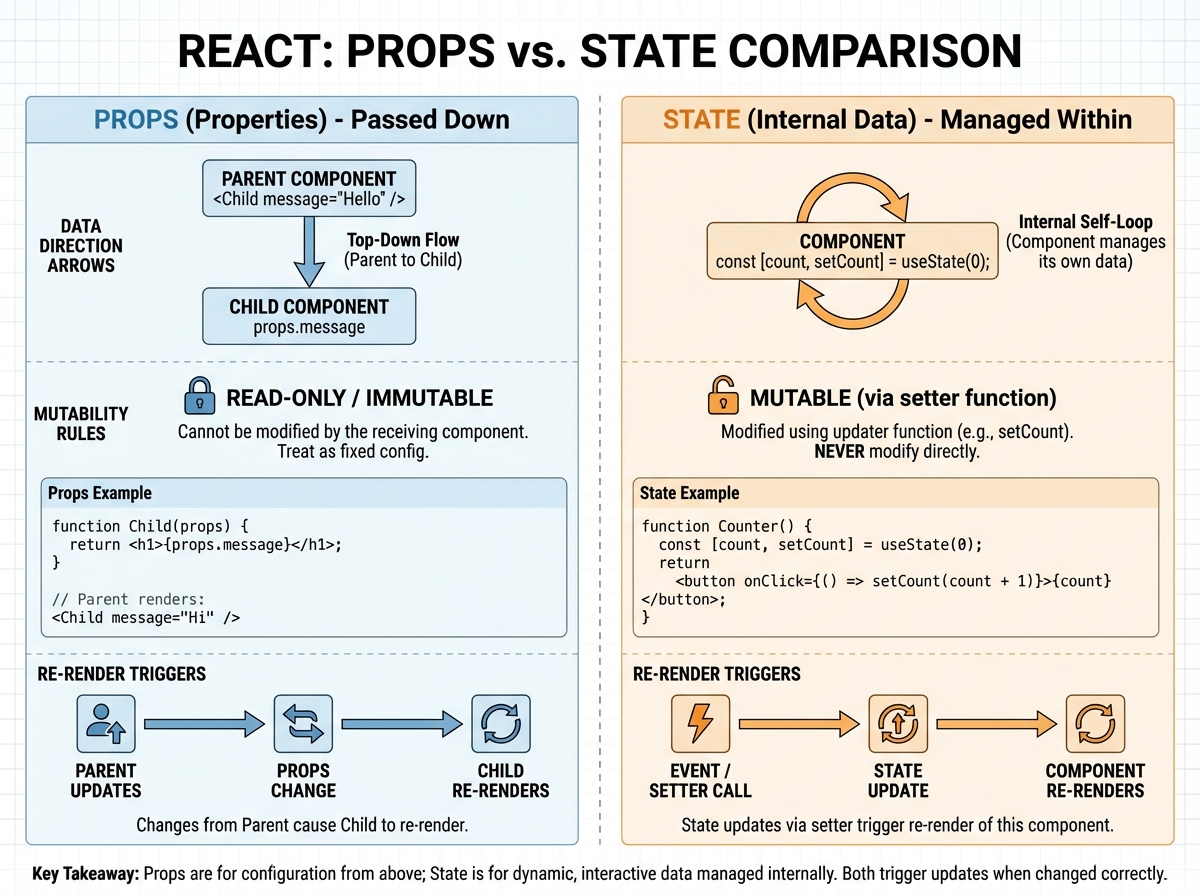
The core React mental model rests on three things: components (the building blocks), props (data passed into a component from outside), and state (data a component manages internally). The Virtual DOM sits underneath all of this — it’s React’s mechanism for figuring out the minimum number of real DOM updates needed after any state change. You don’t interact with the Virtual DOM directly, but understanding that it exists explains why React re-renders are efficient and why you should never mutate state directly.
| Concept | What It Is | Common Misconception |
|---|---|---|
| Component | A reusable UI function that returns JSX | Not a template — it’s a JavaScript function |
| Props | Read-only data passed from parent to child | Props cannot be changed by the receiving component |
| State | Internal data that triggers re-renders when changed | State is not global — it’s local to the component |
| Virtual DOM | An in-memory representation of the real DOM | Not faster than the DOM — it minimizes DOM operations |
| JSX | Syntax sugar that compiles to React.createElement() | Not HTML — it’s JavaScript with HTML-like syntax |
Three things that will surprise you:
- JSX compiles away entirely — there’s no JSX at runtime
- React doesn’t care about your folder structure at all
- A component re-rendering doesn’t mean the DOM updates
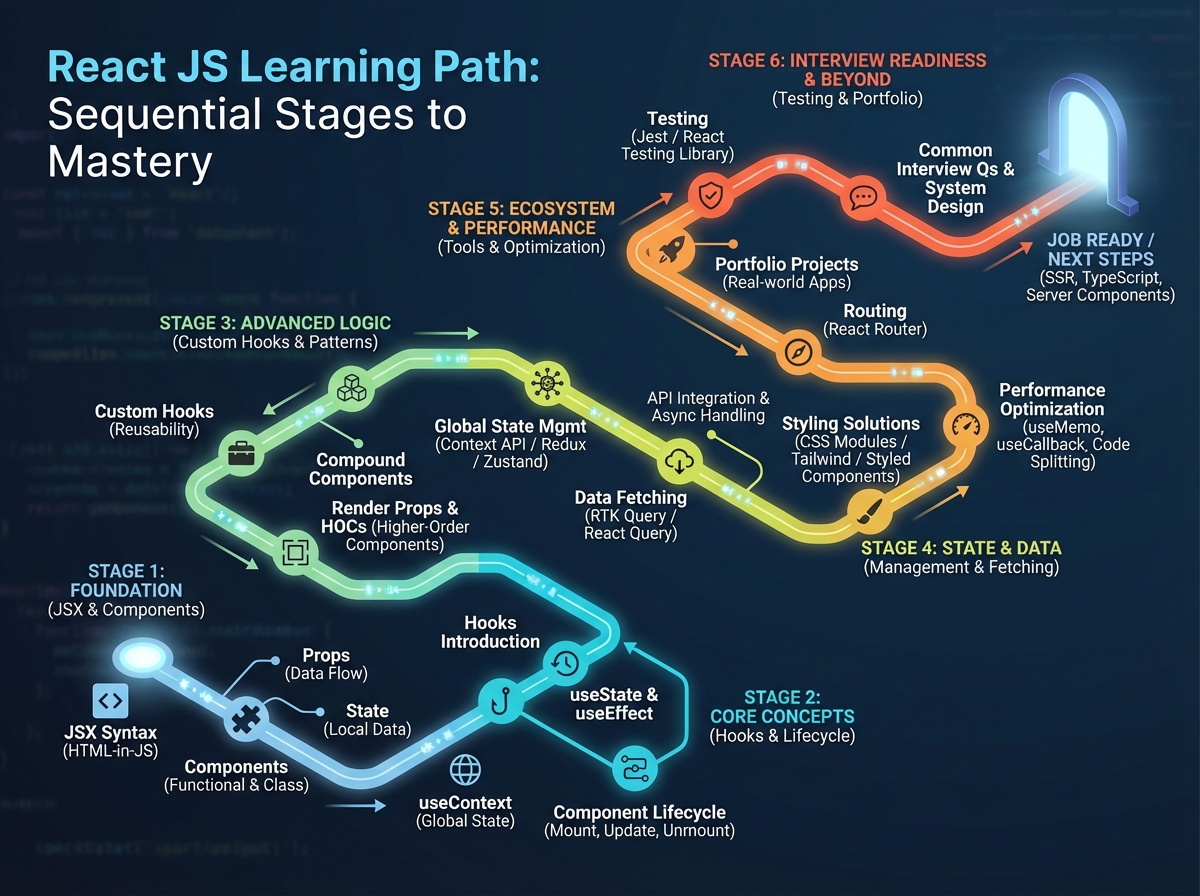
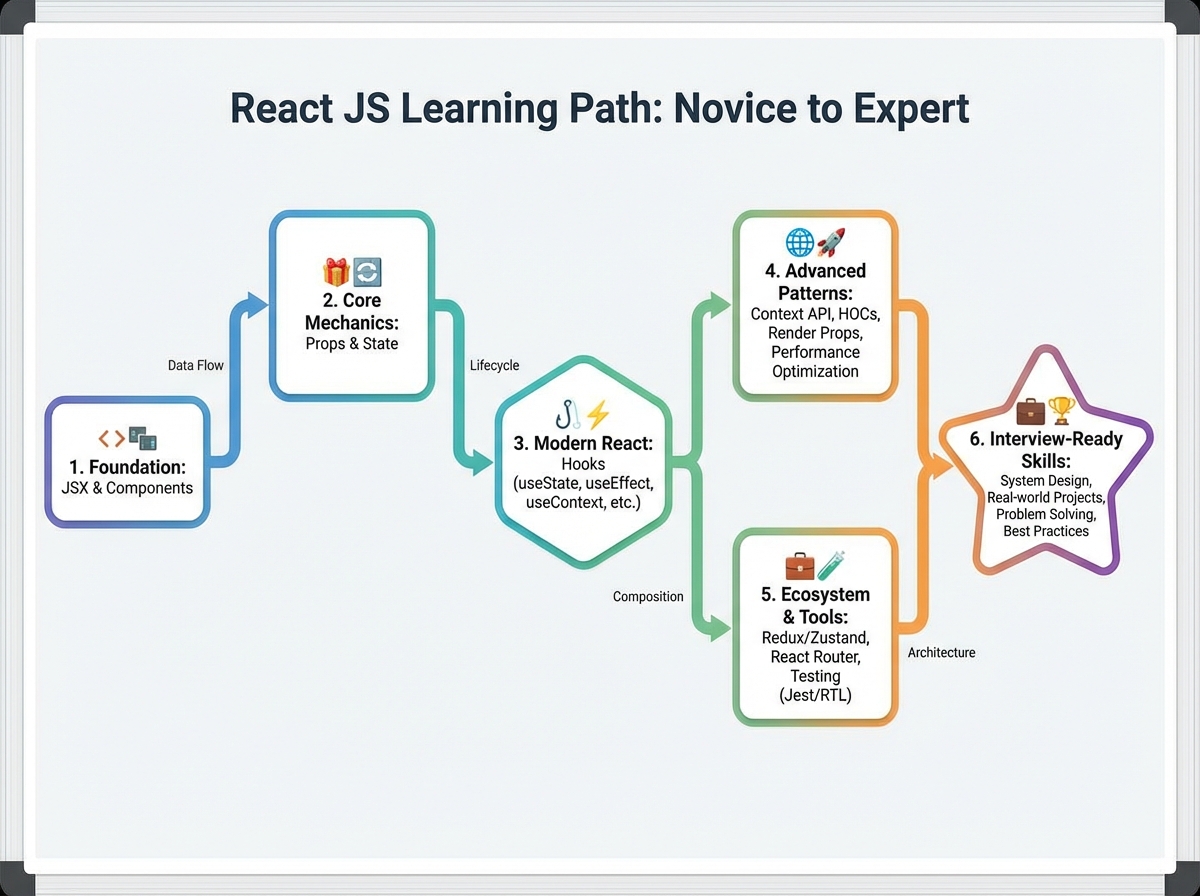
How Long Does It Actually Take to Learn React JS?
| Stage | Content | Time |
|---|---|---|
| Foundations | JSX, components, props, state, Virtual DOM | 1–2 weeks |
| React Hooks | useState, useEffect, useContext, useReducer | 2–3 weeks |
| Advanced Concepts | Lifecycles, HOCs, Portals, performance optimization | 2–3 weeks |
| Data Flow & Patterns | Controlled vs uncontrolled, Flux, lifting state | 1–2 weeks |
| Ecosystem & Tools | Babel, Webpack, React Router, create-react-app | 1 week |
| JavaScript ES6 | Arrow functions, destructuring, let/const, modules | Ongoing alongside all stages |
| Total | Full beginner-to-interview-ready journey | 8–13 weeks |
The order matters far more than the pace — someone who takes 14 weeks but does them in sequence will outperform someone who jumps to hooks before they understand why props are one-directional. And if it takes you 16 weeks, that’s still a timeline that leads to a job. The estimate above assumes consistent daily practice, not just passive watching.
The Moment Components Stop Feeling Magical
Most people’s first week with React feels like watching a magic trick. JSX looks like HTML, the browser renders something, and it all seems to just work. The problem is that “just works” understanding breaks down the moment you need to compose two components together or pass data between them.
The biggest mistake people make when learning React is treating components like HTML templates. They write one giant component that does everything — fetches data, holds state, handles events, and renders the full page. It works, technically. But it’s unmaintainable, and it means you haven’t actually learned the component model at all. The realization that changes everything: a component should do one thing well, and when it starts doing two things, that’s your signal to split it.
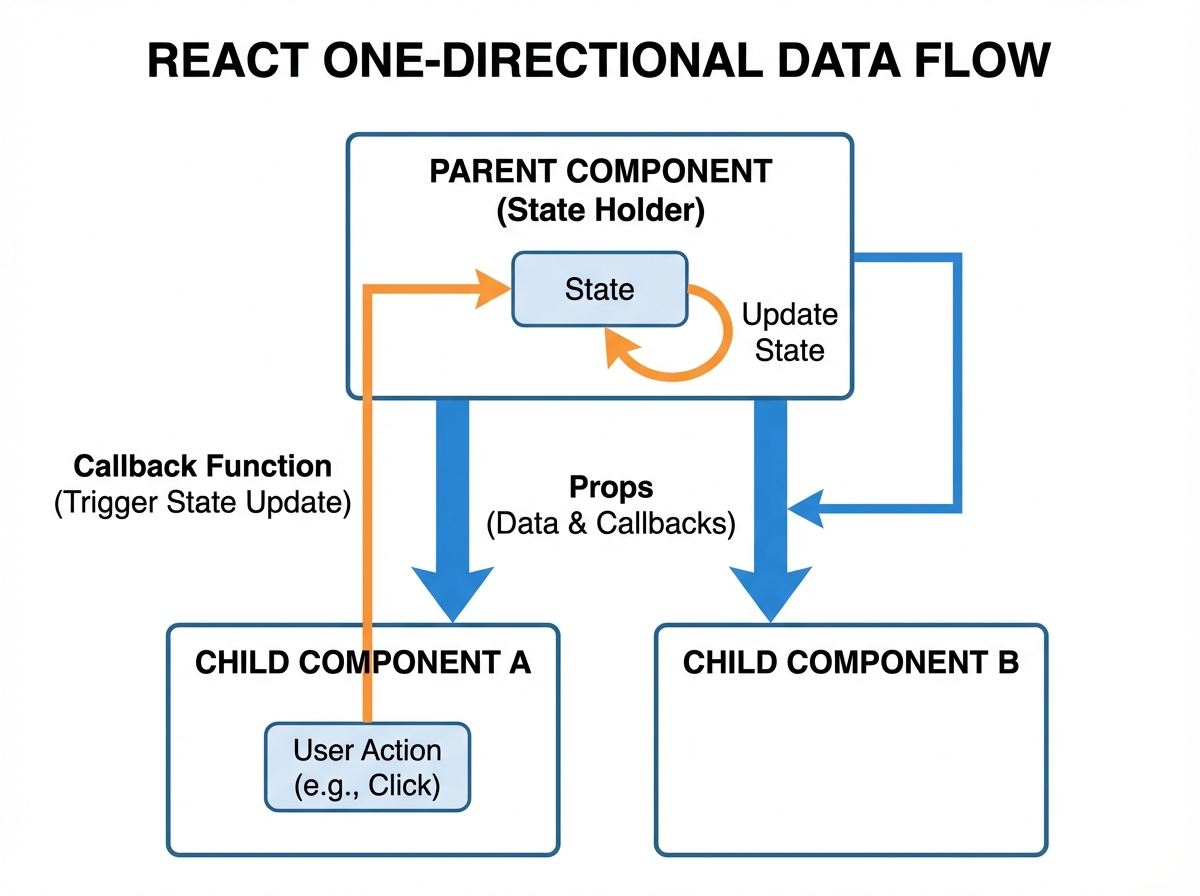
Props are where the one-directional data flow concept becomes concrete. Data flows down from parent to child — never the other way. When you first bump into this constraint, it feels like a limitation. Why can’t a child just update its parent’s data? Once you understand that this constraint is what makes React apps predictable and debuggable, the constraint starts feeling like a feature. That shift in perspective is the first real breakthrough.
Why Hooks Confused You the First Time
Hooks arrived in React 16.8, and they replaced class components for managing state and side effects. If you learned React before that, the shift was jarring. If you learned after, you might have encountered hooks without ever understanding what came before — which creates a different kind of confusion.
useState is straightforward on the surface: give it an initial value, get back the current value and a setter function. What’s not obvious is that calling the setter doesn’t immediately update the variable — it schedules a re-render. So if you call setCount(count + 1) three times in a row, you might expect count to jump by 3. It won’t. You get 1. This is one of those things that causes real bugs before it causes understanding, and the understanding only lands when you’ve hit the bug yourself.
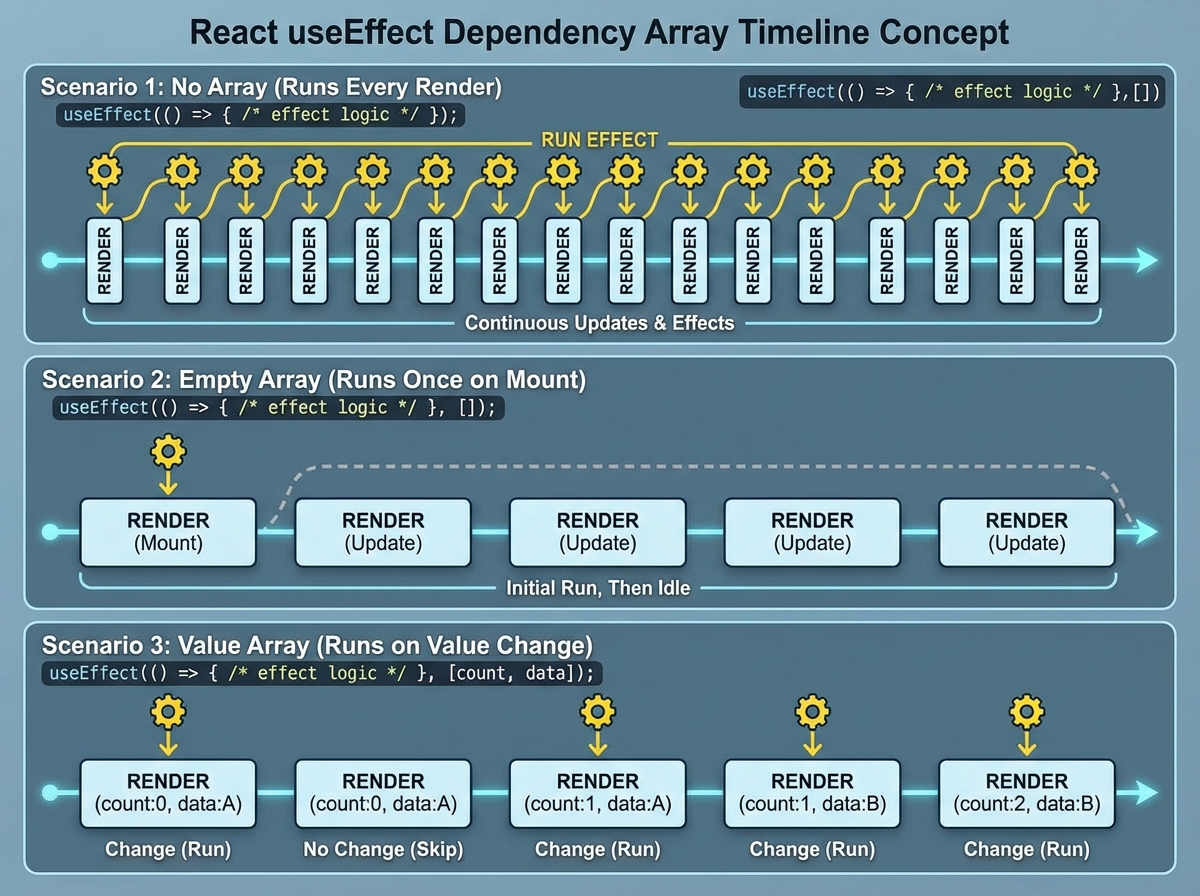
useEffect is where most people spend the longest time confused. The dependency array is the thing that trips everyone up. Leave it out, and the effect runs after every render. Pass an empty array, and it runs once on mount. Pass specific values, and it runs when those values change. That logic is simple to state but genuinely tricky to apply correctly — especially when you’re dealing with async functions inside an effect or needing to clean up subscriptions. For anyone working toward React JS interview questions on hooks and state management, this is the territory where preparation separates candidates who stumble from candidates who explain confidently.
Advanced React Patterns Nobody Explains Clearly
Once you’re comfortable with hooks, you’ll run into a new set of concepts that feel conceptually distant from anything you’ve done before: Higher-Order Components, Portals, and performance optimization patterns. These aren’t things you reach for every day — but they appear in interviews reliably, and they reveal whether you understand React’s underlying model or just its surface syntax.
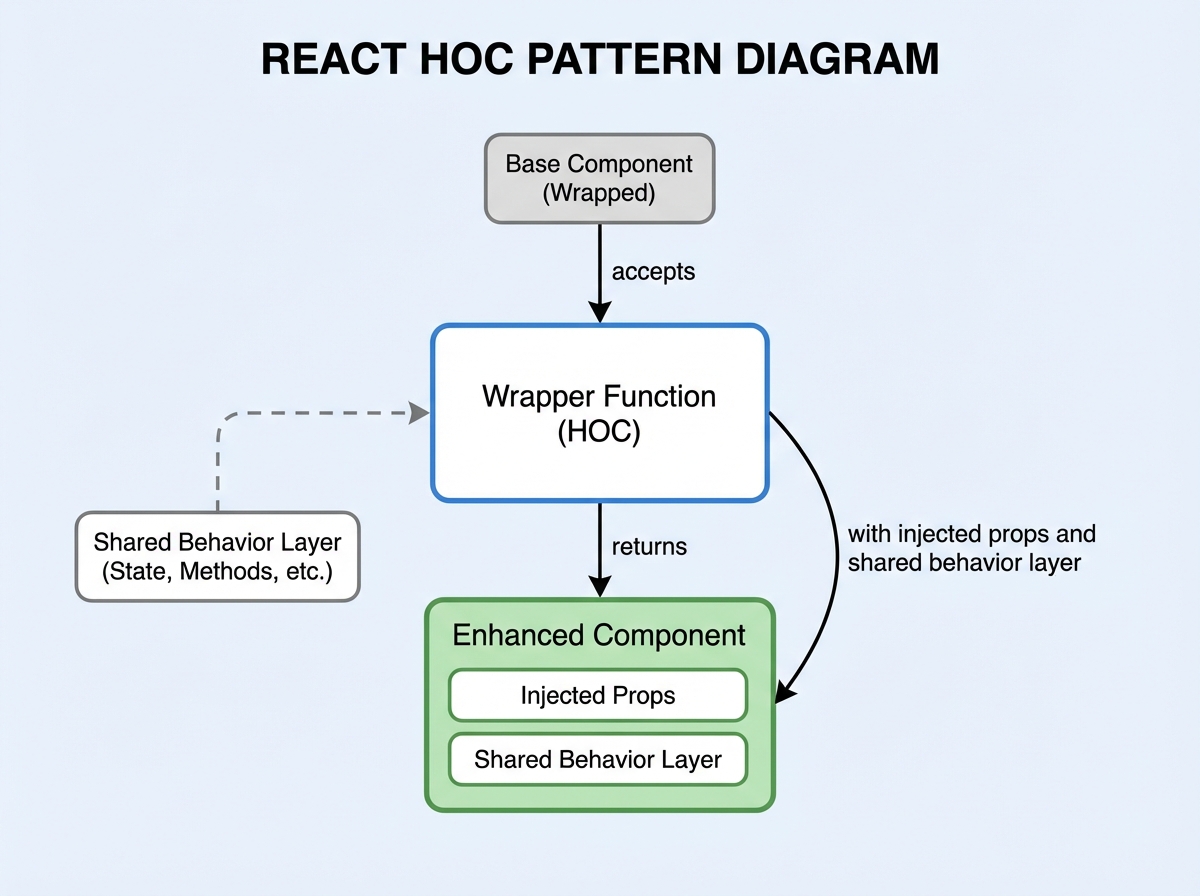
A Higher-Order Component is a function that takes a component and returns a new component. The most common real-world use is adding shared behavior — authentication checks, logging, error boundaries — without copying that behavior into every component that needs it. The mental shift required is thinking about components as values you can pass around, transform, and compose. That’s pure JavaScript thinking applied to the React model.
Portals solve a specific problem that beginners rarely encounter but senior developers hit constantly: rendering something (like a modal or tooltip) outside the parent component’s DOM node while keeping it in the React component tree. Without Portals, a modal inside a deeply nested component inherits CSS overflow and z-index rules from every parent — which breaks layout. Portals let React manage the component while the browser puts it anywhere in the DOM you specify.
Understanding Data Flow Before You Touch Redux
State management is the topic most self-taught React developers get wrong — not because it’s conceptually hard, but because they reach for complex solutions before understanding the simpler ones fully. Before you look at Redux or Zustand, the question to answer is: do you actually understand how state flows through a React application without any external library?
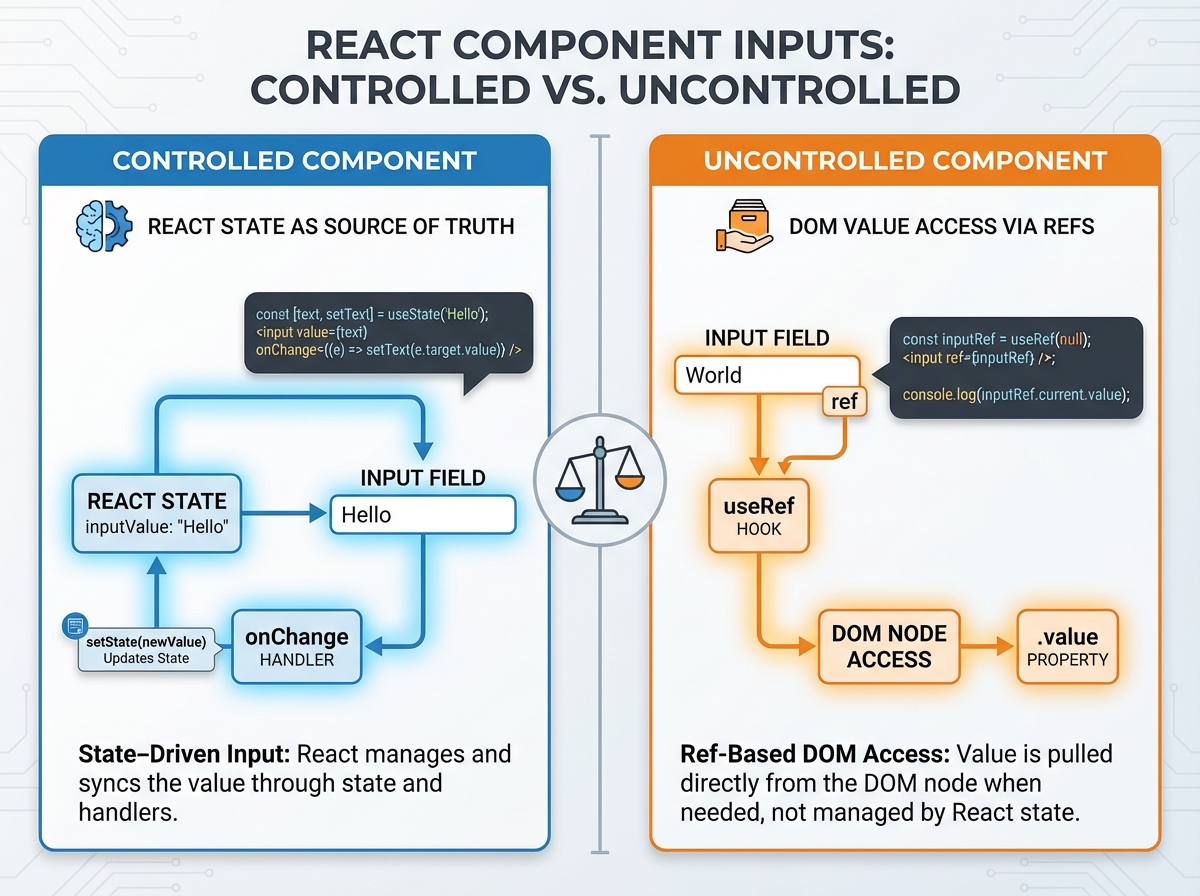
The Flux pattern predates Redux and explains the philosophy behind it: data flows in one direction, actions trigger state changes, and the UI is a pure function of state. That mental model makes React apps predictable. You always know where your data came from and what caused it to change. Controlled components make this concrete at the input level — a controlled input’s value is always driven by state, never by the DOM. An uncontrolled component lets the DOM hold the value and you read it when needed.
The practical difference matters in forms. A controlled form gives you validation on every keystroke. An uncontrolled form is simpler to set up but gives you less control. Neither is universally right. What matters is knowing which you’re using and why — because interviewers ask this question specifically to see if you understand React’s data model or just copy-paste form code from Stack Overflow.
The Ecosystem Gap That Makes Job Seekers Stumble
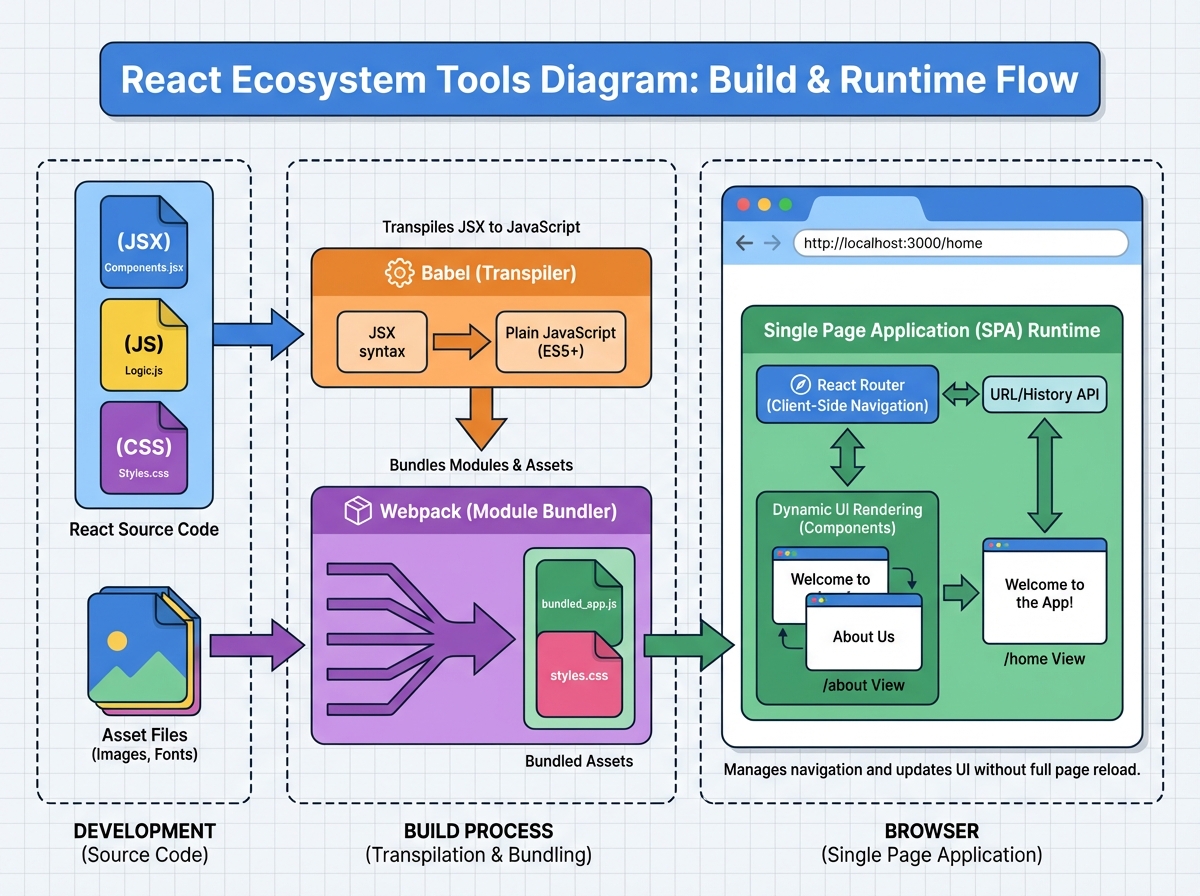
There’s a specific moment many developers hit when they realize that knowing React and knowing how to build a React project are different things. React doesn’t ship with a bundler, a transpiler, or a router. Those come from the ecosystem — Babel, Webpack, React Router — and if you’ve only used create-react-app, you’ve been using all of them without knowing it.
Babel is what allows you to write JSX and modern ES6+ syntax and have it work in browsers that don’t support it natively. It transpiles your code into an older JavaScript version that runs everywhere. Webpack takes all your files — JavaScript, CSS, images — and bundles them into assets the browser can efficiently load. Understanding what these tools do (not necessarily how to configure them from scratch) is what separates developers who can work in any project setup from developers who only work inside pre-configured environments.
React Router handles client-side navigation — it changes what the UI shows based on the URL without actually requesting a new page from the server. The concept of a Single Page Application lives here: the HTML file loads once, and React swaps out the visible components based on the route. This is something every React job will assume you understand, and it’s often the first real-world gap between someone who learned React and someone who’s built with it. For anyone filling in those ecosystem knowledge gaps, resources on how to pass technical certifications with active practice offer a useful parallel on how preparation depth translates to test performance.
The JavaScript ES6 Foundation You Can’t Skip
This is the part nobody wants to hear: if your ES6 fundamentals are shaky, React will feel harder than it actually is. Not because React is built on exotic language features, but because React code is written in modern JavaScript idioms that assume fluency — and when you’re unsure whether something is React syntax or JavaScript syntax, debugging becomes a nightmare.
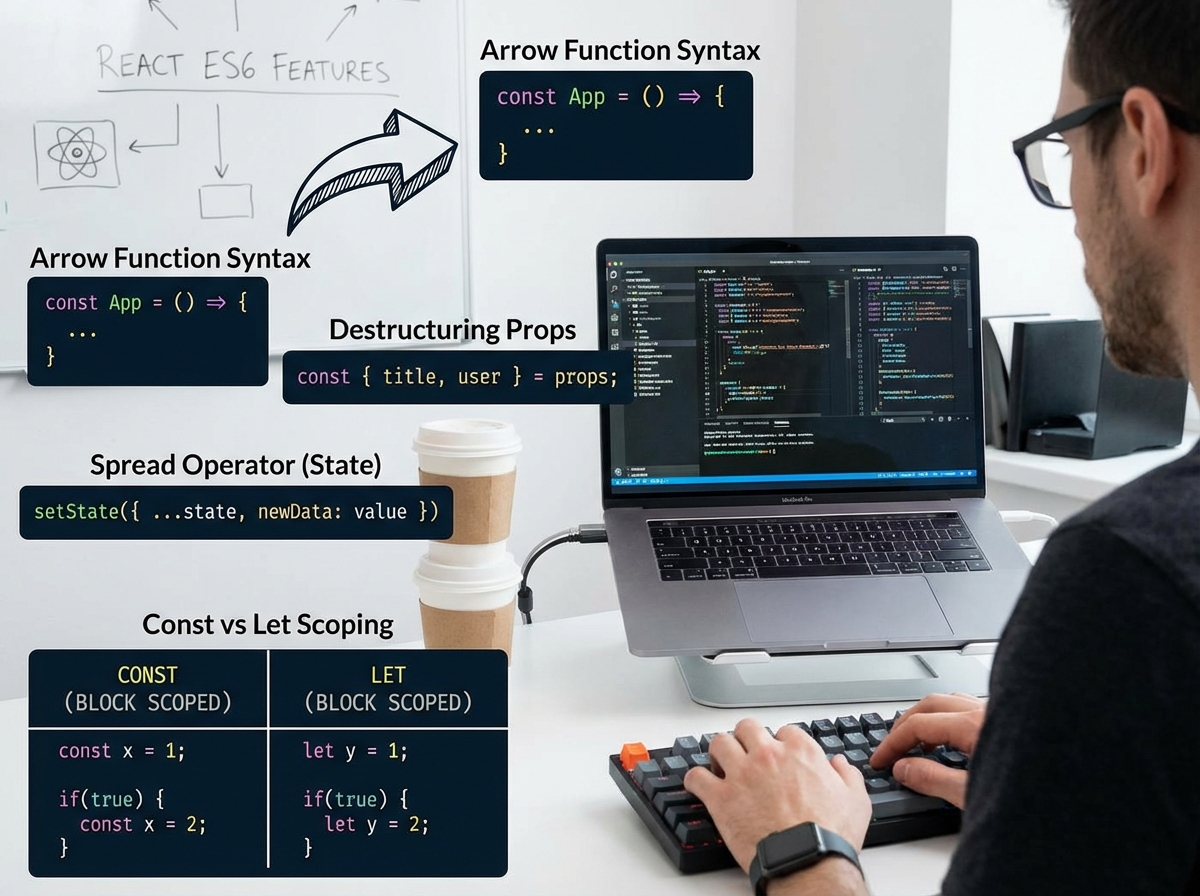
Arrow functions, destructuring, spread operators, the difference between let and const, template literals, modules — these aren’t optional extras. They’re the vocabulary React code is written in. When you see const { name, age } = props and don’t immediately recognize that as object destructuring, you’re reading React code through a language barrier. The fix isn’t to study ES6 separately and then come back — it’s to learn these features in the context of the React code where you need them.
The most important ES6 concept for React specifically is the spread operator used with state updates: setState({ ...prevState, key: newValue }). Understanding why you spread the previous state instead of just assigning the new key directly comes from understanding JavaScript object references — mutating an object doesn’t create a new reference, so React doesn’t detect the change. That’s a JavaScript concept, not a React concept. Getting that straight changes how you debug state issues entirely.
What Interview Preparation Actually Tests
Technical interviews for React roles don’t test whether you can build a todo app. They test whether you can explain why the todo app works — and what would break if you changed one specific thing. That shift from doing to explaining is where most candidates get caught.
The questions that separate confident candidates from unprepared ones are almost always about tradeoffs: Why would you use useReducer over useState? When does a component re-render, and how would you prevent unnecessary ones? What’s the difference between useMemo and useCallback? None of these require you to write complex code. They require you to have a clear mental model of what React is doing underneath the code you write.
Active recall — being tested on material rather than reviewing it — is what builds that kind of confident fluency. Reading about useCallback doesn’t create the same neural pathway as being asked a question about it, getting it wrong, reading the explanation, and being asked again. The self-taught developers who pass React interviews aren’t necessarily the ones who studied the most — they’re the ones who tested themselves the most. That’s a reproducible approach, not a talent.
Looking back at this journey, the through-line is clear: React rewards people who understand the why behind each concept, not just the what. The developers who struggle in interviews are almost always the ones who consumed a lot and tested themselves very little.
Apply these immediately:
- Write components that do exactly one thing — if you can describe what your component does using “and,” it should be two components
- Practice explaining the Virtual DOM out loud — if you can’t say it without looking it up, you don’t own the concept yet
- Break every
useEffectyou write into three parts — what it does, when it runs, and what it cleans up - Build one small form using controlled components, then rebuild it with uncontrolled components — the comparison makes the difference visceral, not theoretical
- Install and run a project without
create-react-app— configure Babel and Webpack manually once so you understand whatcreate-react-appis hiding from you - Read every error message fully before Googling it — React’s error messages are unusually informative and training yourself to read them first builds debugging instinct fast
- After every concept you learn, write one question about it — then answer your own question 24 hours later without looking at your notes
- Test yourself on React JS interview questions after each concept — not at the end of everything, but immediately after each topic so gaps surface while context is fresh; understanding how structured interview prep works in adjacent technical fields shows the same pattern: active testing beats passive review every time
Leave a Reply